AI Spend Categorization for Procurement Teams
Clean taxonomy, normalized data, and AI with human review turn noisy spend into accurate, actionable procurement categories.
In this article
Poor spend classification can drain up to 20% of a procurement budget. If I want cleaner reporting, better supplier rollups, and more control over tail spend, I need more than a one-time cleanup. I need a clear taxonomy, standardized source data, AI-assisted tagging, human review for low-confidence records, and monthly accuracy checks.
Here’s the short version:
Start with the category tree first. If category rules overlap, the output gets messy.
Use at least 12 months of spend data, and if I can get 24 to 36 months, that gives the model more history.
Train on the fields that matter most: supplier name, item description, unit price, quantity, cost center, business unit, date, currency, and MCC.
Clean the data before classification. Supplier aliases, duplicate records, vague descriptions, and mixed units hurt accuracy.
Route low-confidence results to people. Human corrections help fix edge cases and improve later runs.
Track precision, recall, and coverage every month. A solid target is 85% to 90% category-level coverage.
Wait before auto-posting. Common categories should hit about 90% to 95% reliability first.
Measure business impact. Look at spend under management, cycle time, manual hours saved, exception rate, and savings from better bundling.
A fast way to think about it: AI helps with scale, people handle unclear cases, and governance keeps the system from drifting. That is how spend categorization turns from a slow data project into a repeatable procurement process.
Spend Categorization in Procurement
Spend Classification, Taxonomy, and Category Management
These three terms often get lumped together, but they’re not the same thing.
Spend taxonomy is the category tree and naming system your team uses. Spend classification is the act of tagging each transaction or line item to the right spot in that tree. Category management is what happens after that data is clean enough to use for sourcing, supplier consolidation, and risk screening.
A good taxonomy should match the way your team looks at spend and reviews exceptions. Put simply, a procurement taxonomy should show where the money went and how that spend should be handled.
The order matters. Taxonomy comes first. If the category tree has overlap or labels that mean too many things, confidence scores fall and teams stop trusting the output.
Where AI Improves the Categorization Process
Once the taxonomy is set, AI can classify messy spend data at scale, often through dynamic categorization that adapts to changing catalogs.
Rules-based systems do fine when the data is neat and supplier names stay the same. But that’s rarely the case in procurement. Invoice text can be messy. P-card transactions often lack detail. And supplier aliases like “MSFT” and “Microsoft” can throw off static rules.
AI looks at transaction text, supplier history, and line-item details to assign categories across large datasets. It can also make a smart call on a new supplier by comparing it with similar suppliers that were classified before. Then, when people review and correct those assignments, the model gets better over time. That makes AI a good fit for tail spend, where manual review usually isn’t practical.
"If you can't reliably classify tail spend, you can't aggregate it, benchmark it, control it, or reduce it." - Milan Panchmatia
Manual vs. Rules-Based vs. AI-Assisted Classification
For procurement teams, the main issue is simple: which method can handle more spend without accuracy falling apart?
Feature | Manual Classification | Rules-Based Classification | AI-Assisted Classification |
|---|---|---|---|
Speed | Slow (8–12 weeks for a spend cube) | Fast to execute, slow to build rules | Very fast (days or real time) |
Accuracy | High for strategic spend; low for tail | Poor on edge cases and noisy text | High and improving |
Scalability | Low (limited by headcount) | Moderate (limited by rule complexity) | High (handles millions of rows) |
Maintenance | High (requires periodic projects) | High (manual rule updates needed) | Low (automated learning from feedback) |
Data Handling | Good for context; bad for volume | Fragile with invoice text and P-cards | Excellent for unstructured and noisy data |
Manual classification still has a place, especially for strategic spend where context matters a lot. But for noisy, high-volume transactions, AI handles the workload far better.
With the category structure in place, the next move is to map the data fields the model needs.
AI-Driven Category Management: A Case Study on Procurement Transformation
Data and Taxonomy Setup
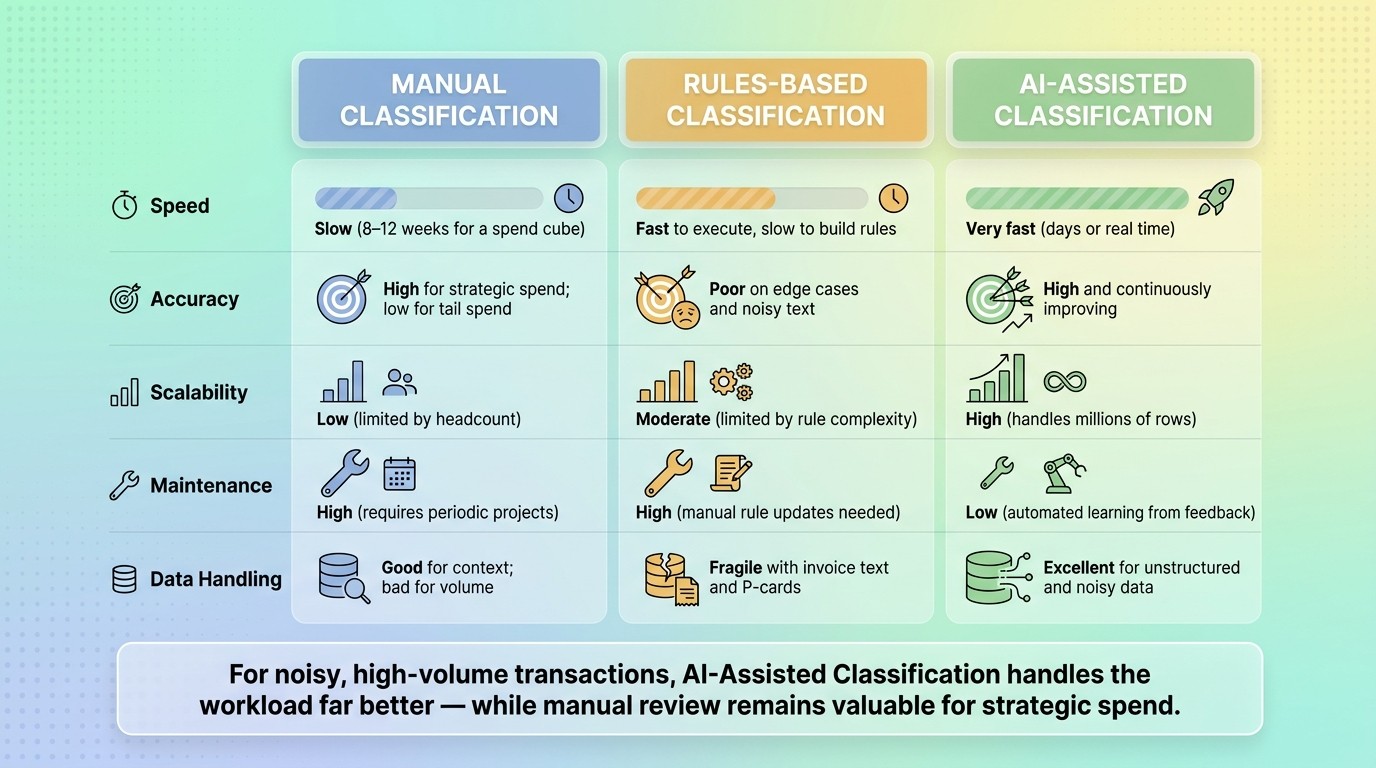
Manual vs. Rules-Based vs. AI-Assisted Spend Classification
Spend Data Sources and Fields You Need
Once your taxonomy is set, the next job is simple in theory and messy in practice: feed it the right data.
Pull data from ERP, AP, P-card, PO, invoice line-item, supplier master, GL, and contract records. Then train on supplier name, item description, unit price, quantity, business unit, cost center, date, currency, and MCC. Some fields carry more weight than others. When these values are complete and consistent, category assignment gets better in a direct way, not just during model training.
You’ll also want enough history for patterns to show up. Use at least 12 months of data. If you can get 24 to 36 months, even better, since that gives the model more to work with. For first-pass training, a labeled seed dataset of 5,000 to 20,000 rows is a solid starting range for most organizations.
Build a Procurement Taxonomy That Fits Your Reporting Needs
Keep the first version simple. Start with 8 to 25 categories. In most cases, a three-level hierarchy - Segment, Family, Class - works best.
Each level needs clear inclusion and exclusion rules. That way, both human reviewers and the model can tell where a record belongs. If the line between two categories feels fuzzy, things tend to fall apart fast. People will tag similar purchases in different ways, and the model will copy that inconsistency.
Build the taxonomy around how your team reviews spend and how leadership wants to see reports. That matters more than making it look neat on paper.
A clean taxonomy only starts to pay off when the source data is normalized to match it.
Cleanse and Normalize Data Before Classification
If supplier names, descriptions, and records are messy, the model will learn messy patterns too.
Normalize supplier aliases, duplicate records, and inconsistent descriptions before classification. Clean supplier names and descriptions make aggregation, savings analysis, and category reporting much easier later on.
Here are the main cleanup steps and why they matter:
Cleansing Step | Action Required | Impact on AI |
|---|---|---|
Supplier Normalization | Consolidate aliases (e.g., "MSFT", "Microsoft Corp", and "Microsoft") into one canonical record | Prevents fragmented spend totals and improves vendor-based mapping |
Description Cleanup | Standardize item names (e.g., "Office chair" vs. "Seating") | Increases confidence in item-level categorization |
Field Enrichment | Add MCC codes or merchant database lookups | Provides context for transactions with vague descriptions |
Deduplication | Merge duplicate vendor and transaction records | Ensures spend queries return one accurate number |
Unit Standardization | Align units of measure and currencies | Enables accurate price variance and volume analysis |
It also helps to seed the model with a small keyword map for high-volume terms such as "hotel" and "air freight". Once the dataset is clean, it’s ready for ingestion and category assignment.
That prepared data becomes the input for the AI workflow in the next step.
AI Categorization Workflow and Team Implementation
From Transaction Ingestion to Category Assignment
Once the taxonomy is set and the data is cleaned up, the process starts with ingestion. Transaction records come in from ERP, AP, P-card, and procurement systems. They can also arrive as PDFs and spreadsheets.
From there, AI maps vendor aliases, cleans up descriptions, and applies category and subcategory tags with NLP and spend context. Each classification gets a confidence score. If the score is high enough, the record moves through on its own. If not, it gets flagged so bad classifications don’t slip through.
Low-confidence records go to human review. That matters because a person can fix the record in front of them and help the system do a better job next time too.
Ownership, Review Cycles, and Exception Handling
Procurement should own both the taxonomy and the review process. Category managers know the edge cases, the supplier quirks, and the category rules well enough to make the right call when a record is messy or unclear.
It also helps to put a few guardrails in place:
Set an SLA for reviews
Check unclassified transactions every day
Hold off on auto-posting until common categories hit 90% to 95% reliability
That last point is a big one. If you auto-post too early, small errors can pile up fast.
Using Category Outputs in Procurement Decisions
Good category data changes the kind of decisions procurement teams can make. Spend that used to sit in separate buckets because of vendor aliases can be grouped into supplier families. That makes fragmented spend much easier to spot and move under preferred supplier programs.
It also makes contract compliance easier to track. Maverick spend and off-contract purchases stop hiding in unclassified line items and start showing up where the team can act on them.
Category managers can then use spend rollups to focus on categories that are high-value, high-risk, or ready for consolidation. Those same outputs also give teams a baseline for tracking accuracy and coverage over time. The next step is making sure that accuracy holds up at scale.
Measuring Accuracy, ROI, and Governance
Track Classification Accuracy and Coverage
Once your categories are live, the job isn’t done. You need to check, on a fixed schedule, whether the system is still accurate and still worth the effort.
Precision and recall are the two main accuracy metrics. Precision shows how often the AI is right when it assigns a category. Recall shows how much of the total spend for a given category the model actually caught. You need both. A system can look good in a dashboard and still miss a big share of spend in practice.
Coverage matters just as much. Aim for 85% to 90% category-level coverage. If you’re below that range, you likely have gaps in the taxonomy, data quality problems, or both. In most cases, unclassified spend is the first red flag.
A simple monthly audit goes a long way. Review a random sample and log misclassifications by category. You can also use exception-review results as the audit sample. That’s often the easiest place to start. If the model isn’t retrained on new supplier and transaction data, classification accuracy falls by about 2 percentage points per quarter.
Connect Categorization Results to Business Outcomes
Once accuracy settles down, connect category data to business results like savings, cycle time, and control. Use the same category rollups to compare results before and after rollout. That gives procurement leaders a clean way to compare AI procurement tools and show ROI and keep support from finance and leadership.
Metric | How It's Calculated | Why It Matters |
|---|---|---|
Spend Under Management | (Classified Spend ÷ Total Spend) × 100 | Expands visibility into tail spend and sourcing opportunities |
Cycle Time | Time from ingestion to final category assignment | Shorter cycles mean faster reporting and faster sourcing decisions |
Manual Effort Reduction | Manual hours saved per month | Shows FTE capacity freed up for higher-level work |
Exception Rate | Transactions flagged for review ÷ Total transactions | Measures model maturity and taxonomy gaps |
Negotiated Savings | Delta between historical price and new rate enabled by spend bundling | Links classification to hard-dollar results |
Reclassification Volume | Number of AI assignments corrected by human reviewers | Helps spot taxonomy drift and areas where retraining is needed |
Before launch, document baseline cycle times, error rates, and unclassified spend. If you skip that step, it becomes much harder to prove improvement later. And the upside is not small: poor spend classification can waste up to 20% of a procurement budget. So even small gains in coverage and accuracy can turn into meaningful dollar impact.
"High-quality, well-governed data is the single biggest differentiator in ROI on AI initiatives." - Gartner
Governance is what keeps the system from drifting off course. Retrain the model each month using reviewer corrections so exceptions go down over time. Then review the taxonomy each quarter to catch category definitions that have become outdated or too broad to produce clean signals.
Conclusion
AI spend categorization can drive strong results, but it only works when the basics are in place. Clean data, a usable taxonomy, clear ownership, and steady measurement are what separate teams that keep getting ROI from teams that stall after launch.
The path is pretty simple: start with reliable inputs, build review loops that feed corrections back into the model, and track both accuracy and business impact from day one.
Spend categorization is not a one-and-done cleanup. It’s a capability you build and maintain. The teams that treat it that way are the ones that turn spend visibility into savings.
FAQs
How long does AI spend categorization take to implement?
With modern AI-powered platforms, setup can take days instead of the months that consulting-led projects often need.
Teams can connect data sources, map transaction data to a set taxonomy, configure the classifier, and start classifying spend with limited manual work. Procright helps procurement teams automate these steps and make reliable, data-driven decisions with less time and effort.
What data quality issues hurt classification accuracy most?
The biggest problems are vendor master fragmentation and uneven item descriptions. If the same vendor shows up under several aliases, and the same product appears with different line-item wording, AI models have a hard time spotting steady patterns. The result? Noisy output and results you can’t count on.
Loose or overlapping category labels make things worse. So do missing feedback loops. Without clear labels and a way to learn from mistakes, the system has less to work with and fewer chances to improve over time.
When should procurement teams trust auto-classification?
Trust auto-classification when reliability is high, usually around 90% to 95% accuracy for common categories. That makes it a good fit for high-volume, high-confidence assignments. For low-confidence or unclear transactions, send them to a human reviewer.
Start with a pilot program first. Use it to check performance against your taxonomy before you switch on automated workflows like PO matching or budget alerts.
Related Blog Posts
Try it on a real buy
Bring one category. Watch where the flags land.
We use a little analytics to see which pages actually help. Nothing else, no ad trackers.