Procurement Software for Small Business: The Complete Guide
It will give a small team a repeatable purchasing process, clearer evidence, and enough control to make decisions before costs become difficult to reverse.
In this article
A purchase request arrives in your inbox, another supplier quote sits in a spreadsheet, and finance is still trying to match last month's invoice to the order someone approved in a chat message. Nothing looks catastrophic in isolation. The problem is that no one has a complete, current view of what the business has requested, approved, ordered, received, or committed to pay.
That's the point at which procurement software for small business becomes practical, not aspirational. The right system won't turn a lean company into a large enterprise. It will give a small team a repeatable purchasing process, clearer evidence, and enough control to make decisions before costs become difficult to reverse.
Why Small Businesses Need Procurement Software
Small-business purchasing often starts with a shared spreadsheet and a few trusted people. An employee emails a request, a manager replies “approved,” and someone in finance creates a purchase order later. When the supplier changes a price, sends a partial delivery, or submits an invoice with different terms, the team searches through inboxes to reconstruct what happened.
That manual process creates familiar leaks. Two people can order the same item because neither sees the other request. A useful quote can disappear in an attachment. A renewal can pass without anyone checking the original agreement. Finance may know what has been invoiced, but not what the company has already agreed to buy.

A digital workflow brings those events together. Employees submit structured requests, managers approve them against defined rules, and the approved request can become a purchase order without retyping the same information. Supplier documents, quotes, receipts, and invoices remain connected to the transaction instead of being scattered across personal folders.
The shift is already reaching smaller organizations, although adoption remains incomplete. APQC data reported for 2025 found that 31% of organizations with fewer than 200 employees used automated purchase-order processing tools, while 12% used more advanced or AI-enabled automation. That leaves most smaller organizations without automated purchase-order processing, but it also shows that procurement technology is no longer limited to large enterprises.
Practical rule: If finance learns about a purchase only when the invoice arrives, your process is recording spend too late.
The best reason to adopt software isn't to create more administration. It's to remove coordination work that already exists, such as chasing approvals, checking duplicate orders, comparing supplier responses, and proving why a purchase was accepted. A small company may not need a large procurement department, but it still needs reliable purchasing records.
What Procurement Software Actually Does
Procurement software connects the buying journey from the first request through approval, supplier selection, ordering, receipt, and invoice review. Think of it as a shared control layer around purchasing, rather than another spreadsheet with a dashboard.
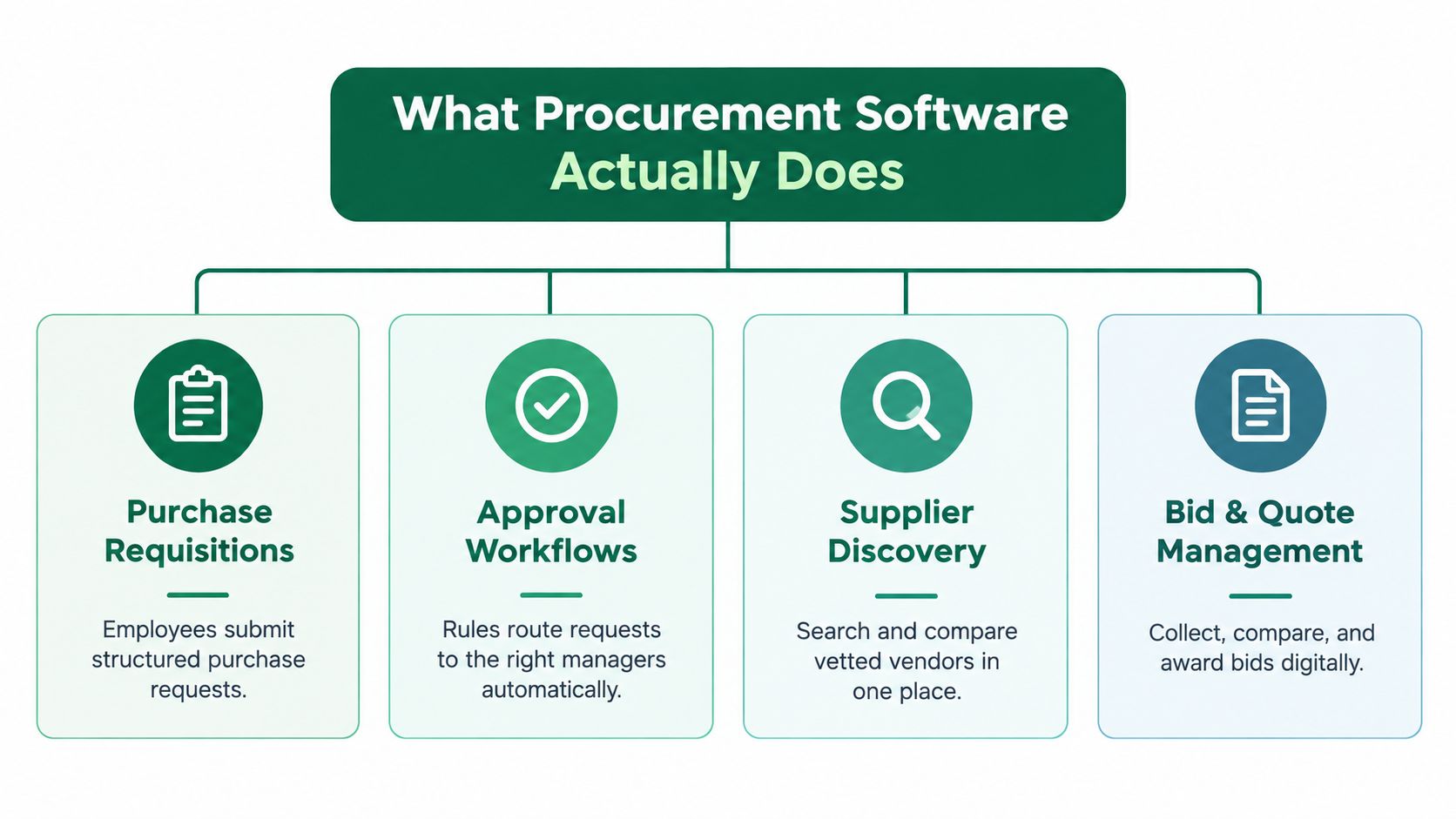
The core functions usually fall into four practical groups:
Purchase requisitions: Employees submit what they need, with quantities, specifications, delivery requirements, and supporting documents.
Approval workflows: The system routes each request to the appropriate manager, budget owner, or finance reviewer.
Supplier discovery: Buyers search for potential vendors and organize supplier information in one workspace.
Bid and quote management: The team collects responses, compares them against the same requirements, and records the award decision.
A mature procure-to-pay workflow then extends beyond sourcing. An approved requisition can generate a purchase order. A receiving record confirms what arrived. Invoice matching checks whether the invoice corresponds to the order and receipt. Spend reporting shows purchasing by supplier, category, department, or project.
That sequence matters because each stage answers a different question:
What does someone want to buy?
Who approved the commitment?
Which supplier can meet the requirement?
What did the supplier quote?
What was ordered and received?
What should finance pay?
Accounting software remains important, but it generally records financial transactions rather than governing the decision to buy. A purchase order created after an employee has already committed to a supplier documents the transaction. It doesn't necessarily prevent an unsuitable purchase.
For a small team, the useful test is simple. Ask whether the software makes the next correct action obvious to a requester, approver, buyer, supplier, and finance user. If it merely stores documents after the fact, it may improve filing without improving control.
Key Features to Look for in Procurement Tools
Start with the buying problem, not the vendor's feature page. A company struggling with supplier comparison needs a different first investment from a company whose main issue is invoice reconciliation.
Prioritize sourcing before polishing paperwork
Feature prioritization matters. An empirical study of micro, small, and medium-sized enterprises reported that e-sourcing had the strongest measured influence on performance, with B = 0.531 and p = 0.000, followed by e-invoicing at B = 0.279, e-tendering at B = 0.129, and e-payment at B = 0.127. The results are study-specific, not a universal ROI forecast, but they support giving supplier discovery and comparable quotations serious weight. Review the study's findings here.
For most small teams, the shortlist should include:
Structured requisitions: Capture specifications and business justification before a supplier is chosen.
Configurable approvals: Route requests by amount, department, category, project, or risk.
Supplier and catalog records: Keep contacts, quotes, terms, and supporting documents together.
Quote comparison: Make suppliers answer comparable requirements rather than sending unstructured proposals.
Purchase-order generation: Convert approved requests into orders without rekeying data.
Invoice and receipt matching: Flag differences between what was ordered, received, and billed.
Audit trails: Preserve approvals, changes, source documents, and decision reasons.
Test the controls, not just the interface
During a demo, use a real purchasing scenario. Ask the vendor to show what happens when a supplier answers “partial” to a requirement, when two quotes use different units, or when an invoice doesn't match the order. A polished dashboard matters less than a clear exception path.
Contract management and spend analytics can be valuable, but they shouldn't displace the controls that stop unclear specifications and unapproved commitments. For a lean team, a narrow workflow that people follow consistently is more useful than a broad suite that requires constant administration.
Evaluating Procurement Software for Your Business
A small business usually feels the cost of a poor software choice in the second month, not on the day the contract is signed. Requests start bypassing the system, approvals stall because the rules are too rigid, and the person who agreed to "just administer it for now" discovers that supplier records, user permissions, and exception handling all need regular attention. Price matters, but what really counts is the cost of running the process after go-live.
Start with the first use case you need to control, then price the software around that scope. Include setup, integrations, training, support, user access, document storage, and any paid module required to make that first workflow work. A lower subscription can still become the more expensive option if it depends on manual workarounds or outside help every time something changes.
Cloud tools often suit small businesses because they remove infrastructure overhead and usually connect more easily with accounting platforms. That matters when purchasing sits with finance, operations, or the owner rather than a dedicated procurement or IT team. Analysts in the Dataintelo procure-to-pay market report estimated that SMEs represented 32.6% of the procure-to-pay software market and projected SME adoption growth at 11.8% annually. Treat that as market context rather than a buying signal, because category definitions and forecast methods vary by report. See the underlying market report.
Software Type | Best For | Cost Range | Implementation Difficulty | Integration Level |
|---|---|---|---|---|
Accounting add-on | Low-volume purchasing already managed in finance | Low to moderate | Low | Usually strong with the accounting system |
Lightweight cloud procurement tool | Approval, request, supplier, and PO control | Moderate | Low to moderate | Moderate to strong, depending on connectors |
Sourcing-focused platform | Supplier discovery, specifications, quotes, and bid comparison | Moderate to custom | Moderate | Varies by accounting and document workflows |
No-code workflow platform | Unusual processes shared across several departments | Moderate to custom | Moderate to high | Often requires configuration or APIs |
Enterprise procurement suite | Complex entities, sourcing, contracts, supplier risk, and global controls | Custom | High | Deep, but typically requires specialist support |
Before you choose, test the fit under normal operating pressure.
What breaks today? Define the failure clearly, whether that is missing approvals, weak quote comparison, or late invoice matching.
What must connect? Confirm whether accounting, inventory, contracts, and identity systems need native or bidirectional integration.
Who will administer it? A system that needs a full-time owner is often the wrong fit for a lean team.
What happens when data is incomplete? Ask vendors to show exception handling, not only the clean workflow.
Can users adopt it quickly? Have a non-finance employee submit a request during the trial.
Use this procurement software evaluation question set to turn those questions into a structured vendor review.
Implementing Procurement Software Without Disruption
Implementation is usually harder than feature selection because it changes who does what, when, and with which evidence. Digital-procurement research identifies operating-model transformation as the leading reason organizations seek external support at 49%, followed by feasibility reviews at 38%, implementation support at 34%, and employee upskilling at 32%. The PwC survey provides the supporting context.
A small business shouldn't begin by migrating every supplier, contract, category, and historical purchase. Start with one repeatable event where the current process causes visible friction.

Use a controlled rollout
Step one, map the current process. Follow one purchase from request to payment. Record where data is entered, who approves it, which documents are required, and where delays or disputes occur.
Step two, clean only the pilot data. Prepare the suppliers, categories, approval roles, budget references, and document templates needed for the first event. Don't attempt a perfect historical archive before anyone has used the system.
Step three, pilot with one team or category. Choose a category with regular purchases and cooperative users. Keep the existing process available for urgent exceptions, but document every exception so you can decide whether the workflow needs adjustment.
Step four, train around tasks. Show requesters how to submit a complete request, approvers how to assess evidence, and finance users how to resolve mismatches. Short hands-on sessions work better than generic demonstrations.
Step five, expand after review. Compare cycle time, incomplete requests, approval delays, duplicate orders, and supplier response quality with the baseline you recorded.
Implementation principle: Preserve the business decision first. Automate the repetitive handoffs around it second.
Teams that need a transparent view of process automation can also review FX transparent procurement software as a reference point when comparing workflow approaches. For active sourcing events, this guidance on onboarding a procurement tool without disrupting RFP cycles is particularly relevant.
Measuring ROI and Long-Term Value
A procurement system earns its place by removing work or improving decisions, not by generating a larger dashboard. Measure the process before launch, then use the same definitions after adoption.
Useful measures include:
Request-to-approval time: How long a complete request waits before a decision.
Purchase-processing effort: How much staff time goes into retyping, chasing, filing, and reconciling.
Duplicate-order frequency: Whether centralized requests prevent overlapping purchases.
Quote comparability: Whether suppliers respond to the same locked requirements.
Invoice exception volume: How often finance must investigate differences between orders, receipts, and bills.
Supplier response time: How quickly invited suppliers provide usable answers.
Policy compliance: Whether required approvals and documents accompany each purchase.
A simple business case can use this structure:
Annual value created = saved staff time + avoided duplicate or non-compliant purchases + documented sourcing improvement.
Net value = annual value created minus subscription, implementation, integration, training, and administration costs.
Don't assign a savings figure to a purchase merely because a software report displays one. Separate verified outcomes from assumptions. If a better supplier decision is made, preserve the original specification, competing offers, evaluation logic, and final terms so another reviewer can understand the conclusion later.
Evidence from SME research supports measuring coordination costs, not only purchase-order volume. One study found a strong positive relationship between e-procurement usage and overall firm performance, with R = 0.730, while respondents associated adoption with procurement efficiency, lower costs, and stronger supplier relationships. The same research identified limited IT infrastructure, skills shortages, setup costs, and security concerns as implementation constraints. Read the study's findings.
For a finance review, use this procurement business case framework to distinguish measured benefits from forecasts.
When to Upgrade to Enterprise Procurement Platforms
A team usually feels this point before it can name it. The buying process still works, but exceptions start piling up. One office needs a different approval path. A second legal entity needs its own budget controls. Contracts need renewal tracking, and supplier reviews need more than a note in a spreadsheet. At that stage, a small-business tool is no longer just “simple.” It starts forcing workarounds.
Enterprise procurement platforms make sense when the operating model has changed, not when the feature list looks impressive.
Common triggers include:
Multi-entity governance: Separate policies, permissions, budgets, and reporting across entities.
Complex sourcing events: Auctions, multi-stage tenders, detailed scoring, and large supplier communities.
Contract and supplier risk controls: Centralized obligations, renewals, compliance evidence, and performance history.
Advanced integration: Deep synchronization with ERP, inventory, payment, tax, and identity systems.
Formal audit requirements: Long-term records, controlled access, and detailed activity histories.
I usually advise small businesses to test one question first: is the current tool blocking control, or is the core problem an undefined process? If approvals are inconsistent because roles are unclear, a larger platform will not fix that. It will only make the confusion more expensive through configuration work, integration effort, data cleanup, training, and ongoing administration.
That trade-off matters. Cloud deployment has made stronger procurement systems more accessible to smaller firms, but accessibility is not the same as readiness. As noted earlier, SME adoption and growth estimates vary by market scope, geography, and product definition, so broad market figures are a poor reason to upgrade on their own.
Before any migration, clean and export supplier, contract, order, receipt, and approval data from the current system. Decide which historical records must stay searchable, which workflows will change, and who owns each cutover decision. A phased migration is usually safer than moving every rule and record at once.
Frequently Asked Questions
Is procurement software the same as accounting software?
No. Accounting software records bills, payments, and financial transactions. Procurement software manages the decision before payment, including requests, approvals, supplier comparison, purchase orders, receipts, and evidence.
Can a small business use procurement software without an ERP?
Yes. Cloud procurement tools can often connect directly to accounting software, or operate as a focused layer around requests, approvals, sourcing, and supplier records. Confirm the integration fields and direction before signing.
What should a small team automate first?
Start with the point where work is repeated and visibility is weakest. That may be structured requests and approvals, supplier quote collection, or invoice matching. Don't automate a process nobody has defined.
How should we evaluate AI recommendations?
Require source evidence, explicit uncertainty, and a human approval checkpoint. A recommendation should show why a supplier passed, failed, or received a partial result, and the record should remain exportable for later review.
What causes adoption to fail?
Common causes include unclear ownership, poor data quality, workflows that don't match actual responsibilities, inadequate training, and a perceived lack of value. A phased pilot exposes these issues before they affect the whole business.
Procright supports sourcing from specification drafting through supplier discovery, cited compliance comparison, weighted evaluation, and final award documentation. If you want to test an evidence-based workflow on a real purchasing requirement, visit Procright and start with a focused sourcing or gap-analysis exercise.
Try it on a real buy
Bring one category. Watch where the flags land.
We use a little analytics to see which pages actually help. Nothing else, no ad trackers.