Accounts Payable Procedures Guide for Enterprise Teams
AP procedures should be the rules that catch the bad invoice, the false vendor, the quiet bank change, and the approval that never should have passed.
In this article
You can usually tell the AP process is broken long before the audit fieldwork starts. A duplicate payment surfaces in a vendor reconciliation, or a buyer forwards a bank-change email that looks fine at a glance, and suddenly the controller is freezing ACH batches, pulling logs, calling the bank, and asking legal to document the mess before the funds settle.
That scramble is expensive because it means the controls were built to move invoices, not stop loss. Accounts payable procedures should be the rules that catch the bad invoice, the false vendor, the quiet bank change, and the approval that should never have been allowed to pass. When they're designed correctly, they don't just make AP faster, they make the failure modes visible before money leaves the company.
The AP Failure That Starts This Guide
The worst AP incidents rarely begin with a dramatic breach. They start with something ordinary, like a vendor master update that looked routine, a duplicate invoice that entered through a different mailbox, or a manager approving a payment without noticing that the supporting documents were incomplete.
In practice, the first bad sign is often found during reconciliation, after the payment is already gone. By then, the controller is doing incident response instead of process control. The team has to verify who changed what, when the payment was released, whether the vendor bank details were altered, and whether any other invoices followed the same path.
Why the audit finding is usually predictable
The audit conclusion tends to be familiar because the failure pattern is familiar. Intake was weak, segregation of duties was partial, and the approval matrix was broad enough to rubber-stamp almost anything that reached it. That's especially dangerous when vendor-master changes and payment release sit too close together in the same workflow.
Practical rule: if a control can be bypassed by someone who already has access to AP routing, it isn't a real control, it's a speed bump.
The point of this guide isn't to explain how to pay bills. It's to map each AP procedure to the specific loss it prevents, so you can see where duplicate payments, fictitious vendors, bad bank changes, and rushed approvals are stopped. That matters even more now that fraud attempts are common and the attack surface includes AI-generated invoices and business email compromise. Survey coverage shows 70% of finance, accounting, and AP professionals said their organization experienced a payment fraud attempt in the past two years or couldn't rule one out, and 28% of known fraud attempts caused monetary loss, which is why the workflow has to be built around control points, not hope.
What Accounts Payable Procedures Actually Are
Accounts payable procedures are an integrated control system, not a payment queue. They cover the full path from invoice intake to three-way matching, approval routing, payment execution, and recordkeeping with reconciliation, and each step has to produce evidence that someone can later test.
A procedure is different from a checklist. A checklist says “review invoice.” A procedure says who reviews it, what triggers the review, what evidence must exist, what exception path opens if something doesn't match, and who owns the next action. That's the difference between work that survives an audit and work that only looks organized at the desk.
The five stages that matter
For enterprise AP, the operating model usually rests on five stages. Invoice intake captures the document and logs it. Three-way matching checks it against the purchase order and goods receipt. Approval routing sends it to the right authority. Payment execution releases funds within terms. Recordkeeping preserves the trail for audit and reconciliation.
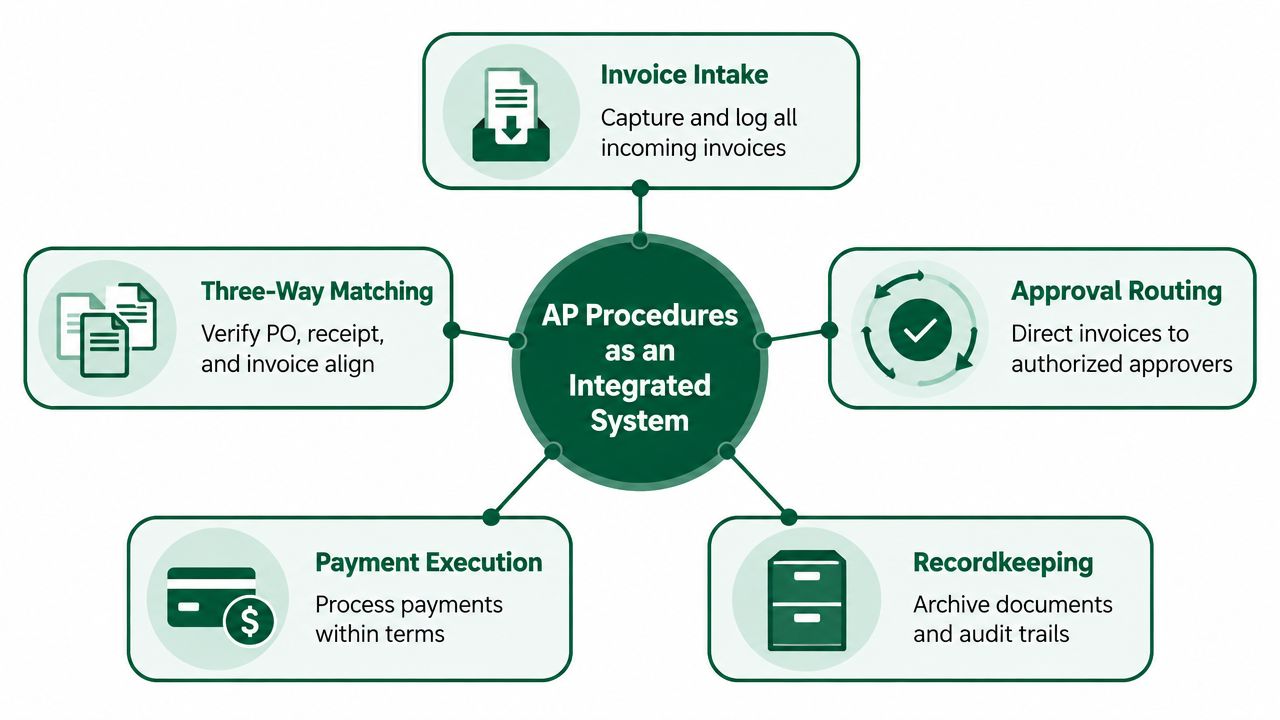
A useful way to think about the difference is this. A payment function answers, “Can we send money?” A procedure asks, “Should this invoice be paid, and what proof do we have?” That distinction matters once invoice volume grows, because informal handling collapses under duplicate pressure and fraud exposure much faster than teams expect.
If you want a smaller-business framing of the same operating idea, the accounts payable for UK small businesses overview is a practical reference point, but enterprise teams need the control design, not just the definition. Once the stages are named, the work is making sure each handoff has an owner, a trigger, and a fail-safe.
The Full AP Lifecycle From Invoice to Reconciliation
The AP lifecycle starts before the invoice shows up. Vendor master setup determines where money is allowed to go, so any bank account or remit-to change should require dual approval and a callback to a known vendor contact. If that isn't locked down, the rest of the workflow is just a polished path to the wrong destination.
The next gate is purchase order issuance. The PO sets the commercial terms, and the goods receipt records what arrived. That's where tolerance thresholds belong, because they define what can move automatically and what should pause for review.
Capture, match, approve, and pay
Invoice intake can happen through OCR, email, or a vendor portal, but AI-extracted invoices need more than transcription. They need header-level fraud scoring, because a clean-looking PDF can still come from a spoofed domain or reflect a changed bank detail upstream.
The matching step then compares the invoice against the PO and receipt. After that, approval routing should follow the delegation-of-authority matrix, not a convenience shortcut. Payment run authorization needs segregation, so the person who prepares the batch isn't also the one who releases it.
A month-end reconciliation closes the loop. The AP subledger has to tie to the general ledger, and open items need to roll cleanly into accruals instead of sitting as unexplained noise. That's also where stale balances and missed receipts become obvious, which is why the workflow should be designed with close in mind, not bolted onto it afterward.
For a broader process map, the end-to-end AP audit reference is useful because it keeps the control sequence visible, and this procure-to-pay process resource is a helpful companion when you're comparing upstream purchasing controls with downstream AP execution.
Every gate exists because a specific failure already happened somewhere else, duplicate payment, fictitious vendor, or stale accrual. Procedures are just the company's way of refusing to pay for that lesson twice.
Three-Way Matching as the Core Control
Three-way matching is the control that keeps goods-based AP from turning into a trust exercise. It compares the purchase order, the goods receipt note, and the vendor invoice, then checks whether quantity, unit price, and line description are aligned within defined tolerances. For physical goods, that's the standard that stops overbilling and catches partial shipments before payment is released, as summarized in the AP control guidance from Autopayables.
If the line items agree, the invoice moves forward. If they don't, it becomes an exception and routes to the owner who can explain the variance. That exception path matters, because three-way match is not just about rejection, it's about making sure the right person sees the right problem.
What the match is actually checking
The three checks are simple but they protect different failure modes. Quantity catches missing items, short shipments, and duplicate billing for units that never arrived. Price catches billing at a rate that doesn't align to the PO or approved contract. Tolerance keeps minor variances from clogging the workflow while still forcing review when the gap is material.
Here's the practical shape of it. A PO for 1,000 units at $50 creates an expected value of $50,000. If 980 units are received and the invoice shows $49.50 per unit, the system should flag both a shortage and a price variance, route the shortage to receiving, route the price question to procurement, and hold payment until the discrepancy is resolved.
Check | What It Prevents | What Happens if It Fails |
|---|---|---|
Quantity | Paying for items not received | Short shipments and overbilling get through |
Price | Paying the wrong rate | Contract leakage and invoice errors accumulate |
Tolerance | Noise in low-risk variances | Clean invoices get buried in avoidable exceptions |
Two-way matching can still be acceptable for low-value services and recurring utilities, where there's no physical receipt to verify. But tolerances should follow risk tier, not a single global percentage. If you apply the same rule to every spend category, you'll either over-control low-risk invoices or under-control the ones that move material value.
For a deeper walk-through of the control itself, three-way match is a useful companion reference when you're documenting the logic in a procedure manual.
Approval Models Compared
Approval design fails when teams confuse “who can sign” with “how the system enforces the sign.” Manual approval matrices still exist because they're easy to build and easy to understand, but they break down fast once invoices start moving across entities, categories, and risk tiers.
A system-enforced workflow does more work for you. Rules live inside the ERP or AP platform, so routing happens automatically based on amount, vendor tier, cost center, or GL account. A delegation-of-authority document sits above that workflow and defines who can approve what, which keeps the system from inventing its own governance.
Criteria | Manual Approval Matrix | System-Enforced Workflow | DoA-Backed Workflow |
|---|---|---|---|
Evidence trail | Weak, often incomplete | Strong, timestamped | Strongest, policy-backed |
Enforcement | Human-dependent | System-driven | System-driven with formal authority |
Audit readiness | Fragile | Good | Best for larger or regulated orgs |
Setup effort | Low | Moderate | Higher, but more defensible |
Which model fits which environment
Manual works when volume is small and the process is still mostly local. It's cheap to stand up, but it often fails the moment someone is on leave, traveling, or interpreting the matrix differently from everyone else. A system workflow costs more to implement, but it gives auditors the log they want, not a signed PDF nobody can route consistently.
For teams comparing design options, automated purchase approvals is a useful reference because it frames approvals as an enforced process, not a clerical task. Once you move into SOX scope or multi-entity operations, the DoA-backed model is the one that holds up under scrutiny.
Building an Approval Matrix That Scales
A matrix only scales when it routes by more than one dimension. Transaction value, vendor risk tier, and spend category all matter, because a $2,000 office supply invoice and a $2,000 services invoice don't carry the same control risk even if the dollar value is identical.
The right structure starts with bands. Then it adds risk tier. Then it adds category. That gives you enough specificity to avoid routing every invoice to the same approver, while still leaving room to escalate cases that need finance or executive sign-off.
A structure you can adapt
Transaction Value | Vendor Risk Tier | Spend Category | Required Approvers |
|---|---|---|---|
Under $5,000 | Transactional | Indirect | Line manager |
$5,000 to $50,000 | Preferred | Direct materials | Line manager, cost-center owner |
$50,000 to $250,000 | Strategic | Services | Cost-center owner, finance reviewer, director |
Above $250,000 | New or unverified | Capex | Director, VP, CFO |
That's a template, not a universal rule. If the vendor is new or unverified, the chain should get tighter, not looser. If the category is intercompany or capex, the finance reviewer should be able to challenge the coding before payment moves.
A flat single-approver matrix seems simple until you add more than two risk tiers. Then it becomes a bottleneck or a loophole, depending on who is trying to use it. One rule should stay fixed. Every approval chain needs one approver outside the requester's reporting line, because that's the control that interrupts internal fraud schemes.
Fraud Controls Most Procedure Manuals Miss
Most AP manuals stop at segregation of duties and declare victory. That's nowhere near enough now that fraud attempts can arrive as convincing invoice copies, spoofed vendor emails, and bank-change instructions that look like routine administrative updates.
The controls that actually block loss
The first control is callback verification for vendor bank changes. Not to the phone number in the email, and not to the number on the new form, but to a pre-registered contact. That single step is what defeats a huge share of vendor-master takeover attempts because it breaks the fraudster's control of the channel.
Duplicate invoice detection needs to do more than exact-match invoice numbers. It should flag near-matches by amount, vendor tax ID, and vendor name variations, because duplicates often arrive with small edits. Segregation of duties also has to be real, meaning the person maintaining vendor master data can't also release payments.
If the control only checks the document that the attacker can edit, the control isn't checking the attacker.
Behavioral analytics on master data changes add another layer. Sudden changes to bank details, remit-to fields, or tax identifiers should be visible in a queue, because those are exactly the fields that get touched when someone tries to redirect money.
Attack Vector | Procedure Step That Catches It | Verification Method | Failure If Skipped |
|---|---|---|---|
Vendor bank-change email | Vendor master update control | Callback to pre-registered contact | Payment reroutes to fraud account |
Duplicate invoice | Invoice intake and duplicate check | Near-match logic by amount and tax ID | Double payment |
Business Email Compromise | Approval and contact verification | Out-of-band validation | False approval survives |
AI-generated fake invoice | Intake fraud scoring | Header and domain anomaly review | Clean-looking fake gets paid |
The gap in a lot of manuals is that they describe controls as if the invoice itself is the risk. It isn't. The risk is the path around the invoice, especially where AI-generated documents and email-based approvals can bypass traditional chains. That's why the manual-heavy approach loses money more often than mixed automated and manual workflows, and why the procedure has to target the actual attack path.
Exception Handling and Dispute Resolution
An exception queue becomes useless the moment it turns into a shared inbox. After that, nobody owns the variance, everyone assumes someone else is handling it, and legitimate invoices start aging because the process can't tell a minor mismatch from a real dispute.
The workable design routes exceptions by type to named owners. Quantity issues go to receiving, price issues go to procurement, missing PO lines go to the requester, and tax or freight disputes go to AP. That way the person who can resolve the problem sees it immediately, instead of the invoice vanishing into a generic “AP exceptions” mailbox.
How to keep the queue from turning into a black hole
Each exception should have a service level, an escalation point, and a closure code. Partial shipments need a follow-up receipt, not a parked invoice that no one revisits. Disputed invoices can stay in a hold account, but only if the aging logic is visible and the owner knows when the item rolls to escalation.
Practical rule: if the exception owner can't be named in the workflow, the workflow is already broken.
A short owner map usually works better than a long policy note.
Price Dispute: procurement manager reviews the PO, contract, and billed rate.
Quantity Discrepancy: receiving lead confirms what arrived and updates the receipt.
Terms Issue: AP supervisor checks the invoice and payment terms.
Missing Receipt: requester confirms delivery or service completion.
The goal is not to eliminate exceptions. The goal is to make sure exceptions don't block clean invoices. When the routing is explicit, legitimate invoices can still pay on time, and the disputed items land with the person who can close them.
Connecting AP Procedures to Month-End Close
AP is part of close whether the procedure design admits it or not. If intake, matching, and payment records are clean, month-end stops being a scramble for missing support and starts being a reconciliation exercise.
Goods-received-not-invoiced accruals should fall out of the receiving log, not from memory or late-night spreadsheet hunting. Intercompany payables should reconcile against a matched transaction reference, and vendor statement reconciliation should use the same source data that powered day-to-day processing. That's how AP becomes a control layer for close instead of a separate pile of work.
Why close gets easier when AP is disciplined
If the workflow produces evidence as it runs, auditors don't need a year-end rescue project. They can trace invoice intake, match decisions, approval steps, and payment release from the same record set. That reduces the usual end-of-month chaos where the controller has to explain why the AP aging doesn't agree with the ledger.
For teams that manage multiple entities or nonprofit-style close calendars, the month-end close checklist for nonprofits is a useful reminder that the best close starts with clean upstream procedures. The same principle holds in enterprise AP, because the quality of the close is usually decided at intake.
When AP is designed well, the last five days of the month are spent reconciling real balances, not reconstructing missing process history. That's the point of the procedure set. It protects cash, but it also protects the accuracy of the books.
Sample Templates Ready to Adapt
Procedures only work when the team has artifacts they can repeat. A good manual gives people forms, fields, and validation rules, not just intent.
Invoice intake checklist
Use this at the front door before an AP clerk touches the queue.
Vendor name: required text field, must match approved vendor master exactly.
PO reference: required, numeric or alphanumeric, must exist in ERP.
Currency: required dropdown, must match PO currency.
Tax breakdown: required line item, must reconcile to invoice total.
Remit-to confirmation: required yes/no check, verified against master file.
GL coding: required account and cost center, validated against chart of accounts.
Approval matrix template
A working matrix should show the routing logic clearly.
Transaction Value Band | Vendor Risk Tier | Vendor Category | Required Approver | Alternate Approver |
|---|---|---|---|---|
Under $5,000 | Low | Indirect | Line manager | Cost-center owner |
$5,000 to $50,000 | Medium | Services | Cost-center owner | Finance reviewer |
$50,000 to $250,000 | High | Direct materials | Director | VP |
Above $250,000 | New or unverified | Capex | VP | CFO |
Exception log template
Track the fields that let you resolve and audit the item later.
Invoice number: required text, unique.
Variance type: required dropdown, price, quantity, tax, duplicate, missing receipt.
Owner: required name field, must be assigned at entry.
Age in days: system-calculated, used for escalation.
Resolution code: required dropdown, approved, rejected, reissued, credit memo, adjusted.
Vendor master update form
This is the form that should be locked down hardest.
Field | Format / Validation | Control Purpose |
|---|---|---|
Legal vendor name | Exact match to registration | Prevents false entity setup |
Bank account details | Verified through callback | Stops account redirection |
W-9 / W-8 status | Required attachment or flag | Supports tax compliance |
Beneficial owner certification | Signed acknowledgment | Supports due diligence |
Dual approval routing | System-enforced approval | Prevents unilateral changes |
If you want a tool that helps turn procurement-side evidence into a traceable record, Procright can support specification drafting, supplier discovery, evidence-based comparisons, and audit-ready decision records. That's more useful than a generic document repository when your AP and procurement processes need to line up cleanly.
Measuring Whether Your Procedures Are Working
Three metrics tell you whether the AP procedure is protecting the business. Cost per invoice processed, first-time error-free disbursements, and cycle time from invoice receipt to payment are the numbers that show whether the workflow is disciplined or just busy.
Benchmark data shows mature or highly automated AP environments can bring cost per invoice down to roughly $2.78 to $3.00 and cycle times near 3.1 to 3.5 days, while average manual processing runs around $10.89 to $19.83 per invoice and about 9.2 to 14.6 days. Those ranges matter because they show what's possible when intake, matching, routing, and exception handling are standardized and instrumented through the process, not handled ad hoc. The benchmark source is the 2026 AP state and benchmark summary.
How each procedure choice moves the metric
Stricter PO enforcement usually improves match quality, but it can lengthen cycle time if buyers create POs late. Duplicate-check logic lowers rework and protects cost per invoice because fewer items bounce back through the queue. Auto-approval rules can shorten cycle time, but only if they're restricted to low-risk, low-value cases with clear evidence trails.
The right metric to watch depends on the control you're changing. If a new rule reduces manual touchpoints but increases exceptions, the queue may look faster while the process gets noisier. That's why first-time error-free disbursements should sit next to cycle time, not behind it.
If you're redesigning AP from scratch, start by mapping each procedure clause to the failure it prevents, then watch the metric it should move. That keeps the conversation honest. Speed matters, but only if the invoice that reaches payment is the right one.
If you're rebuilding AP procedures, Procright can help you create the evidence trail upstream so the finance side inherits cleaner source data and fewer avoidable disputes. Visit Procright if you want a workflow that supports procurement controls, supplier comparisons, and audit-ready documentation instead of another pile of disconnected approvals.
Try it on a real buy
Bring one category. Watch where the flags land.
We use a little analytics to see which pages actually help. Nothing else, no ad trackers.