Checklist for Implementing Real-Time Decision Support
Real-time decision support succeeds only when data, rules, people, and review processes are fixed before the tool goes live.
In this article
Most procurement AI projects stall because the setup work is weak, not because the software is bad. If I were rolling out real-time decision support, I’d keep the plan simple: fix data first, define approval rules before setup, test in shadow mode, and track adoption and override patterns after launch.
Here’s the short version:
Start with readiness: document current cycle time, cost, accuracy, and compliance baselines.
Clean the data: many teams spend 80% of implementation effort on data prep, and spend classification should be at least 85% accurate.
Pick a narrow pilot: begin with 3–5 repeatable decisions like PO price variance, off-contract spend, or supplier risk flags.
Set hard rules early: define approval limits, escalation paths, override reason codes, and audit trail needs before configuration.
Match speed to the task: most procurement decisions need updates every 5–15 minutes, not split-second processing.
Test before cutover: run in parallel first, then move to human approval, and use full automation only for low-risk cases.
Use clear success targets: look for 30–40% lower sourcing cycle time, 70%+ active use in pilot, and 80%+ recommendation acceptance.
Keep watching after launch: track touchless rate, off-contract leakage, compliance, and model drift month by month.
A few numbers stand out. AI in procurement can cut sourcing cycle time by 30–40% and invoice processing cost by 70–80%. But 95% of pilots fail to scale, often because leaders never made the new workflow mandatory or the source data was messy.
At a glance, the article breaks the rollout into four parts:
Readiness and requirements
Design and configuration
Implementation, pilot, and rollout
Monitoring and rule updates
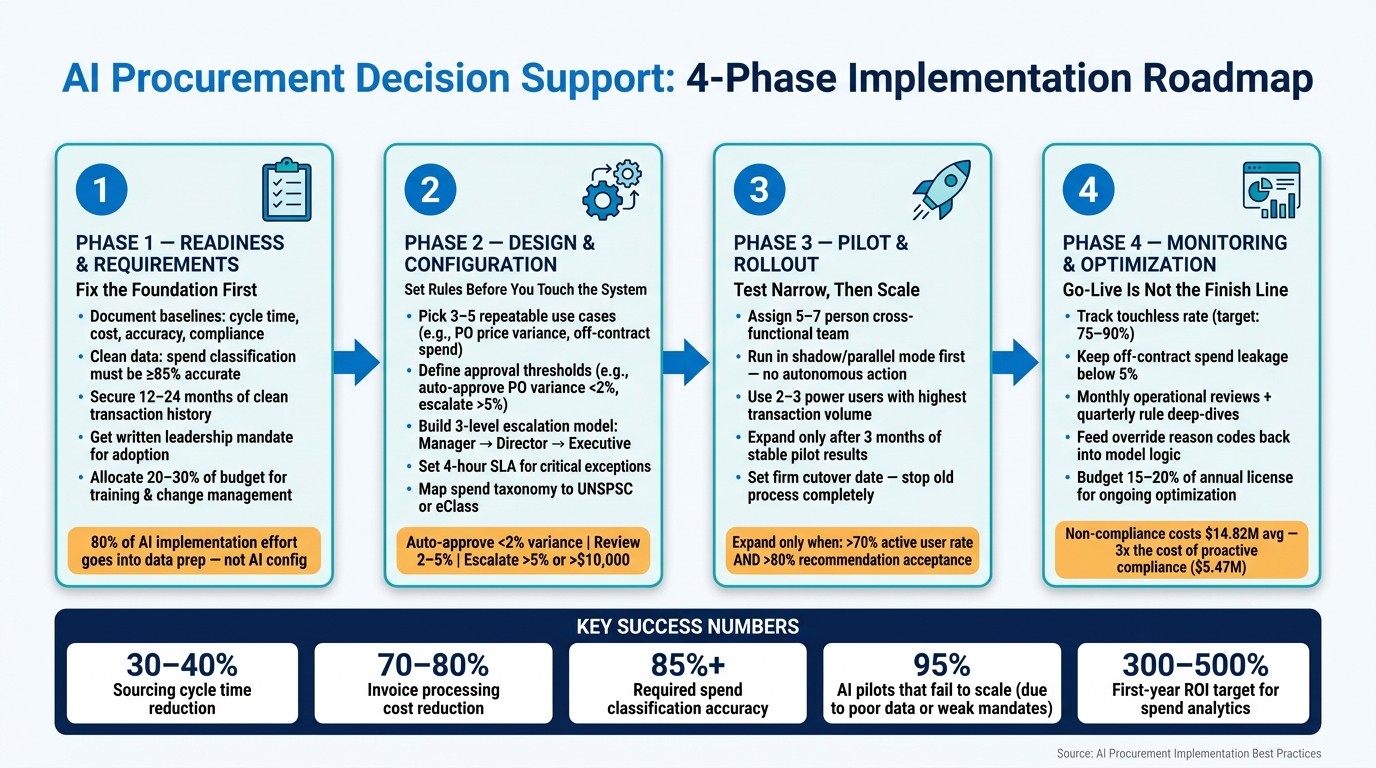
AI Procurement Decision Support: 4-Phase Implementation Roadmap
After 30 Years in Procurement, I Built an AI Strategy Engine
Checklist Part 1: Readiness and Requirements
Business, Governance, and Risk Readiness
Set success metrics and document your current baseline before deployment. If you skip this step, it's hard to tell whether the system is helping or just adding noise.
[ ] Define target outcomes and document current-state baselines for cycle time, cost, accuracy, and compliance.
[ ] Identify which procurement decisions need real-time support vs. near-real-time refreshes (5–15 minutes) vs. batch
[ ] Set a first-year ROI threshold for spend analytics, such as 300–500%.
[ ] Build a decision playbook: for each decision, document its purpose, cadence, inputs, thresholds, and named owner.
[ ] Define the approval matrix by dollar amount and named approver - for example, under $250 self-approval, $5,000+ requires Controller sign-off - before any configuration begins.
[ ] Secure a written leadership mandate that the new system is the required path for all purchases above a defined threshold.
[ ] Document legal, compliance, and auditability requirements, including audit trails.
[ ] Confirm SOC 2 Type II and any applicable regulatory requirements are part of the requirements.
Data, Integration, and U.S. Localization Requirements
80% of AI implementation effort goes into data preparation, not AI configuration. That's where most of the work lives. Spend data should be classified to at least 85% accuracy, and you should have 12–24 months of clean transaction history before you begin.
[ ] Inventory all data sources: ERP, P2P platform, CLM, and supplier portals.
[ ] Confirm spend data classification accuracy is at or above 85%.
[ ] Deduplicate the supplier master file.
[ ] Clean the Chart of Accounts before import - 10 hours of upfront cleanup can save roughly 100 hours of rework after launch.
[ ] Verify API availability for ERP and P2P systems.
[ ] Match data freshness to the decision cadence: most procurement tasks need near-real-time refreshes (5–15 minutes), not sub-second latency.
[ ] Establish U.S. formatting standards for currency, dates, separators, and mixed units.
Stakeholders, Process Mapping, and Security Needs
Real-time decision support changes more than software. It also changes who decides what, when, and with what level of access. So before daily use starts, line up the people, clarify your procurement process, and lock down access rules.
[ ] Identify and confirm participation from procurement, IT, legal, finance, and compliance stakeholders.
[ ] Select 2–3 power users with the highest transaction volume to join configuration decisions early.
[ ] Map current approval workflows end-to-end, including all exception paths and manual handoffs.
[ ] Assess change impact: which roles will see the biggest workflow shift?
[ ] Allocate 20–30% of total implementation budget for training and change management.
[ ] Document security requirements: SSO, role-based access control (RBAC), encryption at rest and in transit, and audit logging.
[ ] Define uptime and latency thresholds for critical monitoring dashboards, including sub-second latency where needed.
[ ] Confirm the ERP or core accounting system is stable - avoid layering procurement AI on top of an active ERP migration.
With readiness complete, move to design and configuration.
Checklist Part 2: Design and Configuration
With readiness confirmed, the next step is turning documented requirements into working decision logic. The goal is simple: set the rules before you touch the system. That means defining thresholds, workflows, and handoff points up front instead of trying to patch them in later.
Define Use Cases, Rules, and Escalation Paths
Start small. Pick 3–5 high-value, repeatable decisions first so the pilot doesn’t bog down. In procurement, strong starting points include price mismatches, quantity discrepancies, late supplier confirmations, off-contract purchases, and supplier blacklisting.
Each use case needs a clear threshold. One practical setup is to auto-approve PO variances under 2% and escalate anything above 2%. Use that same logic with service levels. For example, if On-Time In-Full (OTIF) drops below 95% for strategic customers, trigger an escalation right away instead of waiting for a weekly report.
Every exception also needs an owner. A simple three-level model works well:
Level 1: Manager
Level 2: Director
Level 3: Executive
For critical exceptions, set a response SLA such as acknowledgment or resolution within 4 hours. And don’t skip vacation delegation. If a primary approver is out, the queue shouldn’t sit there collecting dust.
Use this checklist for setup:
[ ] Prioritize 3–5 repeatable use cases such as price mismatches, quantity discrepancies, late supplier confirmations, and off-contract purchases.
[ ] Apply the table below to each use case.
[ ] Encode non-negotiable guardrails - such as embargoed geographies or vendor risk thresholds - into a hard-stop rules list.
[ ] Define decision owner and reviewer roles for each decision so it is clear which cases are fully automated and which require human review.
[ ] Build the three-level escalation model with named owners and a 4-hour SLA for critical exceptions.
[ ] Configure vacation delegation rules to prevent approval bottlenecks.
[ ] Require reason codes for every manual override to support continuous rule refinement.
Use this starter threshold structure:
Threshold Category | Automated Action (Green) | Conditional/Review (Amber) | Escalated (Red) |
|---|---|---|---|
PO Price Variance | < 2% | 2%–5% | > 5% or > $10,000 |
Supplier Risk | Low/Green Score | Watchlist/Yellow | Sanctioned/Blacklisted |
OTIF Performance | > 95% | 90%–95% | < 90% |
Build Taxonomy, Templates, and Compliance Logic
Once the rules are set, standardize the data fields behind them. For each of the 3–5 priority use cases above, good recommendations depend on clean, consistent data structures. Map internal spend categories to a standard taxonomy like UNSPSC or eClass. Before scaling AI recommendations, confirm spend data is classified to at least 85% accuracy.
Taxonomy is only part of the job. You also need guided intake templates that collect the right metadata at the moment a request is made: category, supplier, budget owner, and cost center. One intake form can route requests by rule instead of by guesswork. Compliance logic should sit inside the workflow itself, including regional rules, spend thresholds, and risk levels.
Work through the following:
[ ] Map internal spend categories to UNSPSC or eClass taxonomy.
[ ] Confirm spend classification accuracy is at or above 85% before enabling AI recommendations.
[ ] Build guided intake templates that capture category, supplier, budget owner, and cost center at the point of request.
[ ] Embed compliance logic - regional rules, spend thresholds, and risk levels - directly into workflow templates.
[ ] Create specification templates for high-volume categories so recommendations are evaluated against consistent criteria.
[ ] Integrate live budget state, cash position, and commitment exposure into approval logic to prevent financially inappropriate recommendations.
Fit Decision Support Into Daily Procurement Work
Rules only help if people can act on them in the flow of work. Map each rule to the screen, queue, or alert where users will see it. Decide where each suggestion shows up - inside the ERP, in a dashboard, or as a direct notification - and match the format to the urgency. High-priority exceptions should show up as immediate alerts. Lower-priority items can be grouped into queues so teams don’t get buried in noise and start ignoring the system.
Each recommendation should lead to a clear next step. Start in parallel testing, where the AI runs beside current human processes and makes recommendations without taking action. Once accuracy is confirmed, move to human-approved mode, where the system drafts recommendations and people approve them before execution. Full automation should be saved for low-risk, well-understood categories.
Use this as the working checklist:
[ ] Map each alert type to a specific workflow touchpoint: ERP screen, dashboard, or push notification.
[ ] Separate high-priority exception alerts from lower-priority notifications to reduce noise.
[ ] Launch in parallel testing first; validate recommendation accuracy before granting any autonomous authority.
[ ] Set guardrails for AI-generated specification drafts and compliance scores; require human review before any output is used in a sourcing decision.
[ ] Build parallel approval paths where legal and finance can review simultaneously rather than sequentially to reduce cycle time.
Checklist Part 3: Implementation, Pilot, and Rollout
With the rules in place and workflows mapped, the next step is simple in theory and hard in practice: build the system, test it on a small scope, and scale only after it proves itself.
This phase works best in a strict order. Start narrow. Check the data. Then expand. The first build should connect only the priority workflows picked during the design phase.
Plan the Project and Build the Integrations
Put a 5–7 person cross-functional team in place, with people from procurement, IT/data science, change management, and finance. Each input source - ERP, P2P, and external signals - should have a named steward so data-quality issues show up early instead of getting buried.
Build the smallest data pipeline that can do the job. That means source lineage, refresh logic, and reconciliation checks against source totals. Connect the main systems through APIs for real-time data extraction, including ERP platforms such as SAP, Oracle, and NetSuite, along with P2P tools and contract lifecycle management systems.
Latency should match the type of decision being made. Use real-time infrastructure only when a decision must happen within seconds or minutes. For many procurement workflows, near-real-time refresh cycles deliver most of the upside without the added mess of full real-time architecture.
There’s also a timing issue that matters more than people think. Wait until the accounting system has been stable for at least 90 days before putting a decision support system on top of it. Clean up chart-of-accounts codes first. If those codes are messy, that mess flows downstream into automated POs and invoices.
Use this checklist before moving into the pilot:
[ ] Assign a 5–7 person cross-functional team with named owners for procurement, IT, change management, and finance.
[ ] Define formal data contracts for each input source, covering completeness, timeliness, and accuracy.
[ ] Build the minimal data pipeline with lineage, refresh logic, and reconciliation checks.
[ ] Connect ERP, P2P, and CLM systems via API and validate real-time data extraction.
[ ] Set latency targets by decision type and use real-time infrastructure only for decisions that must happen within seconds or minutes.
[ ] Confirm the ERP has been stable for at least 90 days before layering decision support on top.
[ ] Treat implementation as a series of 60-day release cycles rather than a multi-year transformation program.
Once the pipeline is stable, run one workflow in parallel run, or shadow mode, before you expand.
Run Pilot Testing and Validate Decision Quality
Choose 3–5 power users who handle the highest transaction volumes and let them run the pilot using live purchase requests. Use the same high-priority use cases and thresholds defined earlier. Start in parallel run, where the system works beside the current human process, makes recommendations, and takes no autonomous action.
Before go-live, make sure the model beats baseline performance on validation data. At the same time, set up monitoring for data drift, model performance, and pipeline health.
Don’t widen the rollout too soon. Expand only after 3 months of pilot results show more than 70% active user rate and more than 80% acceptance. Also, check bias and error by segment - like product family or region - instead of leaning on one global accuracy score. A model can look strong at the top line and still miss badly in a certain category or geography.
Metric | Target |
|---|---|
Active User Rate | >70% of pilot group |
AI Recommendation Acceptance | >80% of suggestions |
Sourcing Cycle Time Reduction | 30–40% improvement |
Spend Classification Accuracy | >85% accuracy |
Contract Compliance Gain | 1–2% improvement |
If the pilot hits those targets, move straight into training and cutover.
Train Users and Execute the Rollout
After the pilot is validated, the focus shifts from testing to adoption and cutover. Training should be set up in three tiers:
Training Tier | Target Audience | Content Focus |
|---|---|---|
Tier 1: AI Literacy | all staff involved in the procurement lifecycle | AI capabilities, limitations, prompting, data privacy, and security |
Tier 2: Tool-Specific | Active System Users | Workflow changes, exception handling, and escalation procedures |
Tier 3: AI Champions | 1–2 Leads per Team | Advanced configuration, peer support, and performance monitoring |
Power users should become the first point of contact for coworkers after launch. Managers also need training on AI-augmented decision-making so they know when to trust system output and when to step in with human judgment.
Before rollout, define on-call support, incident playbooks, and escalation paths for exceptions or errors. This is the part teams often treat as admin work, but it’s what keeps small issues from turning into launch-day chaos.
Set a firm cutover date and stop the old process on that day. As Shaoli Paul, Content Manager at ProcureDesk, puts it:
"A clean cutover means the old process stops on the cutover date." - Shaoli Paul, Content Manager, ProcureDesk
Don’t leave old email or spreadsheet approvals hanging around in parallel. That only creates confusion and weakens adoption. Once cutover is done and the pilot stays stable, expand by category, region, or business unit.
Checklist Part 4: Monitoring, Optimization, and Summary
Go-live isn't the finish line. If you want the system to stay accurate, trusted, and useful, it needs active maintenance. The job after launch is simple to state and hard to do well: keep checking whether the system is still improving spend control, compliance, and auditability.
Track KPIs, Auditability, and Compliance
After cutover, measure whether production performance still lines up with the pilot. That means watching efficiency, financial impact, compliance, and adoption after go-live.
For efficiency, track the touchless rate - the share of exceptions resolved without manual review. The target is 75% to 90%. Top teams keep manual review below 10% of cases. For financial impact, track savings leakage from off-contract spend. The target is to bring that below 5%.
Compliance has a direct cost. The average total cost of non-compliance is $14.82 million - almost three times the $5.47 million cost of proactively maintaining compliance. So don't just glance at compliance metrics now and then. Track contract compliance rates and price/quantity mismatch rates on a regular basis.
Auditability matters just as much. Every transaction should leave a complete audit trail: what recommendation the system presented, what action the user took, and a reason code if they overrode it. Those override patterns tell a story. If users keep rejecting one type of recommendation, that's a strong sign the rule needs another look.
Use this checklist to keep the basics in view:
[ ] Track touchless rate (target: 75% to 90%), savings leakage (target: below 5%), and contract compliance rates.
[ ] Maintain immutable audit trails that capture the recommendation presented, the action taken, and override reason codes.
[ ] Review contract compliance rates and price/quantity mismatch rates regularly.
[ ] Track active users and usage frequency, and aim for 70%+ sustained adoption.
Maintain Rules, Models, and User Trust
When performance starts to shift, update rules before users lose trust.
Model drift is quiet, and it can do real damage. Prices change. Suppliers change. Thresholds change. A model trained on last year's data can start making recommendations that feel off. And once that happens, users may stop trusting the system before anyone notices the numbers slipping. Set up continuous monitoring for data drift and model performance, and assign a named owner who is responsible for flagging degradation.
A steady review rhythm helps here. Run a monthly operational review for exception patterns and threshold performance. Then do a quarterly deep-dive to retire low-yield decision rules, adjust tolerance thresholds, and give the system more autonomy in areas where it has shown strong accuracy. Plan for the cost too: ongoing optimization usually runs 15% to 20% of the annual software license.
Alert fatigue can wreck adoption fast. If every small price fluctuation sets off a flag, users will start tuning out all alerts, including the ones that matter. Adaptive thresholds based on historical variance help cut that noise.
Override reason codes shouldn't just sit in a log. Feed them back into rules and models so future recommendations improve over time.
[ ] Assign a named owner for model drift monitoring and pipeline health.
[ ] Set a monthly cadence for operational reviews and a quarterly cadence for rule and threshold updates.
[ ] Configure adaptive thresholds based on historical variance to reduce alert fatigue.
[ ] Feed override reason codes back into model and rule logic as closed-loop learning.
Consolidated Implementation Checklist
Use this final checklist to confirm the system is operating the way it was designed to operate.
Readiness
[ ] Document current-state baselines, including cycle times, costs, and accuracy.
[ ] Confirm data governance policies and security controls.
[ ] Map all stakeholders, decision rights, and escalation paths.
Design
[ ] Define priority use cases, approval thresholds, and escalation rules.
[ ] Build spend taxonomy and compliance logic.
[ ] Embed decision support into existing procurement workflows.
Implementation
[ ] Define who can approve or override recommendations and when to escalate.
[ ] Apply least-privilege access controls to sensitive financial and vendor data.
[ ] Identify 2 to 3 internal experts as the first point of contact for post-launch questions.
Monitoring
[ ] Track touchless rate, savings leakage, contract compliance, and adoption.
[ ] Log every recommendation, override, and reason code.
[ ] Run monthly operational reviews and quarterly rule/threshold deep-dives.
[ ] Feed override patterns back into model logic.
FAQs
How do I know if my procurement data is ready?
Your procurement data is ready when it’s stable, accurate, and easy to access. Your accounting system should already be live, not mid-move, and your chart of accounts should be organized the same way across the board so old problems don’t get dragged into the new setup.
You also need one trusted place for data, along with complete, well-formatted records, clear ownership, and set quality standards. If not, a real-time system won’t fix bad data. It will just make mistakes show up faster and spread further.
What should I automate first in a pilot?
Start with procurement decisions where lower latency will improve outcomes or cut risk in a clear way. Put your attention on high-impact work where manual steps slow everything down and create bottlenecks.
A strong first step is to automate specification creation and product comparison. With Procright, teams can generate clear specifications fast, then automate product discovery and technical analysis to produce evidence-based compliance scores.
When should decision support remain human-in-the-loop?
Human-in-the-loop is a must for high-stakes, strategic, or complex decisions where accountability, risk tolerance, and explainability matter.
Procright can help with specification creation, product discovery, and compliance verification through data-driven recommendations. But the final call should still involve human review.
Why? Because people need to make sure those decisions are justifiable, fit the organization’s goals, and can be backed up with clear, traceable evidence when an audit comes around.
Related Blog Posts
Try it on a real buy
Bring one category. Watch where the flags land.
We use a little analytics to see which pages actually help. Nothing else, no ad trackers.