Procurement Workflow Automation: Checklist for Success
Fix the process and clean data first; set clear rules, human review, and run a 4–8 week pilot to cut cycle times and costs.
In this article
Procurement automation works when you fix the process first, set clear controls, and test on a small scope. If you skip those steps, the tool just moves bad inputs and approval delays from one place to another.
Here’s the short version:
I’d start with one workflow only, like requisition-to-PO, invoice processing, or contract review.
I’d set baseline numbers before launch, such as cycle time, manual touches, exception rate, and maverick spend.
I’d clean the data first, because poor supplier records, weak classification, and bad intake forms can break the rollout.
I’d split work between rules and AI: rules for fixed decisions, AI for messy inputs and document-heavy tasks.
I’d put human review on high-risk actions, low-confidence outputs, supplier setup, and high-value transactions.
I’d run a 4–8 week pilot, train users by role, and expand only after adoption and acceptance stay steady.
A few numbers stand out:
Procurement cycle times can drop by 50%–70%
PO processing cost can fall by 60%–80%
Data prep can take about 80% of rollout effort
Three-way match tolerance often sits around ±2% to 3%
A pilot should scale only when user adoption is above 70% and AI acceptance is above 80%
Step | What I’d focus on | What success looks like |
|---|---|---|
Readiness | Scope, goals, data, owners, controls | Baselines set and risks known |
Design | Current-state mapping, intake, approval logic | Fewer handoffs and clear exception paths |
Setup | Integrations, audit logs, review gates, dashboards | Requests move with less manual re-entry |
Pilot and improve | Small launch, training, weekly reviews | Stable metrics before expansion |
This checklist is useful because it keeps the work simple: prepare first, build second, scale last.
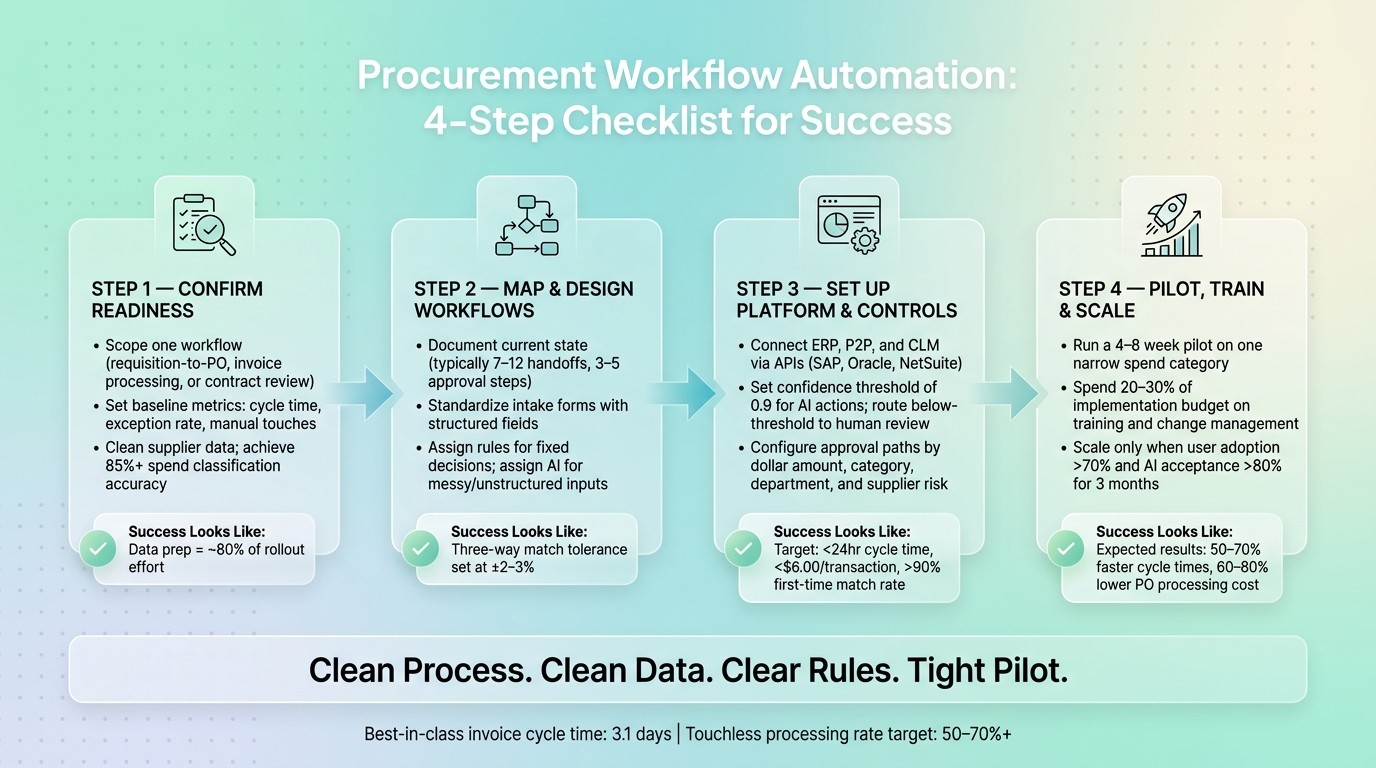
Procurement Workflow Automation: 4-Step Checklist for Success
Automate the Purchase Order Workflow
Checklist 1: Confirm Readiness Before You Automate
Before you design any automation, make sure the workflow is ready by using AI procurement frameworks to standardize processes. That means checking the scope, the data, the owners, and the controls before you touch the tool.
Set scope, goals, and success metrics
Start with one workflow. For most teams, that means requisition-to-PO, invoice processing, or contract review.
Then get specific about what a win looks like. If the target is fuzzy, the project will be too.
Use these targets:
Metric | Target | Best-in-Class Benchmark |
|---|---|---|
Invoice cycle time | Under 5 days | 3.1 days |
Requisition-to-PO | Under 24 hours | - |
Touchless processing rate | 50% to 70%+ | 49.2% |
User adoption rate | Above 70% | - |
AI recommendation acceptance | Above 80% | - |
Before launch, document your current cycle times, exception rates, and manual handoff counts. That baseline matters. Without it, ROI is just a guess.
It also helps to stay conservative in the business case. A projected 60% to 70% cut in invoice costs is easier to defend than promising the absolute top end.
Next up: make sure your systems and data can support those goals.
Check data, systems, and integration dependencies
Data prep takes about 80% of the total effort in an AI procurement rollout. So don't leave the data audit for later. Start early.
Focus first on the data tied to your pilot category. Get spend classification to at least 85% accuracy, remove duplicate records from your supplier master, and confirm contracts are digitized and searchable, not buried as scanned PDFs in folders.
Then review your systems. Your ERP, P2P platform, and CLM tools need usable APIs. If you're working with older systems, API limits can slow everything down or stop integration altogether.
"The end-to-end cycle is only as automated as its weakest stage. Structured intake creates the data that all downstream automation depends on." - Jesus Vargas, Founder, LowCode Agency
Once the tech setup is clear, lock down who decides what.
Secure executive sponsorship and AI governance
If automation touches approvals, payments, or supplier data, it won't stay inside Procurement for long. You need backing from the CPO or VP of Procurement, plus active sign-off from Finance, IT, Legal, and Security before configuration starts.
Set three rules upfront:
Where AI can act on its own
Where a person must approve
What must be logged
Also, carry your current Sarbanes-Oxley (SOX) and internal financial controls into every step the AI agent touches. Automation doesn't cancel those duties.
Checklist 2: Map Current Workflows and Design the Future State
With readiness confirmed, the next move is simple: look closely at how procurement works today before you build anything new.
This section covers three actions: map the process, standardize the inputs, and assign AI to the calls that involve messy or unclear data.
Document each step of the current process
Start by mapping the current process. If you skip this step, you risk automating a process that already has too much drag.
Most procurement teams think their workflows are simpler than they are. In practice, a manual requisition-to-PO process often includes 7 to 12 handoffs and 3 to 5 approval steps. If those steps aren't mapped clearly, the confusion doesn't go away. It just gets automated too.
"Procurement automation projects inherit the problems of the processes they automate." - Elementum AI
Go stage by stage and document the work at the task level. That means noting how requests come in, how items are described, how budget checks happen, and how approvals move from the requester to the manager.
For invoice-to-pay, document how invoices arrive, who handles three-way matching, and how tax treatment and payment terms get checked.
Be specific. Record:
Named approvers
Dollar thresholds
Delegation rules
Exception triggers
Also mark every exception trigger you can find, including price variances, requests for nonpreferred vendors, and any AI confidence score that falls below your threshold.
One more thing: don't map workflows during an ERP migration or a GL restructure. Wait until the system has been stable for 90 days.
Once each step is visible, you can move on to intake and control points with a lot less guesswork.
Standardize requests, specifications, and controls
After you map the current state, the weak spots usually stand out fast. Free-text item descriptions, messy vendor names, and informal email requests can stop automation before it even gets going.
Replace ad-hoc intake with a structured form. At a minimum, it should capture requester, department, spend category, item description, quantity, estimated cost in U.S. dollars, business justification, and required date. Downstream automation depends on the data created at intake, so this part matters more than most teams expect.
For spend classification, use a known taxonomy like the United Nations Standard Products and Services Code (UNSPSC). That gives AI a cleaner way to map requested items to catalog entries.
On the supplier side, standardize vendor names, tax IDs, bank data, payment terms, and compliance documents across your master list. A practical place to start is your top 50 vendors by spend volume from the last 12 months, then clean those records first.
Set matching tolerances as well. For three-way matching - PO, goods receipt, and invoice - a value tolerance of plus or minus 2–3% gives the rules layer a clear line between straight-through processing and exception routing.
Identify AI use cases that improve decision quality
Once the workflow is standardized, use AI only where it helps with inputs that are messy, incomplete, or open to interpretation.
Use rules for decisions that should lead to the same outcome every time, such as routing approvals by dollar threshold, blocking payments outside tolerance, and enforcing delegation-of-authority matrices.
Use AI for areas where the input is unstructured or ambiguous, like spec creation, supplier document review, and pricing analysis.
The key is to draw a clean line between where AI recommends and where rules decide. If an output comes back with low confidence, send it to human review.
Checklist 3: Set Up the Platform, Controls, and Reporting
Once the future-state workflow is locked in, move into system setup. This part comes down to three things: what the platform needs to do, how control points should work, and which metrics you’ll watch.
Define configuration and integration requirements
Start with the basics. Make sure the platform connects with your ERP, contract system, and supplier tools. Also check that scanned contracts are OCR-searchable, so teams can find what they need without digging through static files. API connectors to your ERP - such as SAP, Oracle, or NetSuite - should push approved requests straight into purchase request and purchase order fields without manual re-entry.
Two data dependencies carry the most weight.
First is supplier master data. Clean up duplicate records, confirm which suppliers are still active, and add outside financial or risk data to vendor profiles before import. If your supplier data is messy on day one, the rest of the setup gets shaky fast.
Second is spend classification accuracy. Your data should be classified at 85% accuracy or higher and tied to a standard taxonomy like UNSPSC before AI tools start mapping requests to catalog entries. Put bluntly: data cleanup belongs on the go-live path, not on a “we’ll fix it later” list.
You’ll also want tight traceability. Audit logs should capture the input, confidence score, and final decision for every AI-influenced action, along with the rule path or reviewer that made the last call. On top of that, set a confidence threshold for human review so low-confidence outputs go to a reviewer instead of moving ahead on their own.
Set approval rules, risk checks, and human review points
Approval paths should be based on dollar amount, spend category, department, and supplier risk level. That gives you a setup that fits the purchase instead of forcing every request through the same lane. Where you can, run legal and finance approvals in parallel rather than one after the other. That alone can cut slowdowns.
Add hard-gate checks for:
Policy limits
Budget availability
Sanctions screening
These checks help stop noncompliant transactions before they ever get approved.
Be clear about when a person needs to step in. High-risk, ambiguous, high-value transactions, plus first-time suppliers, should go to human review. For three-way matching, set tolerance thresholds at ±2–3% on value so exact matches can auto-approve while mismatches move to the right team.
Use named approvers and prebuilt delegate paths. That sounds simple, but it saves a lot of back-and-forth when someone is out and an approval is stuck in limbo.
Track outcomes with operational dashboards
Before go-live, set baseline metrics for cycle times, cost per transaction, error rates, and maverick spend percentage. If you don’t have a baseline, you can’t show ROI later.
After controls are in place, reporting shows whether they work in day-to-day use. Dashboards should make it easy to see how controls, speed, visibility, and exception handling change as automation matures.
Keep a close eye on:
Requisition-to-PO cycle time
Cost per transaction
First-time match rate
Maverick spend on a weekly basis
Targets to aim for are under 24 hours for requisition-to-PO cycle time, below $6.00 per transaction, and above 90% for first-time match rate.
Use weekly dashboards and two-week reviews to tune the pilot before expanding.
Checklist 4: Pilot, Train, and Improve Over Time
Run a pilot with a narrow spend category or process
Once your controls and reporting are in place, test the workflow in a short pilot before you scale it.
Start with one tightly bounded workflow for 4 to 8 weeks. A lot of procurement AI pilots stall out because the team tries to do too much at once. Better starting points are indirect spend under $50,000, NDA redlining against a standard playbook, or RFP first-draft generation.
Go after a workflow that has high volume and obvious friction. Then document the baseline before the pilot starts. Track approval cycle time, exception rate, manual touches, and transaction cost. If you don’t have a clear “before,” it’s hard to show the “after”.
For the first few weeks, it can help to run the new workflow in parallel with the current process. That gives you room to check outputs before the system starts making decisions on its own.
Stick with the same approval rules, review points, and dashboards you set up earlier.
Keep the pilot window tight. 4 to 8 weeks pushes the team to stay focused and helps stop scope creep before it starts.
Train users on new workflows and AI-assisted decisions
Plan to spend 20%–30% of the implementation budget on training and change management. That may sound like a lot, but it’s usually the difference between a tool people use and a tool people dodge.
Train users on the same rules, thresholds, and exception paths used in the pilot. A simple tiered model works well:
Training Tier | Who It's For | What It Covers |
|---|---|---|
AI Basics | All procurement staff | AI capabilities and limits, data privacy, explainability |
Workflow Training | Active system users | Workflow changes, exception handling, escalation paths |
Team Champions | 1–2 per team | Advanced configuration, peer support, performance tuning |
Role-based training matters here. Requesters need to understand guided buying and structured intake. Approvers need to know how to read risk scores and use mobile approval apps. AP and procurement reviewers need to work exception queues and know when a confidence-gated handoff calls for human judgment.
Be direct with approvers about three things:
when AI can act
when a person must review
what needs to be logged
Pick 1–2 Team Champions per department as early as you can. These should be trusted team members who can help with troubleshooting and day-to-day peer support.
Review performance and expand in phases
Use each review cycle to fine-tune rules, thresholds, and training. Pay close attention to overrides. When users override AI recommendations, that usually means one of two things: the model needs tuning, or the rule itself needs to change.
Don’t expand just because the pilot finished. Expand only when the pilot metrics stay steady. Scale when user adoption is above 70%, AI acceptance is above 80%, and results remain steady for 3 months.
Metric | Pre-Automation (Baseline) | Basic Automation (RPA/Rules) | AI-Enhanced Automation |
|---|---|---|---|
Approval Cycle Time | Days/Weeks | Hours/Days | Minutes/Hours |
Manual Touchpoints | 100% manual | 40–60% manual | <10–20% (exceptions only) |
Exception Rate | N/A (all manual) | High (rigid rules) | Low (context-aware) |
Compliance Adherence | Variable/Manual Audit | Rules-based | Continuous/Automated |
Conclusion: A Checklist to Reuse Across Procurement Workflows
Key points to carry into your next automation project
Use this sequence for every workflow: readiness, process design, platform controls, then pilot-driven improvement.
Process discipline matters just as much as the order itself. Why? Because good execution depends on clean inputs, clear controls, and performance you can measure.
Start with one workflow. Set measurable baselines before deployment. Enforce human review anywhere financial or supplier risk is high. Then scale only when acceptance rates stay steady.
If you want software support for that checklist, choose a tool that backs up those same controls. Procright supports this workflow with AI specification creation, product discovery, and compliance scoring.
FAQs
Which workflow should we automate first?
Start by auditing your current processes for manual, repetitive, high-volume work that slows people down. Focus first on workflows that offer quick ROI, are fairly easy to put in place, and make sense for AI.
Good places to start often include:
invoice processing and three-way matching
purchase requisition automation
centralized intake workflows
RFP drafting or template creation
Before you roll anything out, document the process and clean it up. Then start with a narrow pilot.
How do we know if our data is ready?
Check five areas:
Spend data classified at 85% accuracy
Supplier master data deduplicated and current
Contracts digitized and searchable
At least two years of consistent transaction history available for export
Internal spend categories mapped to a standard taxonomy
Your data doesn't need to be perfect before you start. But it's worth finding these gaps early and fixing them, because they can make or break the work that comes next.
When should AI decisions require human review?
Human review matters most in high-stakes decisions, like new supplier activations, contract awards above set thresholds, and exception resolutions tied to financial commitments.
It also comes into play when AI confidence drops below set thresholds, or when a decision involves major legal, financial, fairness, or hard trade-off issues. Procright’s transparent, data-driven analysis gives reviewers the context they need to make informed calls on AI-flagged tasks.
Related Blog Posts
Try it on a real buy
Bring one category. Watch where the flags land.
We use a little analytics to see which pages actually help. Nothing else, no ad trackers.