Compliance Score Checklist for Tender Automation
Set scoring goals, map requirements to rules, link evidence to every score, and log reviews to make tender scoring audit-ready.
In this article
If you can’t trace a tender score back to a rule, source, and reviewer note, it should not decide an award.
I’d boil this checklist down to four things: set the scoring goal first, separate pass/fail from rated items, tie every score to source proof, and log every review and override. That’s how I keep scoring clear, repeatable, and ready for audit months or even 3 years later.
Here’s the full picture in plain terms:
Pick one scoring purpose upfront: pass/fail, weighted scoring, or a blended model like 70/30 technical-to-price.
Tag each requirement before review starts: mandatory, rated, or informational.
Lock scales, weights, and formulas early so totals equal 100% and reviewers score the same way.
Build one requirement matrix with IDs, exact requirement text, source clauses, rule types, and scoring rules.
Define proof rules for each item, such as a SOC 2 Type II report, VPAT, page number, or section reference.
Flag weak or missing proof with labels like “Partially” or “Not Found.”
Send low-confidence results to review, such as anything below an 80% confidence threshold.
Record all overrides with the old score, new score, reason code, reviewer ID, evidence link, and MM/DD/YYYY date.
A short way to think about it: good tender automation is not just about scoring fast; it’s about showing exactly how each score happened.
Area | What I check |
|---|---|
Scoring setup | Goal, weights, formulas, pass/fail split |
Requirement setup | IDs, source links, rule types, exact wording |
Evidence | Citations, proof type, missing-source flags |
Review controls | Confidence threshold, human review triggers |
Audit record | Override logs, reason codes, retention period |
If I were reviewing a tender process today, this is the checklist I’d use before I trusted any final score.
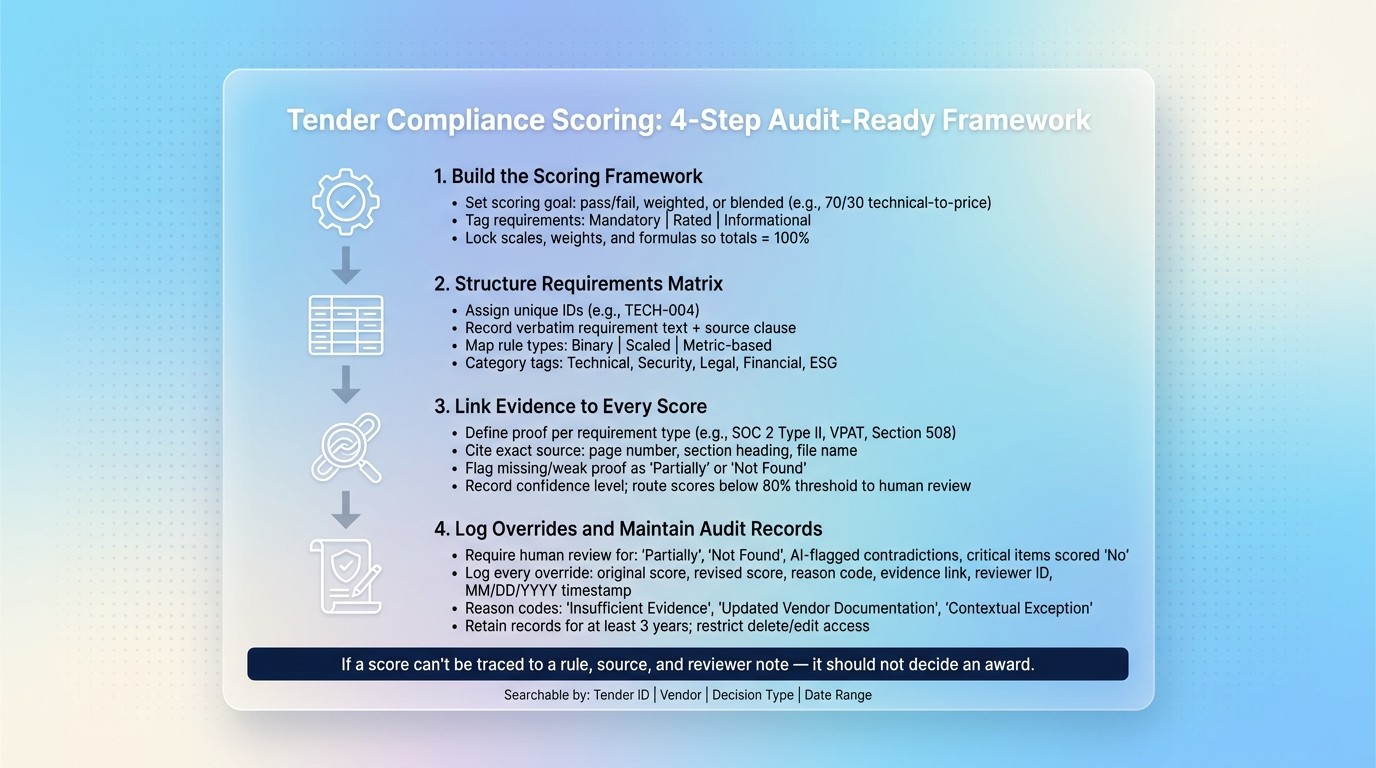
Tender Compliance Scoring: 4-Step Audit-Ready Framework
How to enable bid and tender processes with AI webinar part 1
Checklist 1: Build the compliance scoring framework
Set the scoring system before vendor responses come in. That means turning the goal into labels, scales, and formulas upfront. If you skip this, scores can drift from one reviewer to the next, and your audit trail can fall apart.
Separate pass/fail requirements from scored requirements
Keep mandatory requirements separate from rated criteria. If you blend them together, a vendor can fail a must-have requirement but still look strong because they scored well elsewhere. That’s a problem. They should have been disqualified right away.
Label every requirement before automation starts. Give each line item one of these three tags:
Mandatory - automatic disqualification. Example: "The solution must comply with GDPR data processing requirements." Write down the policy behind that label.
Rated - scored criterion used for ranking. Example: "Threat detection rules must be customizable," scored on a scale.
Informational - for reference only.
This labeling step creates the audit trail for disqualification decisions.
Standardize scales, weights, and score formulas
Once each requirement is labeled, turn it into a measurable rule. Every rated criterion needs three things written down: a scale, descriptive anchors, and a weight.
A scale on its own leaves too much room for judgment. That’s why written anchors matter. Use labels like Yes, Partially, No, or Not Found. They help reviewers score the same way, both across teams and over time.
Weights need to be set at both the category and item level, and the grand total must equal 100%. After that, add up each category and fix any gaps. You also need to document how technical compliance scores and pricing will be combined, so the formula is clear before anyone starts reviewing responses.
Pick one scoring model, then lock the scale, weights, and formula before scoring begins. Modern teams are also exploring AI supplier scoring to improve data hygiene and explainability.
Once the framework is fixed, map each requirement to a rule and source reference.
Checklist 2: Structure specifications and map requirements to rules
Turn tender documents into one compliance matrix so each requirement can be tracked during review and audit. This step brings everything into a single format that supports scoring now and evidence checks later. In plain terms, the matrix becomes the handoff point for rule mapping and evidence review.
Build a requirement matrix with source references
Each row in your compliance matrix should include:
a unique requirement ID such as TECH-004 or 2.2.3
the verbatim requirement text
the source clause or page reference
a category tag
a mandatory or rated status
a rule type
the scoring rule
Keep the requirement text exactly as written. If you paraphrase, you invite vendor assumptions and make scoring less consistent.
Each row should also link back to the original clause, page, or section. That way, reviewers work from evidence instead of memory.
Category tags like Technical, Security, Compliance, General, Legal, Financial, or ESG make it easier to send items to the right reviewers and keep results grouped by domain. Adding importance levels to each item also helps evaluators focus on what matters most, instead of treating every line the same.
Map each requirement to a measurable compliance rule
Once the matrix is built, assign a rule type to every row. The rule type tells the scoring engine how to judge the vendor response. Common options include binary (Yes / No / Partially / Not Found), scaled, and metric-based.
Define the expected response format for each rule so vendor answers are judged the same way every time. If a requirement is vague, tighten it into something measurable before you map it. Otherwise, scoring turns into guesswork.
Requirement Category | Rule Type | Typical Evaluation Metric |
|---|---|---|
Technical | Scaled / Metric-based | Throughput (Gbps), Capacity (events per second) |
Security / Compliance | Binary (Pass/Fail) | GDPR compliance, SOC 2 certification |
General / Legal | Binary (Pass/Fail) | Acceptance of terms, financial stability |
Financial | Metric / Scaled | Unit price, Total Cost of Ownership (TCO) |
Support / Maintenance | Scaled | Response time (hours), local availability |
ESG | Scaled | Carbon footprint |
Next, attach evidence and rationale to each rule so every score can be checked and backed up.
Checklist 3: Link evidence to every score and configure clear output
A compliance score means very little if no one can trace it back to proof. Once you’ve built your requirement matrix and mapped your rules, tie evidence to every single score. That’s what makes the result traceable, reviewable, and audit-ready. Use the requirement ID from the matrix to connect evidence to each score, then spell out what kind of proof counts for each requirement.
Define evidence types and citation rules
Set clear proof rules for each type of requirement. A security requirement should point to a SOC 2 Type II report or another audit report. An accessibility requirement needs a Voluntary Product Accessibility Template (VPAT) that documents Section 508 conformance. For other requirement categories, use the source type that best fits the claim.
Each score should point to a specific source: a page number, section heading, or named file. Vendor documentation by itself isn’t enough. SOC 2 Type II Report, Section 4.2, p. 18 is a valid source reference. Use the same citation format across all requirements so the output stays consistent and easy to check.
Your automation should also catch missing proof. If a score has no valid source reference, flag it. If the evidence is missing or falls below the set threshold, the output should show "Partially" or "Not Found". It should never pass quietly.
Record score rationale, confidence, and exceptions
After citations are set, document how AI scores compliance risks and how the final score was reached. Record the rule, threshold, result, confidence level, whether the score was system-generated or overridden, and any exception or assumption.
Use stronger proof for pass/fail decisions, and treat weaker proof as backup only:
Evidence Category | Reliability | Verification Difficulty | Scoring Relevance |
|---|---|---|---|
High | Low | Critical for pass/fail | |
Lab Test Reports / VPATs | High | Medium | High for technical compliance |
Technical Manuals / Data Sheets | Medium | Medium | High for feature matching |
Policy Attestations | Medium | Low | Medium (risk-based) |
Marketing Brochures / Videos | Low | High | Low (supporting only) |
If someone overrides a system-generated score, write down why. Don’t just swap in the new score and move on. That written rationale is what keeps the record ready for review later.
Checklist 4: Run reviews, log overrides, and maintain audit records
Once each score is tied to evidence, the next step is simple: send exceptions to a human reviewer and record every override.
Set review checkpoints and human validation rules
Human review should be required for any "Partially" or "Not Found" result, any score that falls below the confidence threshold, any AI-flagged contradiction, and any critical or high-importance requirement scored "No" or "Partially."
Set a confidence threshold - for example, 80% - and route anything below that mark to a reviewer instead of finalizing it.
Procright keeps evidence-backed scoring, source mapping, and reviewer actions in a single audit trail.
Log score changes and retention rules
Once those review rules are in place, log every override in a set format.
For each score change, record the original score, revised score, reason code, evidence link, reviewer ID, and MM/DD/YYYY timestamp.
Reason codes should stay consistent so the log is easy to search. Labels like "Insufficient Evidence," "Updated Vendor Documentation," and "Contextual Exception" give auditors clear filters to work with.
Your logs should also be searchable by:
Tender ID
Vendor
Decision type
Date range
Keep those records for at least three years, and limit delete and edit access.
Conclusion: Final checklist for transparent and auditable scoring
Clear data-driven procurement decisions rely on linked parts: objective, labels, weights, rules, evidence, rationale, review, and logs. Put those pieces together, and you get a score people can explain, repeat, and stand behind in an audit.
Use these controls as the final review before award:
Control Category | Must-Have Element | Purpose |
|---|---|---|
Evidence | Cited Source Links | Ties scores to specific pages, manuals, or videos |
Scoring | Importance Weighting | Makes sure critical requirements have more impact on the final ranking |
Rationale | Decision rationale | Records the why behind scores and human overrides |
Audit | Reviewer Logs | Tracks who reviewed what evidence and when |
Clarity | Standardized Labels | Prevents subjective interpretation of compliance |
The aim is simple: a score that reviewers and auditors can trace back to its source. Platforms like Procright help keep evidence-backed scoring, source mapping, and reviewer actions in one place, so teams don’t have to piece things back together later.
If a score can’t be traced, it isn’t ready for award. Build it once, apply it the same way each time, and your team can defend every evaluation years later.
FAQs
What is a compliance score in tender automation?
A compliance score in tender automation shows how closely a product or vendor matches each requirement in your procurement specification.
It uses AI to match products to spec lines and assign labels like Yes, Partially, No, or Not Found. Each score includes cited evidence from manuals, web pages, or product documents, which gives you a clear, audit-ready record. Procright handles this with verifiable data.
When should a score be sent for human review?
Send a score for human review when the system flags uncertainty or exceptions that call for judgment. This matters most in cases like:
partial compliance
missing or conflicting evidence
decisions that need a clear, auditable trail
Procright helps with this by citing the source behind each score and marking partial compliance as its own status. That way, reviewers can check the exact lines and supporting evidence before giving final approval.
What evidence is strong enough to support a tender score?
Strong evidence is direct, verifiable source material linked to a specific compliance claim. In plain English: you should be able to point to the exact proof and check it yourself.
The best sources are things like technical documentation, user manuals, official data sheets, verified web pages, or product demo recordings. Sales decks and marketing materials don’t carry the same weight because they often make claims without showing the proof behind them.
Procright leans into transparency by mapping scores line by line to each requirement and citing the exact document, video, or source used. That gives your team an audit-ready trail they can review in a clear, objective way.
Related Blog Posts
Try it on a real buy
Bring one category. Watch where the flags land.
We use a little analytics to see which pages actually help. Nothing else, no ad trackers.