How AI Adds Compliance Rules to Spec Templates
AI extracts and maps compliance rules from source docs, flags conflicts, and prepares auditable spec templates for human approval.
In this article
AI can do the prep work, but people still have to approve the rules.
I start with the right source documents
I tag each source with version, date, owner, scope, and jurisdiction
I use AI to pull out must/shall rules, numeric limits, and exceptions
I map each rule into the right spec field
I send unclear, missing, or conflicting items to human review
I lock the final template only after sign-off and version control
That’s the whole system.
In plain English: AI helps turn long standards, policy files, and contract language into short spec rules that a team can review. It can cut draft time, reduce missed clauses, and keep source links attached to each rule. But it should not make legal judgment calls or pick between conflicting clauses on its own.
A few points matter most:
Source control comes first. If I use the wrong PDF version, I can pull the wrong rule.
Traceability matters. Each rule needs a clear source line, page, or clause.
Numbers need care. Units, thresholds, and retention periods have to stay exact.
Human review is not optional. AI can flag gaps, but people clear them.
Final templates need an audit trail. Reviewer name, source, evidence, and version history should stay attached.
One line stood out to me: a spec should be tight enough that product matching happens against actual cited sources, not general opinions. That idea drives the whole process.
So if you want a short takeaway, here it is: use NLP to extract and sort compliance rules; use people to judge, approve, and lock the final template.
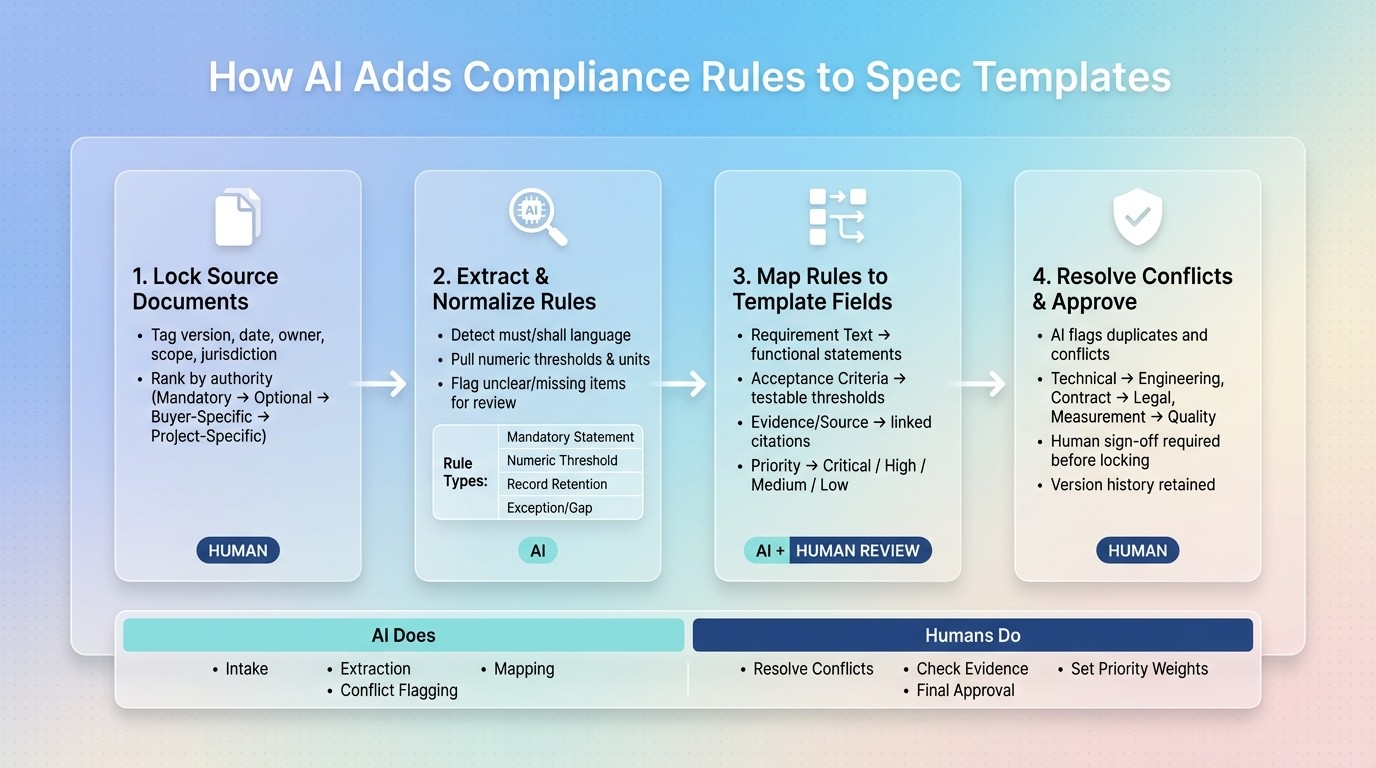
How AI Adds Compliance Rules to Spec Templates: 4-Step Workflow
How to use AI to create and audit compliant documentation
1. Start with source standards and required metadata
Before extraction starts, your team needs a clear view of every document that should shape the spec template. Pull together the standards, policies, SOW clauses, regulations, and buyer-specific requirements that will govern the template.
Define which documents feed the template
After you set the source list, classify each source as mandatory, optional, buyer-specific, or project-specific. Then rank them by authority before extraction starts. This gives the AI a clear pecking order, so it knows which rules are non-negotiable and which ones should be marked as conditional.
Do not write a technical procurement specification from a vendor datasheet. It creates a self-referential source that lets the vendor define the criteria.
Record source metadata before extraction begins
Record key metadata for each source before extraction. That way, every rule can be traced back to its source document. And that paper trail matters when a procurement decision has to be defended years later.
Metadata Field | Why It Matters |
|---|---|
Document title & version | Prevents rules from being pulled from outdated editions |
Effective date | Confirms the rule was active at the time of the spec |
Jurisdiction | Ensures regional regulations are applied correctly |
Document owner | Identifies who to contact if the source is disputed |
Applicability scope | Limits rules to the products or projects they actually cover |
Revision status | Flags documents still under review and likely to change |
Using the wrong PDF version of a standard can pull in outdated requirements or miss a recently added exception. Locking down the version before extraction starts prevents that problem.
With the source set locked and tagged, AI can move to rule extraction and normalization.
2. Extract and normalize compliance rules with AI
Once the source set is ready, AI pulls out binding language and turns it into short, structured line items. The point isn't to paste long paragraphs from a standard into a field. It's to turn dense regulatory text into clear, reviewable lines that a procurement team can use. AI can also turn fragmented PDFs into structured line items.
Detect mandatory statements, thresholds, and exceptions
AI scans source material for binding language such as must, shall, and required so it can separate hard obligations from descriptive text. It also pulls specific measurable values, such as performance capacities, physical tolerances, and retention periods. A rule like "The system must handle at least 50,000 EPS" is much easier to review than a paragraph that hides the same requirement in background text.
When AI pulls numeric thresholds, keep the unit exactly as written and standardize abbreviations in the template. Here's how different requirement types are handled during extraction:
Requirement Type | AI Action | Example Output |
|---|---|---|
Mandatory Statement | Detects "must/shall" language | "The solution must support GDPR and local data privacy." |
Numeric Threshold | Extracts values and units | "Handle at least 50,000 EPS." |
Record Retention | Identifies required proof | "Retain logs for 12 months." |
Exception/Gap | Routes to human review | "Missing load tolerance data." |
Each rule should keep its source citation and review status so reviewers can trace the evidence fast.
Those normalized rules then become the inputs for template mapping.
Flag unclear or incomplete language for review
Not every clause in a standard is clear. Some are incomplete. Others point to a second document that isn't in the source set. When that happens, send the item to human review instead of guessing.
Flagged items should stay out of the template until a human reviewer resolves them. If the AI can't determine a requirement or threshold, it should ask follow-up questions before the document is finalized.
Once the rules are normalized, map each one to the right template field.
3. Map extracted rules to the correct template fields
Once the rules are normalized, the next job is simple in theory and messy in practice: put each rule into the template field that will control sourcing and scoring. If one rule could land in more than one place, use the source priority set in Step 1 to decide. After that, run a duplicate and conflict check before sign-off.
Match each rule to requirement, evidence, or approval fields
Most rule types have an obvious place in the template. Functional requirements go in the technical requirements field. Measurable limits, such as minimum performance levels or retention periods, belong in acceptance criteria. Source material goes in evidence fields. AI can route many of these rules based on structure and wording.
Template Field | What Goes Here | Example |
|---|---|---|
Requirement Text | Mandatory functional statements | "The system must handle at least 50,000 EPS log collection capacity." |
Acceptance Criteria | Testable thresholds and limits | "Minimum 12-month log retention capacity." |
Evidence / Source | Linked documents, excerpts, or video timestamps | Link to a source PDF, page 12. |
Compliance Status | AI-assigned label after review | "Yes", "Partially", "No", or "Not Found" |
Priority / Importance | Weight assigned to the rule | Critical, High, Medium, or Low |
When a mapping is unclear, send it to human review instead of forcing it into the wrong field. If a rule fits more than one field, or doesn’t fit cleanly at all, flag it for manual review.
Keep source citation and priority with each rule
Every rule placed in the template should carry two things with it: where it came from and how important it is. The source citation should point to the exact document, clause, page, or video timestamp, not just the name of the standard. That level of detail matters because reviewers need to trace each rule back to a specific line.
"The output is a spec document tight enough that product matching can happen against real sources, with compliance scores tied to specific lines, not general impressions." - Procright
Keep that cited trail intact so reviewers can see why a rule was included. It also makes the duplicate check and final approval step much easier.
Priority matters during scoring too. Rules marked Critical should carry more weight than rules marked Low. That turns the template into a weighted decision tool, not just a checklist.
Next, check for duplicates and conflicts before locking the template. This ensures you can compare products for compliance efficiently once the spec is finalized.
4. Check for duplicates, resolve conflicts, and route for sign-off
Once the rules are mapped to the right fields, there’s one last pass before approval: make sure the template doesn’t carry duplicate requirements or conflicting instructions into sourcing. AI can spot the issues. People make the call.
Run a final check against both the template and the approved rule library. The AI reviews each rule for duplicate clauses, overlapping thresholds, and acceptance criteria that clash with each other. A simple example: two rules assign different retention periods to the same component.
When the AI finds a conflict, it should flag the issue and keep both versions visible for human review. It should not decide on its own which rule stays. If a conflicting rule gets overwritten without review, that’s how compliance gaps slip out of sight.
Send each issue to the right team:
Technical issues go to engineering
Contract issues go to legal
Measurement disputes go to quality
Every flagged item should stay open and visible until a human clears it.
Approve, lock, and track the final template version
After reviewers clear all flagged items, the template can move to final sign-off. Human reviewers confirm that the rules are accurate, complete, and right for the jurisdiction before release. Nothing gets locked before that human sign-off happens.
After approval, lock the template version and keep the version history. That record should include the reviewer, the evidence, and the source for each rule.
Procright supports this workflow by linking rules to source lines and keeping compliance scores tied to cited evidence.
Conclusion: Let AI prepare the rules, keep humans responsible for approval
The setup is simple: AI prepares the rules, and people approve them.
AI can take in source material, pull out rules, map those rules to template fields, and flag conflicts. But the final template still needs human approval.
AI cuts down the time spent on prep work. Still, the end result has to stand up in an audit. The decision also needs to hold up years later if someone comes back and asks, "Why was this rule approved?" That’s why every final rule should keep its source, supporting evidence, and approver attached to it, so the template stays auditable.
AI is good at the heavy lifting up front:
intake
extraction
mapping
conflict flagging
The judgment calls stay with your team. That includes resolving conflicts, checking evidence, setting priority weights, and giving final approval. That split isn’t accidental. It’s the guardrail that helps keep the template compliant and defensible.
Put simply, AI does the setup work. Humans make the call.
FAQs
How does AI decide which rules belong in each spec field?
AI figures out the right rules for each specification field by asking focused questions about the category and use case. That helps bring out technical details, load limits, and compliance standards that are easy to miss when teams move fast.
It then pairs those answers with past specifications to match the right standards to the right fields. The result is a spec that is more complete, with requirements that can be measured instead of left open to interpretation.
What happens when two source documents conflict?
When two source documents say different things, Procright flags that conflict during compliance scoring and mapping. Instead of forcing a simple pass/fail call, it marks the affected requirements as partial.
Each outcome is linked to the cited evidence behind the score, so reviewers can see what caused the issue and sort out the mismatch. Final sign-off still needs human review before the completed spec template is used.
What should human reviewers approve before a template is locked?
Before locking a specification template, human reviewers need to make sure the requirements are complete, technically accurate, and in line with organizational standards.
They should also check that AI filled in the main technical gaps, such as capacity requirements or security controls, and that the final document reflects stakeholder agreement. The goal is a document that’s audit-ready and clear enough for objective product matching and side-by-side vendor comparisons.
Related Blog Posts
Try it on a real buy
Bring one category. Watch where the flags land.
We use a little analytics to see which pages actually help. Nothing else, no ad trackers.