How AI Powers Real-Time Spend Analysis
AI classifies and cleans spend data, detects anomalies and duplicates, and triggers role-based alerts so teams stop bad spend before payment.
In this article
AI helps finance and procurement teams spot spend problems before money leaves the business. Instead of waiting for month-end reports, I can use AI to sort transactions, match supplier names, check contract rules, and flag odd activity as spend data comes in.
Here’s the short version:
AI classifies spend fast: ML and NLP sort purchases into categories with 95%–99% accuracy, vs. 60%–75% with manual work.
It cleans supplier data: AI matches name variants like “Acme Corp” and “ACME Corporation,” which can cut supplier counts by 15%–25%.
It flags problems early: Teams can catch duplicate invoices, off-contract purchases, and budget spikes during the buying cycle.
It can cut costs: Companies often save 6%–12% on annual procurement spend and reduce compliance issues by about 30%.
It depends on clean data: ERP, AP, P-card, expense, PO, invoice, supplier, and contract data all need to feed one governed pipeline.
It works best in phases: Start with data connections and supplier cleanup, then classification, then alerts, then forecasting.
What this means for you is simple: if your spend data updates daily or hourly, AI can turn it into data-driven procurement decisions your team can act on.
A few points matter most:
Connect spend data through APIs, not manual CSV files
Standardize supplier records, currency, dates, and units
Review low-confidence classifications each week
Set alerts with context, such as seasonality and approved exceptions
Show each team only the metrics and alerts tied to their job
I’d sum it up this way: real-time spend analysis is less about reporting and more about control. The value comes when AI findings move straight into approvals, AP checks, budget reviews, and supplier decisions.
Build a Reusable Spend Cube Agent - From Raw GL Data to Instant Spend Analysis | Spendflo

Build the Data Foundation for Real-Time Spend Analysis
Those AI features only work if your spend data is connected and standardized.
Real-time spend analysis runs on a data layer that's connected, clean, and governed. If spend visibility is weak, companies can still lose 1–3% of annual revenue to waste that could have been avoided.
Connect the Right Spend Data Sources
Pull your core spend sources into one pipeline. That usually includes ERP systems like SAP, Oracle, and NetSuite, along with eProcurement and P2P platforms, accounts payable records, expense management systems, corporate card (P-card) transaction feeds, purchase orders, supplier invoices, travel and expense reports, mileage reimbursements, supplier master data, and a contract repository.
The way you connect those systems makes a big difference. Manual CSV exports slow things down and create version-control headaches. A better option is bidirectional API integrations or real-time data pipelines that pull in transactions as they happen. In high-transaction settings, daily refresh is the floor. Hourly refresh is better if you want real-time visibility.
Standardize Data for AI Accuracy
Raw data from different systems almost never lines up cleanly on its own. One supplier might show up as "Acme Corp", "ACME Corporation", and "Acme Inc." in three places. AI can use entity matching across Tax IDs, addresses, and bank accounts to tie those records together. To cut down on false positives, set the system to require at least two matching identifiers before it auto-merges supplier records.
You also need to standardize currency, dates, numbers, and units across systems. Do the same for item descriptions and unit prices so AI models read transactions the same way across categories.
A Practical Data Governance Checklist
Governance doesn't have to turn into a giant project. Before you scale, nail down a few basics:
Map systems and owners - List every system that feeds spend data and assign a technical owner for data-flow integrity.
Define a unified spend taxonomy - Use a structured hierarchy such as UNSPSC and apply it the same way across business units.
Set refresh frequencies - Decide what "real-time" means for your company and document whether each source updates hourly or daily.
Establish data quality rules - Set required fields like Tax ID and GL code, then run regular validation reviews during the first 90 days of deployment.
Document unit of measure policies - Lock imperial or metric rules into your normalization logic by commodity type.
You don't need perfect classification on day one. 95–97% accuracy is usually enough to start getting value. From there, analysts can improve results by reviewing low-confidence classifications over time.
With that data layer in place, AI can classify spend, add context, and flag exceptions in real time.
How AI Classifies, Enriches, and Monitors Spend in Real Time
Once the data is clean, AI turns each transaction into a spend event that can be classified, enriched, and checked as it happens. It starts with automated classification.
Automate Spend Classification with Machine Learning and NLP
ML models look at supplier names, descriptions, cost centers, GL accounts, and amounts to assign categories in seconds. NLP handles supplier-name cleanup and free-text descriptions, so variations like "Acme Corp" and "Acme Ltd" can be tied to the same vendor. It also maps messy line-item text to the right category.
That matters because raw transaction data is often all over the place. One vendor might show up under three names, and line items can read like shorthand only one person understands. AI cuts through that mess fast.
AI can push classification accuracy to 95%–99% and cut analyst prep time from about 80% of hours to under 20%. Teams usually get better results when they review low-confidence classifications on a regular basis. That feedback helps the model improve over time.
Once spend is classified, AI adds the supplier, contract, and compliance context needed for decisions.
Enrich Transactions with Supplier, Contract, and Compliance Context
Classification tells you what the spend is. Enrichment tells you whether it lines up with contract terms, risk checks, and policy rules.
After a transaction is categorized, AI can layer in:
Payment terms
Contract references
Renewal windows
Supplier risk indicators
Benchmark pricing signals
Contract context is a big deal here. AI can cross-check each transaction against approved supplier lists and active contracts, then flag maverick spend - purchases made off-contract or with unapproved vendors - before payment goes out. On the compliance side, Procright can add structured specification data and transparent compliance scores to show whether a purchase meets defined standards.
With that context in place, teams aren't just looking at spend. They're looking at whether the spend should have happened that way in the first place.
Detect Anomalies, Duplicates, and Policy Violations Early
AI builds a baseline by supplier, category, and business unit, then flags outliers in real time. Duplicate detection compares new records with past entries using amount, vendor name, and invoice number to help stop overpayments. Organizations using AI-driven spend monitoring can reduce compliance violations by about 30% and cut recovery costs by half.
When an alert fires, the next step is simple: trace what caused it, compare pricing, and figure out whether you're seeing a one-off issue or a deeper pattern.
Turn AI Outputs into Dashboards, Alerts, and Decisions
When AI flags a transaction, the job isn't done. Someone still has to see it, understand it, and act on it fast.
That’s where dashboards and alerts come in. They move AI output to the right owner so it can become a real decision. Classification and enrichment give you clean, context-rich spend data. The next step is simpler, but harder in practice: make sure the right people see the right signals at the right time, and know what to do when something looks wrong.
Design Dashboards by Role and Business Goal
Build dashboards around the decision each person needs to make. One dashboard won’t work for every role.
A CFO wants to know if total spend is tracking against the quarterly budget. A category manager needs to spot supplier price variance. An operational buyer needs to know whether an approval is stuck. Same system, very different jobs.
The aim is to move dashboards beyond after-the-fact reporting and into live decision-making. That means showing committed spend (approved POs) next to actual spend (paid invoices), so teams can see their true remaining budget at any point in the month, not just at close.
Role | Primary KPIs | Alert Threshold | Action Owner |
|---|---|---|---|
CFO | Total spend vs. budget, forecasted month-end spend | >5% variance from quarterly budget | Finance Director |
CPO | Realized savings, supplier risk scores, contract utilization | Supplier risk score drop >20% | Strategic Sourcing Lead |
Category Manager | Price variance across suppliers, spend fragmentation, contract utilization | Price increase >3% for core SKUs | Category Manager |
Operational Buyer | Approval lag, maverick spend flags, PO-to-invoice match rate | Approval delay >48 hours | Procurement Ops |
Modern platforms also support natural-language search. So a finance analyst can ask, "Why did marketing overspend?" right inside Microsoft Teams or Outlook and get instant context.
Dashboards help people see the problem. Alerts push them to act.
Set Real-Time Alerts for Cost, Risk, and Compliance Events
If AI finds an exception, the system should send it into a workflow, not just record it somewhere no one checks.
Alerts only work when they include business context like seasonality, planned events, and approved exceptions. Without that context, teams get buried in noise and start ignoring the alerts that matter.
A smart place to start is an alert when a department reaches 80% of its monthly spend allocation, not 100%. That gives budget owners time to shift funds or pause non-essential purchases before the overrun is locked in.
Alert Condition | Responsible Team | Expected Response |
|---|---|---|
Category overrun | Budget Owner / Finance | Reallocate funds or pause non-essential POs |
Off-contract purchase | Procurement | Redirect buyer to preferred vendor or catalog |
Duplicate payment | Accounts Payable | Block payment before execution |
Supplier price spike | Category Manager | Initiate renegotiation or switch to alternate supplier |
Frequency anomaly | Internal Audit | Investigate for potential fraud or billing error |
Each alert should connect to a clear workflow. Take an off-contract purchase alert. It should show the preferred vendor or contract context right in the buyer's approval screen, so the buyer can act on the spot without leaving the workflow.
That link between detection and action is what turns spend monitoring into spend control.
How to Roll Out and Scale AI-Powered Spend Analysis
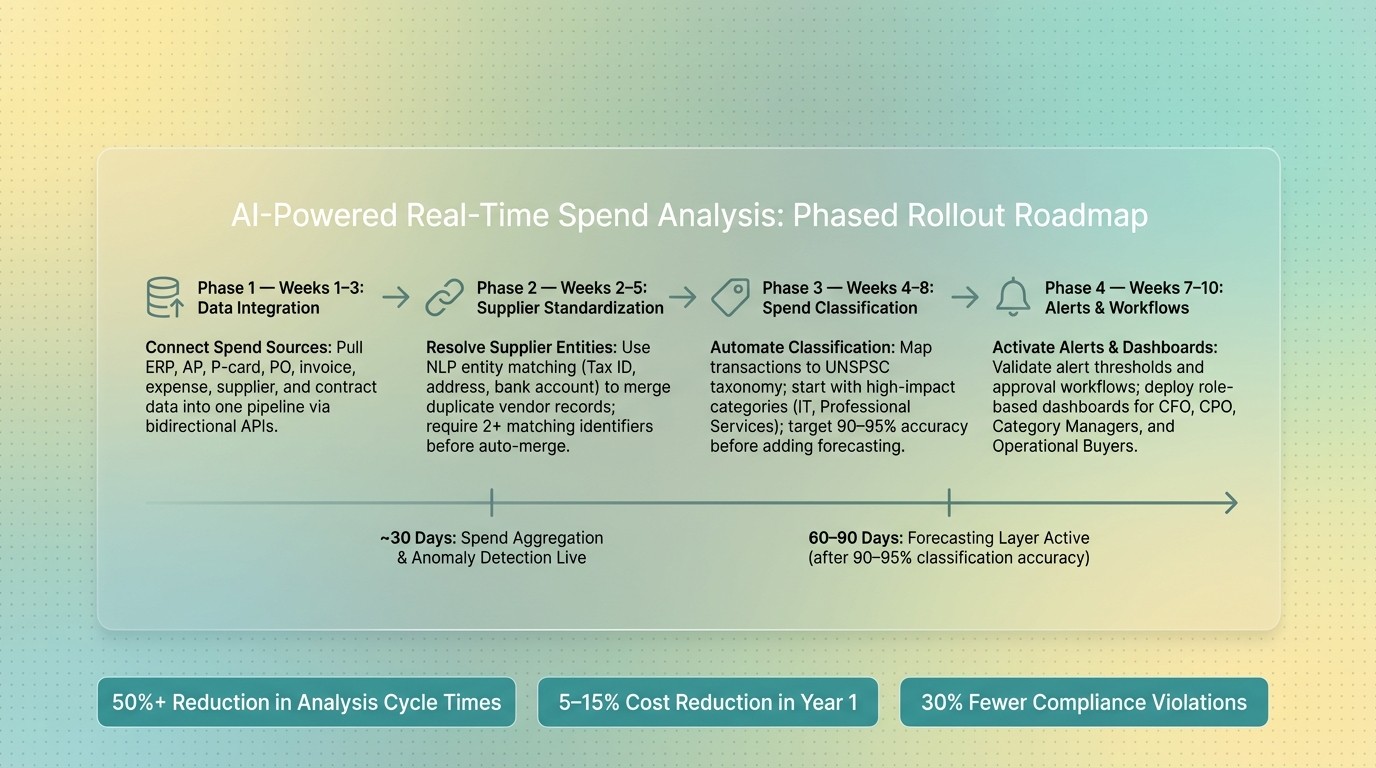
AI-Powered Real-Time Spend Analysis: Phased Rollout Roadmap
Follow a Phased Rollout Plan
Once your data, classification, and alert logic are set up, the next step is simple in theory but easy to mess up in practice: roll things out in phases. That lowers risk and gives teams time to trust what they’re seeing.
Start with data integration in weeks 1–3. Pull your main spend sources into one pipeline. Then, in weeks 2–5, run NLP-based supplier entity resolution so duplicate vendors get merged and records are standardized.
From weeks 4–8, map transactions to a category taxonomy like UNSPSC. It makes sense to begin with high-impact categories such as IT and Professional Services, then move into tail spend after that. By weeks 7–10, validate alert thresholds and approval workflows.
In most cases, spend aggregation and anomaly detection can go live in about 30 days. Forecasting usually comes later, around 60–90 days. There’s a good reason for that. Add forecasting only after classification passes 90–95% accuracy. If the classification layer is shaky, the forecasts will be shaky too, and trust can disappear fast.
Assign Ownership, Controls, and Change Management
When the pilot is stable, lock in permanent ownership before you expand.
After launch, somebody has to keep classification quality from slipping and make sure the pipeline stays clean. A clear split of ownership helps:
Procurement owns the category taxonomy and reviews low-confidence classifications from the alerting queue each week.
Finance owns budget alignment and cash flow metrics.
IT owns data pipeline integrity and ERP integration.
That weekly classification review matters a lot. It’s a big part of getting to 97%+ accuracy over time. Put it on the calendar, assign a person to it, and track whether it happens.
The tougher change isn’t technical. It’s how people work day to day. Teams need to move from monthly review cycles to real-time intervention, with AI signals feeding into the approval flows they already use.
Training should center on that shift. Show teams how AI-generated alerts connect to current approval workflows, so acting on an insight doesn’t mean jumping into a new system or changing their whole routine.
Conclusion: Key Steps to Real-Time Spend Intelligence
The move from manual batch reporting to real-time spend intelligence follows a pretty clear order. First, build a clean and connected data base. Next, automate classification and enrichment. Then surface signals through role-based dashboards and alerts. After that, scale with governance and clear ownership. Each step rests on the one before it.
Real-time spend intelligence depends on clean data, accurate classification, clear ownership, and action driven by alerts.
Organizations that use a structured rollout often see a 50%+ reduction in analysis cycle times and 5–15% cost reductions within the first year. That value shows up when teams act on AI signals fast - before spend decisions are finalized, not after.
FAQs
How much clean data do we need to start?
You don't need perfect data to get started. Autonomous spend analysis systems can work with the data you already have, so there's no need for a separate, heavy data-cleaning project first.
They pull data from sources like ERP systems, contracts, and invoices, then automatically correct, flag, and normalize inconsistencies. As time goes on, the system learns from past corrections and applies those patterns to new transactions, which helps improve accuracy over time.
What should we automate first in real-time spend analysis?
Start with automated data intake and classification. Always-on pipelines from ERP and P2P systems cut reporting lag and reduce manual reconciliation. At the same time, machine learning can sort transactions and flag anomalies as they happen.
Procright also helps teams make decisions earlier. It supports the work of building complete specifications, finding suitable products, and checking vendor compliance before any commitments are made.
How do teams avoid false alerts?
Teams can cut down on false alerts by using systems that compare odd activity with existing contracts, purchase orders, and approval chains. If there's a valid reason behind the activity, the alert can close on its own.
It also helps to keep a steady feedback loop in place. When people mark an alert as true or false, the model starts to learn what "normal" looks like inside that organization. Over time, that means less noise and better alert accuracy.
Related Blog Posts
Try it on a real buy
Bring one category. Watch where the flags land.
We use a little analytics to see which pages actually help. Nothing else, no ad trackers.