How AI Simplifies Supplier Cost-Benefit Analysis
AI-standardized supplier scoring that reveals total landed cost, quality, lead time, and risk—speeding procurement reviews from days to hours.
In this article
The lowest quote is often the wrong choice. I look at supplier decisions through total cost, not unit price, because freight, defects, delays, duties, and payment terms can erase what looked like a $800 savings.
Here’s the simple version: AI helps me pull supplier data from ERPs, spreadsheets, and portals, clean it up, standardize it, and score each supplier against the same rules. That makes it easier to compare price, quality, lead time, compliance, and risk in one view. In many teams, that can cut review time from days to hours.
If I want this to work, I need to do four things first:
Set the scoring criteria before running the model
Clean and standardize supplier data before ingestion
Measure total landed cost, not just quoted price
Review AI output with a human check before awarding the business
A good supplier review usually includes:
Quoted price
Total landed cost
Lead time in business days
Defect or return rate
Compliance pass/fail
Final weighted score
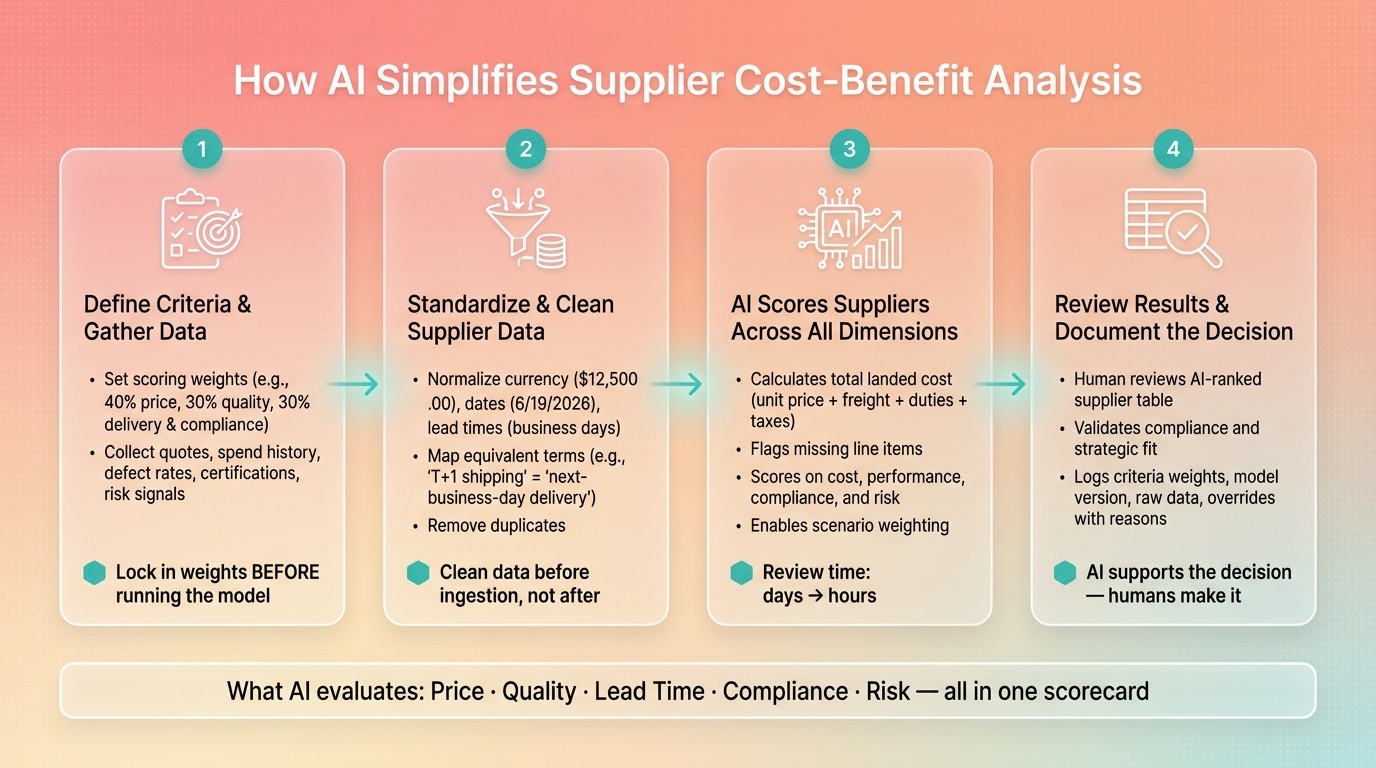
AI-Powered Supplier Cost-Benefit Analysis: 4-Step Workflow
ChatGPT for Supplier Analysis - Analyze Performance and Pricing with AI Insight
Quick Comparison
What I compare | What price-only review misses | What AI helps me see |
|---|---|---|
Unit price | Hidden freight, duties, taxes | All-in landed cost |
Delivery | Long lead times, weak fill rates | Delay risk and inventory impact |
Quality | Defects, returns, warranty cost | Quality-related cost drag |
Compliance | Missing certifications or terms gaps | Pass/fail issues and quote gaps |
Supplier risk | Financial or supply risk | AI tools for supplier risk assessment consolidate risk flags into one scorecard |
Bottom line: AI does the cleanup, conversions, scoring, and gap checks. I still make the final call, but I do it with a clearer side-by-side view and a written reason I can defend.
Step 1: Define Supplier Decision Criteria and Gather the Right Data
Once your data is clean, decide what AI should score. This is the step where you build the scoring model AI will use to judge supplier value. Start with the criteria, then pull in the inputs.
Choose the Factors That Affect Total Supplier Value
First, pin down the category, the business goal, and what stakeholders care about most. Unit price matters, but it’s only the starting point. To get a better read on supplier value, group your criteria by value driver:
Cost: Total landed cost, including freight, duties, and taxes, plus payment terms and rebate structures
Performance: Lead time in business days, order fill rate, defect and return rates, and SLA adherence
Compliance and risk: Compliance status and supply disruption risk
Price should have a smaller weight than many teams give it. Quality, risk, and service should do more of the heavy lifting. Before you run any analysis, assign a weight to each factor. For example, you might use 30% quality, 40% price, and 30% split between delivery and compliance. Your team decides the weights. AI uses them.
After the scoring model is locked in, gather the same inputs for every supplier.
Collect and Standardize Supplier Data Before Running the Analysis
For each supplier, collect supplier quotes, spend history, purchase volumes, delivery performance, defect and return rates, contract terms, certifications, and risk signals.
Then standardize the format and naming before analysis. Every input should follow standard U.S. business formats: currency as $12,500.00, dates as 6/19/2026, and lead times in business days. Clean up duplicate entries and inconsistent supplier names in your ERP before ingestion, not after.
Once the criteria and data are standardized, AI can compare hundreds of vendors across cost, performance, and compliance.
Step 2: Use AI to Compare Direct Costs, Hidden Costs, and Tradeoffs
Once your criteria are weighted and your data is standardized, AI can rank suppliers on the same basis. That means you can move from a pile of quotes to a clear view of what each option actually costs.
How AI Scores Suppliers Across Cost, Performance, and Compliance
AI looks past the quoted unit price. It ranks suppliers by normalizing freight, tariffs, taxes, and warehouse handling into one landed cost figure. It also converts currencies and units of measure so every bid is judged on the same basis.
It also accounts for costs that don’t always show up right away. That includes lead-time variability, admin workload, payment terms, and possible penalties. On top of that, AI flags compliance and risk exposure, such as financial instability, poor labor practices, or missing ESG certifications.
One of the most useful features here is missing-line-item detection. If one supplier leaves freight out of a quote while another includes it, AI flags the gap automatically. That’s the kind of detail that can slip past a manual spreadsheet review. If a vendor leaves out required line items from your RFQ, AI brings that to the surface before you award the contract.
Procright supports this step by combining specification analysis with clear compliance scoring, so every supplier is measured against the same baseline before the ranking is produced.
Once AI scores the bids, the next move is to look at the tradeoffs behind those scores.
How AI Surfaces Tradeoffs That Affect the Final Decision
AI makes tradeoffs easier to see. A lower unit price may look good at first glance, but it can be offset by weaker delivery performance, quality issues, or compliance risk. AI puts those tradeoffs in plain view before the decision is made.
It also lets you test different weighting scenarios without rebuilding the model from scratch. If your team wants to put more weight on delivery speed or compliance, you can run that scenario fast and see how the ranking shifts. That gives you a final decision you can defend with a straight face.
Use the ranked results to build the comparison table in Step 3.
Step 3: Review Results Using a Clear Supplier Comparison Table
Using the same weights and standardized inputs from Steps 1 and 2, show the results in a simple table. This is the reporting stage of the AI-driven evaluation process, not a new analysis step.
Build a Supplier Scoring Table for Decision Review
A good scoring table puts each shortlisted supplier on its own row, so the gaps are easy to spot. The columns should focus on the metrics that drive the decision: quoted price, total landed cost, lead time, defect rate, compliance status, risk level, and overall score. Simple color-coding can help flag outliers fast. This visibility is essential when using predictive analytics for supplier risk management to identify potential disruptions before they occur.
Supplier | Quoted Price (USD) | Total Landed Cost | Lead Time (Business Days) | Defect Rate | Compliance Status | Risk Level | Overall Score |
|---|---|---|---|---|---|---|---|
Supplier A | $10,000 | $11,200 | 5 | 0.5% | Pass | Low | 92/100 |
Supplier B | $9,200 | $11,800 | 12 | 2.1% | Pass | Medium | 78/100 |
Supplier C | $11,500 | $12,100 | 3 | 0.2% | Pass | Low | 88/100 |
Supplier B has the lowest quoted price, but freight, handling, weaker quality, and higher risk drag down its score. Add a two-sentence AI summary that explains the top supplier’s main strengths and the key tradeoff. That plain-English rationale helps turn a score into something a manager can approve.
Supplier A ranks first because it pairs a low all-in cost with strong quality, low risk, and a short 5-day lead time. The main tradeoff is that Supplier C ships faster and has a lower defect rate, but its higher landed cost keeps it behind Supplier A.
Break Out Direct Costs from Hidden Costs When the Purchase Is Complex
If the contract is large or the supply chain has a lot of moving parts, add a second table that separates visible costs from the ones that tend to hide in the background.
Cost Category | Supplier A | Supplier B | Supplier C |
|---|---|---|---|
Direct (Visible) Costs | $10,000 | $9,200 | $11,500 |
Hidden Costs: Logistics and Duties | $1,200 | $2,600 | $600 |
Hidden Costs: Rework and Warranty | - | - | - |
All-in Cost | $11,200 | $11,800 | $12,100 |
This breakdown makes it much easier to explain to Finance or a VP why the lowest-bid supplier is not the recommended choice. Instead of leaning on instinct, you can point to a clear line item: Supplier B’s $2,600 in hidden logistics costs wipe out its $800 price edge. Procright's compare products for compliance and transparent scoring can help keep the breakdown easy to audit.
Use these tables to document the award rationale and hand off to final validation. Next, validate the top-ranked supplier against any final business or compliance checks.
Conclusion: Validate AI Recommendations and Document the Final Choice
The workflow has four steps: define criteria, standardize data, score suppliers, and review the results. But that setup only holds up if a person reviews the final score.
Think of the scoring table as the starting point, not the finish line. Before making an award, the procurement team should confirm that the top-ranked supplier clears any business or compliance checks that didn't make it into the automated scoring. AI can help with extraction, matching, and side-by-side comparison, but people still need to judge strategic fit and supplier relationship factors.
Just as important, document the final decision so the same process can be repeated and audited. At a minimum, record:
the criteria weights used
the AI model version
the raw data analyzed
any manual score adjustments made
Every override should also be logged with the reason behind it. That audit trail helps with internal reviews and SOX compliance for material purchases.
AI should support the decision, not make it. The aim is a faster decision with stronger support - one that people can explain and defend.
FAQs
How does AI calculate total landed cost?
AI calculates total landed cost by combining direct product pricing with logistics and operating costs. It looks past the quoted unit price and adds in freight, tariffs, taxes, and warehouse handling fees.
It also factors in inventory risk, such as lead-time swings, safety stock needs, and possible production disruptions. That gives procurement teams a clearer view of the full financial impact.
What supplier data should I prepare first?
Start by pulling data into one place from your ERP system, invoices, purchase orders, and contracts. Begin with supplier profiles: company name, location, years in business, and active certifications.
Next, bring in pricing and performance data. That includes unit costs, volume discounts, payment terms, on-time delivery rates, lead times, and defect rates. Put this information into structured tables or CSV files so the AI can read it more accurately.
Why is human review still needed?
AI can automate data extraction, normalization, and early risk screening. That saves time and cuts a lot of manual work.
But final decisions still need human review.
Procurement teams do the part AI can’t handle on its own. They read messy, complex situations, set weighting models and approval thresholds, manage supplier relationships, and make sure each decision fits the company’s bigger goals.
Related Blog Posts
Try it on a real buy
Bring one category. Watch where the flags land.
We use a little analytics to see which pages actually help. Nothing else, no ad trackers.