K-12 Procurement Workflow Checklist for AI
Map procurement steps, lock required fields, set AI review rules, and record privacy/compliance checks before automating K-12 purchases.
In this article
Most K-12 purchasing delays start before vendor review. If I want AI to help without creating audit or privacy problems, I need to map the current process first, set firm review rules, lock down required fields, and tie every AI step to policy, privacy checks, and a dated record.
Here’s the article in plain terms:
I start by mapping each step from request to payment
I list systems, files, and outside sources staff use
I assign roles, approval limits, and record owners
I set rules for what AI can draft, flag, and score
I standardize requisition and contract fields
I sort purchases by spend category so the right checks apply
I keep logs for AI outputs, reviews, overrides, and retention
I train requesters, approvers, IT, finance, and audit staff
I track cycle time, override rate, and off-contract spend
A few numbers stand out: major purchases can take about 16 weeks, research and drafting procurement specifications can take 30 staff days, quote gathering can take up to 6 weeks, and off-contract buying can account for about 1.8% of annual purchase value. The point of AI here is not to replace staff judgment. It is to cut manual work while keeping a clear record of who reviewed what, when, and why.
Use this checklist as a simple way to connect workflow steps, human review, compliance rules, and audit records before AI goes live.
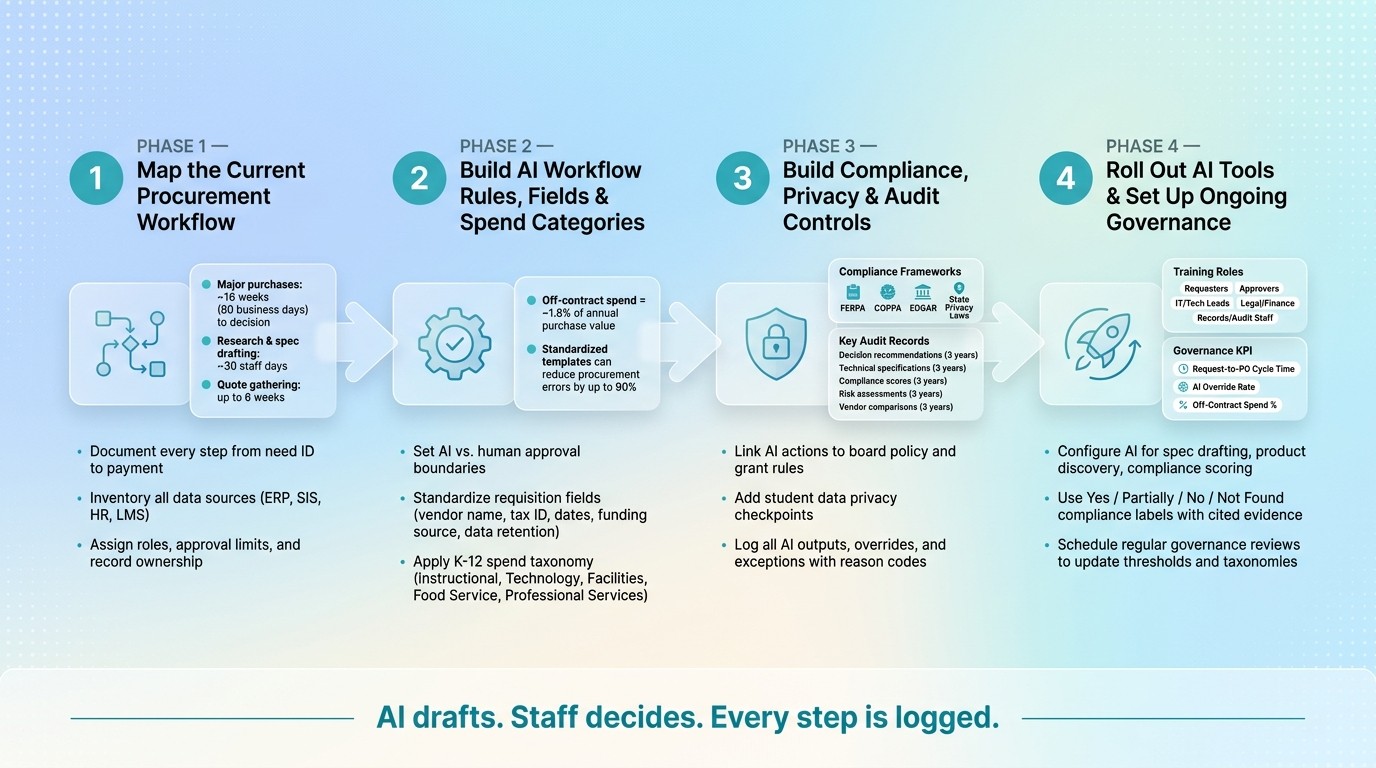
K-12 AI Procurement Workflow: 4-Step Checklist for Compliance & Audit Readiness
1. Map the Current Procurement Workflow Before Adding AI
Before you set up any AI tool, first get a plain, accurate view of how purchasing works in your district right now. Follow the workflow from requirements definition to supplier discovery, comparison, approval, and payment. Then note how long the full cycle takes. Major purchases can take about 16 weeks, or roughly 80 business days, to reach a decision.
This step is more than process mapping for its own sake. It gives you the control layer for automation. Once the workflow is visible, you can mark the points where AI can help draft content, extract data, compare options, or flag missing information.
Document Each Step From Need Identification to Payment
Map every step, handoff, and approval threshold from need identification through payment. That means looking at who starts the request, who reviews it, who compares vendors, and who signs off at each stage.
Some of the slowest parts are still manual. Research, comparison, and spec drafting can take about 30 staff days. Quote gathering can take up to 6 weeks.
A common problem shows up early: teams often reuse old templates instead of writing to current requirements. That usually leads to incomplete specs, which then leads to more back-and-forth later. One simple way to spot this is to count clarification emails per requisition. If that number is high, the specs are probably weak.
Inventory Data Sources and System Connections
List every system and source that touches the process. On the internal side, that often includes:
The ERP or financial system for spend management and purchase orders
The SIS
HR systems
LMS platforms
You also need to log the outside material staff use to define and verify requirements. That can include vendor datasheets, web pages, PDFs, product manuals, and videos.
The point is to find where people are entering the same information more than once. If staff are re-keying data from one system into another, that's a clear friction point. Shared spreadsheets, email threads, and supplier portals deserve close attention too, since they often become the places where duplicate entry and missing records pile up.
Assign Staff Roles, Approval Limits, and Record Ownership
Map who owns each step and which record each person or team is expected to keep. In many districts, procurement handles pricing, compliance, and supplier risk. Technical specifications, on the other hand, often sit with IT, curriculum, or other subject-matter staff.
That split matters. If a spec doesn't match technical standards, approvals can stall for months. So don't just note the task itself. Document exactly where those handoffs happen.
You should also record approval thresholds for each role and keep one connected file that ties together the define, source, compare, and document steps. That's what helps the record hold up in an audit years later.
Role | Typical Responsibility | Record Ownership |
|---|---|---|
Curriculum / IT / Subject-matter staff | Draft and validate specifications | Specification document |
Procurement / Purchasing | Supplier discovery, comparison, compliance checks | Vendor evidence and recommendation |
Business office | Invoice and payment processing | Invoice and payment records |
Superintendent / Board | Final approval and audit record | Approval log |
Use this workflow map to set AI routing, required fields, and compliance checks.
2. Build AI Workflow Rules, Required Fields, and Spend Categories
A workflow map is only the starting point. The next step is to turn that map into clear rules: what AI can draft, what it must flag, and what staff alone can approve. Those rules should power routing, field validation, and category checks.
Set Approval Routing Rules and Human Review Boundaries
AI can draft specifications, surface products, and compare claims, while staff make the final decision. That split matters. It keeps the process moving without handing final judgment to software.
Approval routing should pause and send the request to a person when AI finds missing technical requirements, conflicts in vendor data, or compliance gaps during the spec stage. Funding source should also shape routing, because grant-funded purchases and general fund purchases may follow different approval paths and federal fund checks.
Workflow Step | AI Role | Human Role | Threshold / Trigger |
|---|---|---|---|
Specification drafting | Identifies the purchase category; flags missing requirements; suggests technical details | Reviews and approves the final spec document | All new requisitions |
Product discovery | Ranks candidates based on market adoption, support coverage, and vendor stability | Selects the final shortlist for evaluation | Purchases > $100,000 |
Compliance comparison | Maps vendor answers to spec lines; flags contradictions and missing data | Verifies cited evidence (PDFs, videos, manuals) for critical items | High-risk categories (e.g., student data privacy) |
Decision defense | Generates a one-page recommendation with a cited record of evidence | Final sign-off; defends the choice during future audits | Major capital or technology investments |
Off-contract buying - purchases made outside negotiated contracts or approved vendor lists - typically consumes about 1.8% of annual purchase value. That may sound small, but across a district budget, it adds up fast. AI can flag those purchases automatically, but only when routing rules are set in advance.
Once routing is set, the next job is to lock down the fields AI must read before it touches a request.
Standardize Contract and Requisition Fields for AI Processing
AI can only route, validate, and audit what it can read. If fields are missing, fuzzy, or formatted three different ways, the process falls apart before it gets anywhere.
Each requisition and contract should include:
Vendor legal name
Tax ID
Start and end dates in mm/dd/yyyy format
Total and annual value in USD
Funding source
Data retention and deletion terms
State and district data privacy requirements
Role-based access controls
Technical capacity limits such as user counts or storage
For technology purchases, those fields help AI rank products against the district's stated capacity needs.
If a required field is blank, inconsistent, or too vague to judge, AI should stop routing and flag the issue. No guessing. No filling in the blanks. Using standardized, AI-readable templates can reduce procurement errors by as much as 90%.
Use a K-12 Spend Taxonomy to Classify Products and Services
A standard spend taxonomy helps AI apply the right checks to the right purchases. Without one, a software license and a cafeteria supply order can end up moving through the same path, which is how mistakes slip in.
Group purchases into clear categories and connect each one to its likely data sources and compliance checks:
Category | Typical Data Sources | AI Compliance Checks |
|---|---|---|
Instructional materials | LMS, Curriculum Dept. | Accessibility (WCAG), content alignment, licensing terms |
Technology / software | IT inventory, SIS | FERPA/COPPA, data deletion terms, SSO compatibility |
Facilities & operations | ERP, Maintenance Logs | Safety standards, local support availability, warranty terms |
Food service | Nutrition systems | USDA grant rule compliance, health certifications |
Professional services | Business Office, past RFPs | Deliverables validation, vendor reliability |
Inside each category, assign importance levels to spec items so AI knows what carries the most weight for your district. For example, a student data privacy checkpoint should be marked as critical for software purchases.
Then tie each category to its required checks and one cited review record. That gives AI a clear path for compliance controls and audit logs, instead of making it treat every request like it's the same kind of buy.
3. Build Compliance, Privacy, and Audit Controls Into the Workflow
Once your routing rules are set, the next job is to build compliance checks into every automated step. Each AI action should connect to a policy before anyone uses it. That means tying each step to board policy, state purchasing rules, grant terms, and budget limits.
Put simply: define where AI can act on its own, and where a staff member needs to step in.
Link AI Actions to Procurement Policies and Grant Rules
Build risk criteria into the specification before the RFP goes out, not after you've picked a vendor.
For grant-funded purchases, route requests by funding source and check them against the grant terms. AI can flag a requisition for extra review when it involves a restricted funding source, but only when the required fields are complete.
The workflow should also cross-check every requisition against its assigned policy basis. If something doesn't match, the system should stop it or send it up for review before the request moves forward.
Add Privacy and Student Data Checkpoints
Any purchase tied to student data, software, or vendor access to sensitive records should go to IT, legal, or the privacy officer based on spend category and role-based access controls.
That review needs to confirm that the vendor's data-processing terms, access controls, and retention rules match district policy and local privacy rules. Every privacy recommendation should include source-linked evidence.
Each checkpoint should also be recorded in the decision log.
Define Audit Logs, Retention Periods, and Override Records
Every AI-touched decision needs a cited record. That includes AI-generated specifications, item-by-item compliance scores, risk flags, vendor comparisons, final decision recommendations, and any human override with the reason it happened.
The record should show:
who reviewed the item
what evidence they used
how exceptions were handled
Label each requirement or product feature as Yes, Partially, No, or Not Found so reviewers can see exactly where a recommendation came from.
For the records below, keep the core audit trail for three years.
Record Type | Captured Data Points | Retention Period |
|---|---|---|
Decision recommendation | One-page summary, cited evidence, stakeholder review log | 3 years |
Technical specifications | AI-generated requirements, merged documents, gap analysis | 3 years |
Compliance scores | Item-by-item rankings, source citations (PDF, video, web) | 3 years |
Risk assessment | Failure modes, performance guarantees, penalty triggers | 3 years |
Vendor comparison | Market adoption, partner activity, financial health scores | 3 years |
If a staff member overrides an AI recommendation or skips a routing step, the workflow should log the reason and attach it to the decision record. Procright can capture source evidence and item-by-item compliance scores directly in the workflow.
Use those records to track performance and update governance.
4. Roll Out AI Tools and Set Up Ongoing Governance
With routing rules, privacy checkpoints, and audit logs already in place, the next step is simple: set up AI to follow those rules from day one.
Configure AI for Specification Drafting, Product Discovery, and Compliance Checks
Start at the spec stage. That’s where things often go off the rails. If requirements are thin or vague, quotes come back incomplete and scoring gets messy fast. AI can help here by acting like a procurement assistant. It can point out missing technical details, flag absent compliance standards, and tighten the draft before discovery starts. In some cases, industry-specific templates can cut procurement errors by as much as 90%.
Once the spec is in good shape, AI can move into product discovery. It can review web pages, PDFs, and videos, then match product features against each requirement line. From there, it can rank options based on factors like market adoption, regional support, and vendor stability.
The compliance review needs to stay detailed. Instead of one rolled-up score, the system should return requirement-level labels:
Yes
Partially
No
Not Found
Each label should include cited evidence tied to the source material for that specific requirement. That way, reviewers can see why a product passed, fell short, or lacked proof. Procright supports specification creation, product discovery, and compliance verification with transparent, source-linked scoring built for documented K-12 workflows.
Each output should also stay tied to the workflow rules and spend category assigned earlier. That keeps the process clean and stops AI from drifting outside the guardrails.
Train Requesters, Approvers, IT, and Business Office Staff
Not everyone uses AI outputs the same way. A requester doesn’t need the same training as someone in finance or records. So the training should match the job, not just the tool.
Role | Training Focus |
|---|---|
Requesters | Answer AI prompts; use approved templates |
Approvers | Review compliance labels and cited evidence |
IT / Tech Leads | Review product fit and technical gaps |
Legal / Finance | Convert risks into contract terms; track off-workflow spend |
Records / Audit Staff | Review the recommendation record and cited evidence |
People should also know how to open the source document behind each claim. That part matters. If someone disagrees with an AI recommendation, they need a documented way to review it, explain the issue, and override it when needed.
Use the same labels and the same evidence sources across every role. When everyone reviews the same way, decisions are easier to defend and a lot less chaotic.
Track Cycle Time, Exception Rates, and Governance Reviews
After go-live, four signals show whether the workflow is doing its job: request-to-PO cycle time, exception rates where AI recommendations were overridden, the share of spend routed through AI-supported workflows, and off-workflow spend.
Those metrics show more than speed. They show whether people trust the system, whether spend is staying inside the process, and whether human review is still catching edge cases.
Governance reviews should happen on a set schedule. Use them to adjust approval thresholds and category taxonomies as market conditions shift and new laws come into play. As Ricardo Martinez, Partner, California Strategies LLC, put it:
"Procurement leaders are going to want to know where the time is saved, what decisions the system is making, what data it uses, where human review stays in place and how the organization avoids creating new risk while trying to move faster."
That’s why fixed reviews matter. Thresholds, category taxonomies, and exception logs should all be checked on a regular cadence.
Conclusion: A Practical K-12 AI Procurement Checklist
Once the rules, controls, and training are set, the next job is simple: make the workflow measurable and easy to audit. Start with the process itself. Map the current workflow, clean the data, define approval limits, and add compliance checks before automation goes live.
Draw a clear line between AI tasks and staff-only decisions. AI can handle drafting, discovery, scoring, and logging. Final contract sign-off, FERPA/COPPA review, and vendor selection should stay with authorized district staff.
Just as important, keep controls, evidence, and audit trails visible in every request, approval, and vendor decision. That way, nothing lives in a black box. Once roles are locked in, track what the workflow is doing after launch, including:
Request-to-PO cycle time
Override rate
Off-contract spend
Each label, source, and review decision should connect to a document, reviewer, and date. That paper trail is what makes a decision defensible during an audit later on.
FAQs
Where should a district start with AI procurement?
Districts should start at the specification stage, before they speak with any vendor. That’s where many purchasing problems begin. If the spec is vague or incomplete, trouble tends to show up later in the process.
With Procright, districts can spell out their exact needs, spot missing requirements, close technical gaps, and line up their documents with the right standards. The result is a clear, measurable technical spec that makes the process more objective, transparent, and easier to defend in a future audit.
Which purchases need privacy and compliance review?
Privacy and compliance review matters most for high-stakes or complex technology purchases - things like software platforms, security systems, and any purchase that involves data processing.
If a product has privacy or security needs, such as GDPR alignment or role-based access control, it should be checked before anyone makes a commitment. Procright can help automate that review by scoring products against documented requirements and flagging compliance gaps.
What records should we keep for AI-supported decisions?
Keep a complete, traceable record for every purchase so your decisions stand up to internal and external audits.
That record should include the finalized technical specifications, line-by-line compliance scores, the original source materials used for each match, stakeholder reviews, and clear documentation showing why certain products were selected over others.
With Procright, you can keep all of this in one consolidated, audit-ready record.
Related Blog Posts
Try it on a real buy
Bring one category. Watch where the flags land.
We use a little analytics to see which pages actually help. Nothing else, no ad trackers.