AI in Procurement: Benefits of Template-Based Comparisons
Template-based AI cuts quote review from days to minutes, boosts accuracy, enforces compliance, and creates audit trails.
In this article
AI template-based comparisons cut quote review time, lower data-entry mistakes, and make supplier choices easier to explain. If I boil the research down, the main point is simple: procurement teams spend most of their effort moving quote data around, not judging suppliers. AI helps by pulling data into one format, checking bids against the same rules, and leaving a clear record of what changed and why.
Here’s the short version:
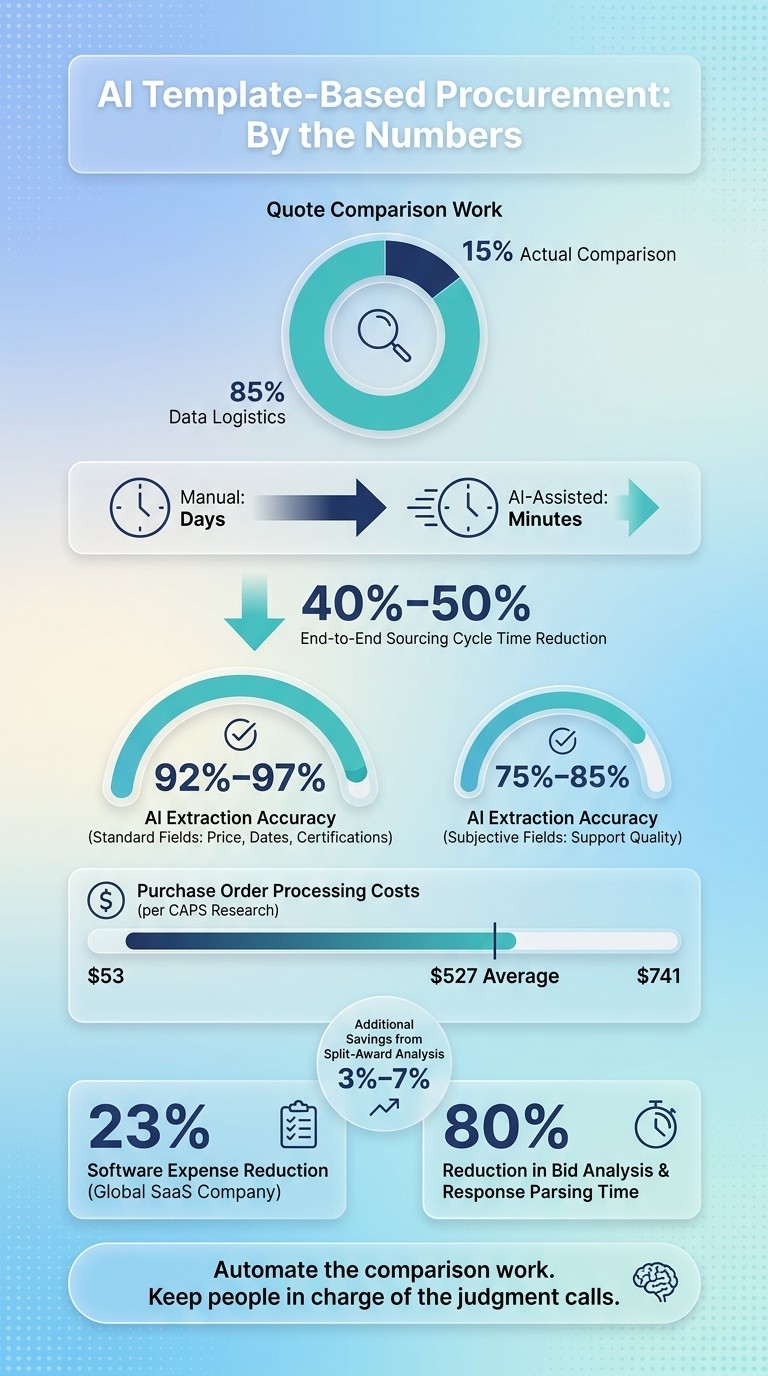
About 85% of quote comparison work goes to data prep, not decision-making.
AI can move review work from days to minutes for many quote checks.
End-to-end sourcing cycle time can drop by 40% to 50%.
AI extraction hits 92% to 97% accuracy on standard fields like price, dates, and certifications.
Human review still matters most for gray areas like item matching, support quality, and final supplier choice.
The best results come from fixed templates, clear scoring rules, and review steps set in advance.
What this means for you: if supplier quotes come in PDFs, spreadsheets, and emails, a template-based AI process can turn that mess into a side-by-side review with pricing, compliance, and scope gaps lined up in one place.
Quick comparison:
Area | Manual review | AI template-based review |
|---|---|---|
Data prep | Heavy copy/paste work | Auto-extraction and normalization |
Review speed | Often takes days | Often takes minutes for first-pass checks |
Accuracy | More typing errors | 92%–97% on standard fields |
Compliance checks | Done case by case | Same rules applied across bids |
Audit trail | Split across files and email | Time-stamped record in one workflow |
Best use | Final judgment and exception review | Repetitive comparison work |
I’d sum it up this way: automate the comparison work, keep people in charge of the judgment calls.
AI vs. Manual Procurement: Key Stats & Time Savings
9 Procurement Activities AI Agents Will Replace (And What's Left)
Research Base: Sources, Definitions, and Evaluation Method
The findings in this article come from benchmark data from The Hackett Group, APQC, and CAPS Research, plus strategy analysis from Bain & Company. The focus stays on sources with quantitative procurement results. In plain English, that means the studies had to show measurable outcomes like labor hours saved, shorter cycle times, or direct cost gains. Financial impact is measured using a standard U.S. fully loaded procurement labor cost of $85.00 per hour.
One point shows up again and again in the research: the gap between "typical" organizations and top performers. That matters because it gives you a realistic range instead of a best-case sales pitch. For instance, CAPS Research reported purchase order processing costs from $53.00 to $741.00, with an average of $527.00. A range like that gives a stronger read on performance than a single headline number.
Key Terms Used in the Studies
If the terms shift from one study to another, the numbers can get messy fast. Here's how the main concepts are used in the research:
Term | How It's Used in the Research |
|---|---|
Attribute Normalization | Converting mismatched units or formats into one comparison basis |
Sourcing Cycle Time | Total elapsed time from issuing an RFQ/RFP to the final award decision |
Scoring and documenting whether a bid meets required criteria | |
Extraction Gap | The time and labor required to move supplier data into a comparison table |
Total Cost of Ownership (TCO) | Bid price plus fully loaded procurement labor costs and rework from transcription errors |
Transcription Error | A typo or transposed digit during manual data entry (e.g., $4.20 entered as $4.02) |
Note: "cycle time" does not always mean the same thing from one study to the next. Some sources measure only the drafting phase. Others track the full evaluation period through award. So when figures are compared across sources, it helps to check what the clock is actually measuring.
How to Read the Evidence
The studies used here fall into three broad groups: benchmark surveys, before-and-after process studies, and case evidence. Each one does a different job.
Benchmark surveys show where most organizations tend to land on cost and time.
Before-and-after studies make cause and effect easier to see, but they don't always carry cleanly across teams or industries.
Case evidence can show striking results, though one company's outcome may not map neatly to a different sector or procurement volume.
Once the terms line up, the evidence becomes much easier to compare. And because the methods vary, this article uses ranges instead of single-point figures. That keeps the analysis grounded as the measured benefits come next.
What the Research Shows: Measured Benefits of Template-Based Comparisons
The research points to three clear gains: faster evaluations, stronger compliance, and lower total cost.
Shorter Cycle Times and Less Manual Analysis
"The comparison logic accounts for roughly 15% of the total task time. The remaining 85% is data logistics."
That split says a lot. Only about 15% of the work comes from actual comparison and decision-making. The other 85% comes from wrangling data.
That’s where AI helps most. Many of the best AI procurement tools focus on this specific data extraction challenge. It pulls data from supplier PDFs, spreadsheets, and emails, then structures it so teams can work with it. It can also match items by meaning, so different descriptions still line up correctly. For example, it can tell that "500GB SSD" and "SSD-500-SATA" refer to the same item. That gives buyers a clean, data-driven supplier comparison without manual mapping.
When common-format conversion is automated too, including currency and unit conversions, evaluation cycles can shrink from days to minutes. The time savings come from standard inputs and automated checks, which the next section covers.
Better Decision Quality, Compliance, and Risk Control
AI-based checks help teams catch problems early. Missing-item and missing-cost checks flag excluded costs before they become change orders. Templates can also include policy checks, such as data residency rules or minimum uptime thresholds, and mark responses that clash with those standards.
Accuracy is strongest on structured fields. AI extraction reaches 92% to 97% accuracy on standard fields like price, timeline, and certifications. More subjective areas, such as support quality, score lower at 75% to 85%, which is why human review still matters.
Automated workflows also log bid revisions and normalization steps in a time-stamped audit trail. That record supports compliance review, including government procurement compliance under FAR Part 6 and Part 13.
Cost Savings and Total Cost Improvements
Manual evaluations often lean on unit price because full cost comparison takes too much time without automation. AI changes that. It makes total cost of ownership analysis more doable by bringing hidden cost drivers to the surface, like escalators, auto-renewal clauses, missing liability caps, and other risk factors that can shift the true cost of a purchase.
One global SaaS company cut software expenses by 23% after adopting AI-based supplier analysis.
The same pattern shows up across the main metrics:
Metric | Traditional Process | AI Template-Based Process |
|---|---|---|
Task Time | Days of manual data entry and alignment | Minutes via automated extraction and analysis |
End-to-End Cycle Time | Slowed by reformatting and drafting | Reduced by 40% to 50% |
Data Accuracy | High risk of manual transcription errors | 92% to 97% accuracy on standard fields |
Decision Basis | Unit-price only | Total Cost of Ownership (TCO) and checks for missing items and costs |
Audit Trail | Fragmented spreadsheets and emails | Centralized, time-stamped digital record |
The next section explains how standardized templates and AI scoring produce these results.
How AI and Templates Produce These Results
Those gains come from two things: structured templates that make supplier bids easy to compare, and AI that does the heavy lifting on extraction, normalization, and scoring.
Standardized Specifications Enable Like-for-Like Evaluations
When every supplier fills out the same template, you start from a level playing field. Each fixed field collects the same requirements and commercial terms in a repeatable format. That cuts down on ambiguity and manual mistakes. AI then handles the messy part by spotting equivalent descriptions across different supplier responses, even when vendors use different wording. It also converts units and currencies into one reporting basis.
AI also checks each bid against the original requirements and flags missing line items. That matters because some bids look cheaper at first glance only because they leave out key cost items. Once the inputs follow the same format, AI can score and compare responses in a consistent way.
AI Scoring and Compliance Checks Make Decisions Easier to Defend
Heatmaps make price outliers stand out fast. AI can also run split-award analysis to test whether dividing the award across multiple vendors creates better value than choosing just one supplier. In many cases, that adds 3% to 7% in savings.
Policy rules can be built right into the workflow too. For example, if you require data residency or certain uptime guarantees, any vendor response that conflicts with those rules gets flagged automatically. Procright supports specification creation, product comparison, compliance scoring, and time-stamped audit logs. Every normalization step and scoring decision is recorded, which makes the process easier to defend with finance, legal, or auditors.
These gains depend on clean source data and clear rules, which is where the main implementation limits show up.
Implementation Limits and Conclusion
Data Quality, Adoption, and Governance Constraints
These results only hold up when the input data is clean, the scoring rules are clear, and the review steps are set ahead of time.
The most common place things fall apart is data quality. If source documents aren't consistent, the template stops being a dependable like-for-like comparison. Extraction accuracy can top 90% for clean, printed quote tables, but it drops on low-resolution scans or merged cells. That sounds minor until you look at the math: even a 0.2% transcription error rate across 1,500 line items can lead to three pricing errors, which is enough to shift the supplier recommendation. A simple fix helps here: use dual validation to check the math and catch extraction mistakes before they move downstream.
Another big risk is treating unlike products as if they're the same. AI can match different product grades as though they were equivalent . That's where trouble starts. Keeping extraction separate from item alignment, then requiring human review of item mappings, cuts that risk down.
Aspect | Documented Advantage | Limitation or Risk | Mitigation |
|---|---|---|---|
Data Extraction | Replaces hours of manual typing with seconds of AI processing | Accuracy drops on low-res scans or merged cells | Use high-resolution scans; add dual-validation checks |
Item Alignment | Semantic matching links different descriptions of the same item | False equivalency errors occur if different product grades are misidentified as the same | Separate extraction from item matching; review mappings manually |
Scope Review | AI can scan entire documents, including footnotes, for exclusions | Hidden costs in fine print can be missed | Flag missing line items and blank cells automatically |
Governance | Digital audit trails record every change and decision rationale | A polished spreadsheet can hide undocumented judgment calls | Capture user attribution and timestamps for every change |
Put simply, the operating rule is this: automate comparison, not final judgment.
Conclusion: Core Findings Procurement Leaders Should Keep in Mind
The main takeaway is straightforward: template-based AI comparisons work best when they standardize data and keep people in control of exceptions. Research shows that bid analysis and response parsing time can drop by 80%. But AI still struggles with strategic context, non-standard pricing formats, and supplier discovery in unfamiliar categories . As Sandeep Karangula, Co-Founder of MoleculeOne.ai, put it:
"AI in sourcing today is brilliant at the parts of the job most sourcing leaders find boring, and useless at the parts that earned them their seats. The key is knowing which tasks AI can automate and which require human judgment."
The best path is to start narrow, measure results against a baseline, and build human review into equivalency decisions and commercial terms. Teams that work this way can get most of the speed gains while steering clear of the confidently wrong errors that damage trust in the process. Template-based comparisons can improve procurement outcomes by standardizing inputs, speeding evaluation, and making decisions easier to defend.
FAQs
How do fixed templates improve quote comparisons?
Fixed templates make quote comparisons much easier because procurement teams can review every vendor response against the same set of requirements. That kind of structure cuts down on confusion and helps teams spot gaps fast.
They also give AI a clean way to map vendor data into one consistent, side-by-side view. So instead of comparing messy formats, teams get a clear apples-to-apples comparison. Procright supports this with industry-specific templates, transparent compliance scores, and item-by-item analysis.
What procurement tasks still need human review?
AI can automate data extraction, normalization, and structural comparisons. That takes a lot of the manual grind out of the process.
But for high-stakes work, human review still matters. Procurement teams need to check that AI-mapped matches and line items line up correctly across suppliers.
People also bring the business context AI can't fully handle on its own. They apply internal policies, risk limits, and project goals, then make the final call using weighted scores and professional judgment so the chosen option fits the job.
How can teams use AI comparisons safely?
Teams should put auditability first and follow a clear, structured process.
Use platforms with direct citations. That way, every extracted value points back to the source document and exact page, so someone can check it by hand if needed. It’s simple: if you can’t trace a data point to its source, you’re working on shaky ground.
Skip general-purpose AI tools that don’t provide citation chains or audit trails. They may be fine for rough drafting, but they’re a poor fit for document review where accuracy and traceability matter.
Before you upload anything, set clear criteria for what you want to extract. Use one unified comparison set across all documents so you’re not comparing apples to oranges. On top of that, make sure the platform has strong security controls, including zero-data retention and AES-256 encryption.
Related Blog Posts
Try it on a real buy
Bring one category. Watch where the flags land.
We use a little analytics to see which pages actually help. Nothing else, no ad trackers.