Checklist for AI Procurement Forecasting Success
Treat AI forecasting as a business program: set KPIs, clean data, run a pilot, govern overrides, and scale only after measurable results.
In this article
AI forecasting works when I treat it like a business program, not a software test. The article’s core message is simple: I need to set clear KPIs first, clean and govern data, test the platform in a pilot, build review rules into day-to-day buying, and track results on a fixed schedule.
If I do that, I can tie forecast work to outcomes that matter in the U.S. business context, such as lower forecast error, less excess inventory, fewer stockouts, and more working capital freed within 6–18 months. The article also points to concrete ranges, including 20%–50% lower forecast error, up to 65% fewer stockouts, and warning signs like MAPE above 25%, critical-field fill rates under 85%, or scaling before adoption is stable.
Here’s the article in one short list:
Start with the baseline: MAPE/WAPE, stockouts, excess inventory, expedited freight, planner time
Pick a small set of goals: tie them to dollars and finance metrics
Fix the data first: 3–5 years of SKU history, supplier and inventory cleanup, update owners
Prove the system in a pilot: 12 weeks, side-by-side with the current process, pass/fail rules set in advance
Set review and approval rules: define owners, override logging, and when humans must step in
Track results after launch: weekly data checks, monthly KPI reviews, quarterly drift and ROI reviews
Scale only after stability: at least 3 months of steady results, 70%+ adoption, and 80%+ recommendation acceptance
What I like about this piece is that it does not treat AI as magic. It says the gains come from clean inputs, clear ownership, audit trails, and steady follow-through. That’s the part most teams miss.
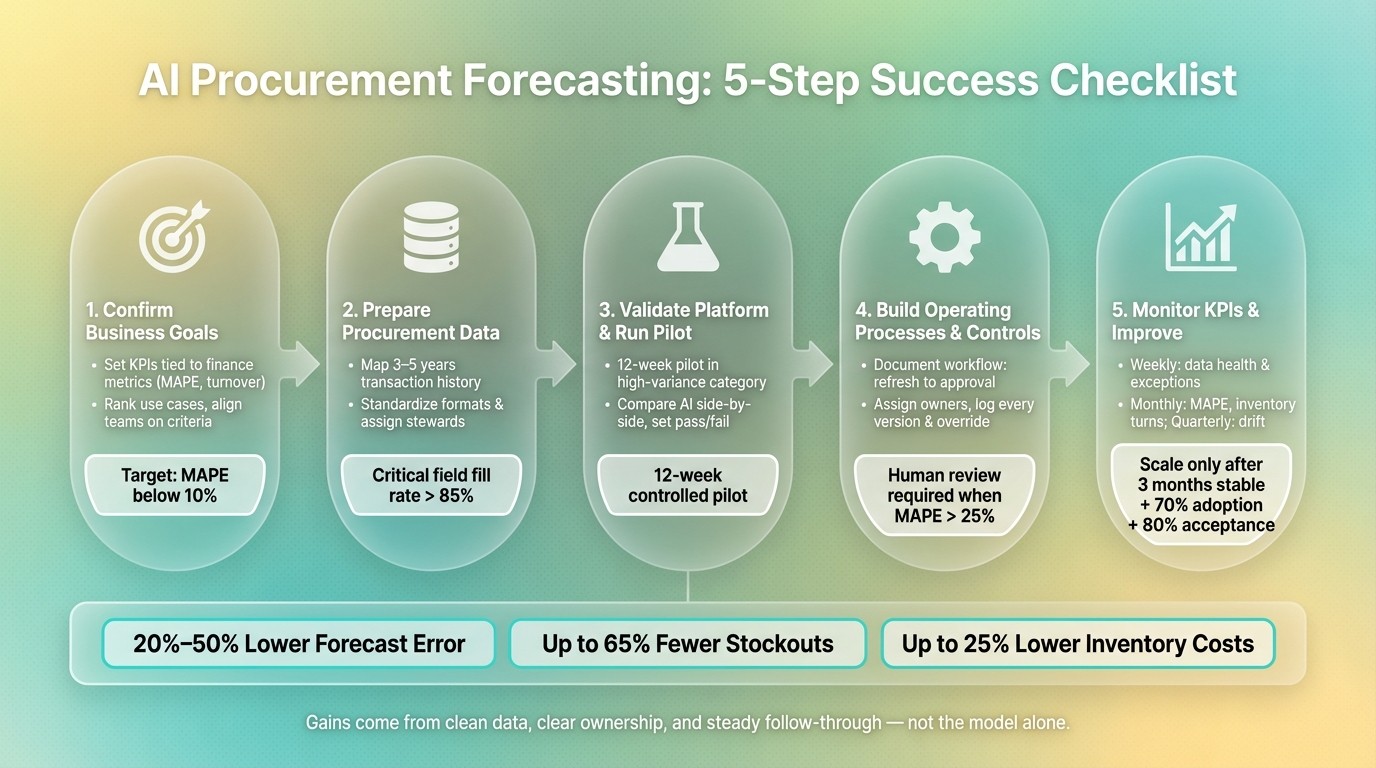
AI Procurement Forecasting: 5-Step Success Checklist
AI Literacy for Supply Chain Professionals: Lead Time Prediction Explained
1. Confirm Business Goals and Forecasting Use Cases
Before you look at platforms or test a model, get clear on the procurement problem AI forecasting needs to solve. If the goal is fuzzy, the system may optimize the wrong metric. That’s how teams end up with a model that looks good on paper but misses the business need.
Set Goals Tied to Procurement and Finance Metrics
Tie each goal to a metric Finance already uses. Good first-wave KPIs include forecast accuracy (MAPE/WAPE), inventory turnover, and stockout rates. For the first 12 months, keep the focus tight. Pick two or three KPIs, then define each one in dollar terms so the impact is easy to track.
KPI | Target Outcome |
|---|---|
Forecast Accuracy (MAPE) | MAPE below 10% |
Inventory Costs | Up to 25% reduction through optimized planning |
Fill Rate | Up to 65% reduction in stockouts |
This step matters more than it may seem. A target like “better forecasting” is too vague. A target like MAPE below 10% or up to 25% lower inventory costs gives the team something concrete to work toward.
Rank Forecasting Use Cases by Category and Risk
Use those goals to choose the first pilot. Score each use case based on business impact and sector benchmarks, data readiness, implementation effort, and time to value. In plain English: start with the case that hurts the most, has usable data, and won’t take forever to launch.
High-priority starting points are often high-volatility categories with dependable historical data. That can include high-variance SKUs, indirect spend such as MRO, facilities, and logistics, or tail spend under $50,000.
Use Case | Primary Business Impact | Required Data Sources |
|---|---|---|
Demand Forecasting | Reduced stockouts; lower holding costs | ERP sales history, CRM, weather, macro indicators |
Lead-Time Forecasting | Improved fill rates; steadier production | Supplier portals, logistics events, historical lead times |
Price Forecasting | Tighter cost control; negotiation leverage | Commodity feeds, labor indices, freight benchmarks |
Capacity Planning | Aligned production and purchasing | Sales forecasts, production plans, real-time demand signals |
Start where the data is already in place and the business pain is easiest to see. That usually gives you a cleaner pilot and a better shot at early wins.
Document U.S. Operating Limits and Success Criteria
Every model has to work inside day-to-day business limits. Write down constraints like budget caps, warehouse capacity, and approval timelines, along with any regulatory or audit rules. Then set time-bound targets across a 6-, 12-, or 18-month horizon so procurement, finance, IT, and operations are working toward the same result.
It also helps to name an executive sponsor who can clear cross-functional roadblocks. Finance, IT, procurement, and operations should agree on the success criteria before you move into data prep or platform review. Once the goals and limits are clear, the next step is to map the data needed to support them.
2. Prepare Procurement Data for Reliable Forecasts
Once the use case is clear, the next job is cleaning the data behind it. In practice, most AI forecasting work happens here, not in model setup. If the source data is messy, the forecast will be too.
Identify and Connect the Right Data Sources
Start by mapping every source the model needs: 3–5 years of SKU-level transaction history, ERP data for open POs, inventory, and lead times, plus AP invoices and spend ledgers. If you have less than two years of history, you may miss a full seasonal cycle. That can skew the model fast. You should also flag stockout periods so zero sales don't get read as zero demand.
It also helps to bring in outside signals. Commodity prices, weather patterns, and market trend signals give the model a way to react to shifts beyond your internal records.
Data Category | Key Fields to Map | Verification Method |
|---|---|---|
Transactional | PO Number, Item ID, Unit Cost, Quantity | 3-Way Match (PO/Receipt/Invoice) |
Supplier Master | Supplier ID, Parent Entity, Lead Time | Entity Matching |
Inventory | Stock Levels, Safety Stock, Stockout Flags | Real-time ERP Sync |
Contractual | Renewal Dates, Liability Caps, Pricing Tiers | OCR & Clause Extraction |
External | Commodity Prices, Weather, Macro Indices | API Data Pipeline Validation |
After that, standardize everything through multi-source product data aggregation before training starts.
Standardize Formats, Units, and Data Quality Rules
Use one format across the dataset. Convert all costs to U.S. dollars ($), format dates as MM/DD/YYYY, and record time zones for multi-region data. For units, pick one base measure. For example, convert cases or pallets into each or lbs so every record is being compared on the same basis.
Supplier data needs cleanup too. Build one master supplier file that ties every name variation back to one approved legal entity name. This step matters more than many teams expect. A common ERP extract has 15%–30% empty fields in critical columns, so put validation rules in place before data reaches the model. Reject records with future dates, negative amounts, or missing item IDs. Aim for a field fill rate above 85% across all critical columns.
Assign Data Governance, Security, and Update Ownership
Before the pilot begins, assign a named data steward for each main data area: supplier master, quote history, product attributes, and inventory records. Then define refresh timing for each source, such as daily ERP syncs or weekly supplier portal pulls, and document how master-data changes are approved and logged.
"High-quality, well-governed data is the single biggest differentiator in ROI on AI initiatives."
Use named data stewards, role-based access, and lineage tracking so the pipeline stays auditable.
3. Validate the AI Forecasting Platform and Pilot Approach
With clean, governed data in place, the next step is to test the platform in a controlled pilot before any broader rollout.
Check Forecasting Fit, Integration, and Transparency
Once your data foundation is stable, make sure the platform can actually use that data without manual fixes or awkward workarounds.
Not every AI procurement tool is a good match for forecasting. The system needs to handle nonlinear demand, heavy seasonality, supplier lead-time swings, and forecasting at the SKU and location level.
Integration matters just as much. Check that the platform has an API-first architecture that fits your ERP setup and can connect with supplier portals without manual exports. It also needs to handle thousands of SKUs across multiple regions without slowing down or breaking under load.
You should also require XAI, permanent change logs, timestamped overrides, SOC 2, data residency alignment, and role-based access. If a planner sees a forecast jump by 20%, they shouldn't be left guessing. They need to see why it happened and who touched the forecast afterward.
Requirement | Questions to Ask | Evidence Needed |
|---|---|---|
Forecasting Fit | Does the model support nonlinear demand and seasonality? | Back-testing results on historical high-volatility SKUs |
Lead-Time Modeling | Can the system ingest supplier performance and logistics delays? | Integration logs showing real-time supplier portal data feeds |
Integration | Does the platform offer native APIs for our ERP? | API documentation and successful data mapping from the pilot |
Transparency | How does the system explain a 20% jump in forecasted demand? | Screenshot of the XAI dashboard for a specific SKU |
Auditability | Is there a permanent log of who changed a forecast and why? | Exported audit trail report showing timestamped user overrides |
U.S. Compliance | Does the platform meet SOC 2 or relevant data residency standards? | Validated security certification and encryption documentation |
Run a Structured Pilot with Clear Acceptance Criteria
After you confirm platform fit, prove performance in a controlled pilot before scaling.
Run a 12-week pilot across one full planning cycle in a high-variance category. Keep the AI forecasts running in parallel with your current method, and use a control group so you can compare results against manual or statistical forecasting.
Evaluate the pilot across five areas:
Forecast accuracy (MAPE/WAPE)
Forecast bias
Override rate
Integration reliability
Planner usability
Set pass/fail thresholds before launch for accuracy, bias, override rate, integration reliability, and planner usability. That part matters. If you wait until the end to decide what “good” looks like, the pilot can turn into a Rorschach test where everyone sees what they want to see.
Also check whether the forecast leads to actual buying decisions. A better number on a dashboard is nice, but procurement teams need to act on it.
If planners spend more time adjusting forecasts than using them, that's a clear sign to go back and review data quality, model configuration, or pilot scope before moving any further.
Connect Forecasting Decisions to Procurement Execution
Forecasts only matter when they lead to the right sourcing actions and compliant item selection. Once the forecast is ready to use, connect it to sourcing, specifications, and compliance checks.
4. Build Operating Processes, Roles, and Controls
Once the pilot shows the model works, the next step is to weave it into daily procurement work. A forecast without a clear action path is just a number.
Map the Workflow from Data Refresh to Purchase Action
Write down the full sequence from data refresh to purchase order approval as part of a procurement workflow automation checklist. If that path isn't documented, AI signals can get ignored, delayed, or handled differently from one person to the next.
A solid workflow usually looks like this: data refresh from ERP, CRM, and supplier portals → model run → exception flagging → planner review → approval → sourcing or replenishment action. Give each step one owner and one trigger. That simple setup turns forecast output into a repeatable buying process.
It also helps to move from monthly reconciliation to weekly exception reviews. Let the AI deal with routine adjustments, and keep human attention on anomalies and high-stakes calls. Then push approved forecasts into procurement workflows by updating reorder points, triggering RPA, or alerting category managers.
Assign Roles and Set Human Review Thresholds
Before go-live, set ownership with a role matrix. A practical split looks like this:
Role | Responsibility |
|---|---|
IT | ERP integration, API stability, security, model hosting |
Procurement / Category Management | Lead-time validation, supplier decisions, high-value order approvals |
Finance / Controlling | Reconciling AI forecasts with budgets and financial plans |
Data / Analytics | Data quality, model performance monitoring, retraining triggers |
Then define clear thresholds for when a buyer can act on an AI recommendation without review and when escalation is needed. Human review should be required for high-value or strategic items, long-term contracts, spend thresholds, or cases where MAPE exceeds 25%. Every override should be logged with the reason behind it.
Add Controls for Auditability, Bias, and Risk
Three controls can't be skipped. Log every forecast version, approval, and override inside the procurement workflow. If you don't, you lose the ability to audit decisions or trace how a forecast turned into action.
Bias and data quality problems often show up when feeds are incomplete or inconsistent. Put validation rules and outlier detection in place so bad data gets rejected before it reaches the model. It also helps to run periodic bias checks on the output.
The table below shows how control levels change across forecasting approaches. That makes it easier to decide where automation fits and where human oversight still matters most.
Approach | Human Role | Auditability | Best Use Case |
|---|---|---|---|
Manual-Only | Data entry and calculation | Low - hard to trace decisions | Stable, low-volume, unique purchases |
Hybrid (AI + Human) | Exception handling and strategy | High - override logs create a clear trail | Volatile, high-value, or strategic categories |
Fully Automated | Governance and guardrail setting | System-driven - requires strict thresholds | Routine replenishment, low-risk tail spend |
For most procurement teams, the hybrid approach gives you the best balance of oversight and speed, while keeping people accountable for consequential decisions. Full automation works better as a narrow exception for routine replenishment and low-risk tail spend.
With workflow, roles, and controls in place, the program is ready for KPI tracking and retraining.
5. Monitor KPIs and Improve the Forecasting Program
Track the Right Metrics on a Fixed Cadence
Once your workflow and controls are set, the job shifts from setup to follow-through. Compare post-launch results against your baseline, and review them on a fixed schedule instead of waiting for problems to pile up.
Weekly, keep your eye on data health and day-to-day signals. That includes pipeline freshness, exception reviews, and how often planners accept AI recommendations versus override them. Monthly, move to performance: forecast accuracy using MAPE/WAPE, forecast bias, inventory turns, stockout rates, and emergency purchases or expedited freight rates, all measured against the baseline. Use the 10% and 25% MAPE thresholds as clear points for review.
A simple rhythm works well here:
Weekly: fix data issues and workflow friction using AI tools for data validation
Monthly: review forecast performance and operating impact
Quarterly: assess model fit, budget impact, and business return
Quarterly, step back and look at the bigger picture: model drift, retraining needs, total working capital impact, and ROI tied to the original business goals.
Also, don't settle for topline averages. Track results by SKU, category, and region. A clean company-wide average can still hide local stockouts or too much inventory sitting in the wrong place.
Watch for Drift, Retrain Models, and Expand Carefully
Models don't stay accurate by themselves. Demand changes. Suppliers change. New products show up. Over time, performance slips.
That's why automated alerts matter. If results fall below your set threshold, the team should know right away instead of finding out at the next calendar review. When retraining is triggered, run the new model in parallel for 8 to 12 weeks before replacing the old one. Then check the effect on inventory, supply, and production decisions before full deployment.
Planner feedback matters too. Don't just log overrides like a checkbox exercise. Collect the reason behind them. That context can show whether the model missed a pattern, the data was off, or the planner had market context the system didn't catch.
Expansion should be earned. Wait until you have three months of stable results, adoption above 70%, and recommendation acceptance above 80%. If you scale before that, you're not scaling a win. You're scaling a mess.
Conclusion: The Core Checklist for Long-Term AI Forecasting Success
The five sections in this procurement checklist follow a clear sequence: clear business goals → clean, governed data → a tested pilot → defined roles and controls → KPI-based improvement. Each part supports the next. Skip one, and the cost usually shows up later in bad forecasts, weak adoption, or lost trust.
AI forecasting can reduce forecast errors by 20% to 50% and cut stockouts by up to 65%. But those gains don't come from picking a model and hoping for the best. They come from steady execution: governed data, clear ownership, documented workflows, and a team that checks results and acts on them. In practice, discipline matters more than the model itself. Teams get the best results when they keep measuring, retraining, and expanding only after the numbers hold.
FAQs
How do I choose the best pilot use case?
Avoid broad, company-wide pilots. Start with one narrow, high-volume, measurable use case where you can show ROI without much debate.
A simple way to pick that use case is to use a selection matrix. Look at:
business impact
data readiness
implementation effort
time to value
In plain English, you want work that matters, has usable data, isn’t a pain to set up, and can show results fast.
Good early picks are repetitive manual tasks such as RFP drafting, spend analytics, or contract summaries. These areas often deliver quick productivity gains, and they’re easier to track. They also help teams build trust over time, especially when you keep human-in-the-loop governance in place.
What should I do if my data is incomplete?
Start by auditing your records for completeness and consistency before implementation. Fix the big problems first, like wrong SKU mappings or lead times, then put validation rules in place so bad records don’t keep slipping into your pipeline.
For modeling, variables with more than 20% missing values should usually be left out so they don’t skew predictions. If you’re creating specifications, Procright can help flag missing requirements and suggest the technical details you still need.
When is it safe to scale AI forecasting?
It’s safe to scale AI forecasting only after you’ve proven it in a narrow, measurable pilot and built strong day-to-day discipline around the process.
Before you expand, make sure your S&OP process is mature, your data is clean and consistent, and your governance is clear. That includes human-in-the-loop validation for high-value decisions, where a person reviews and checks what the model recommends. From there, scale step by step, based on results you’ve already shown in practice.
Related Blog Posts
Try it on a real buy
Bring one category. Watch where the flags land.
We use a little analytics to see which pages actually help. Nothing else, no ad trackers.