Best Practices for Using Custom Specification Templates
Use a single controlled spec template with one owner, versioning, measurable requirements, and scoring to cut supplier clarifications.
In this article
Bad specs waste time and money. I’d fix that by using one clear template, one owner, one version history, and one review process.
Here’s the short version: if I want cleaner bids, fewer supplier questions, and less back-and-forth, I need to make every requirement specific, measurable, and easy to score by learning how to automate product specification creation. The article shows that structured RFQs can cut supplier response time by 40%, improve quote comparability by 60%, and reduce manual quote cleanup from 3–4 hours to about 30 minutes per RFQ.
What I’d focus on first:
Set ownership: name one template owner and define who drafts, reviews, and approves
Control versions: use one master file, release labels, effective dates, and a change log
Write clear specs: include units, tolerances, standards, and pass/fail checks
Split requirements: mark items as Mandatory or Preferred
Build in scoring: add compliance fields and weighted evaluation criteria
Tailor by category: manufacturing, IT, and services should not use the same fields
Tie specs to risk: connect each field to safety, legal, cost, delivery, or support risk
Review on a schedule: update after failed bids, quality issues, code changes, or supplier confusion
Track results: look at cycle time, clarification requests, comparable quotes, and quality deviations
A few numbers stand out. The article notes that vague RFQs can lead to quotes that vary by 300%. It also says supplier clarification requests can drop by up to 60%, quality deviations by up to 35%, and procurement risk exposure by up to 40% when templates are kept current and structured well.
Area | What I’d do | Why it matters |
|---|---|---|
Governance | Assign owner, reviewers, and approvers | Stops copy drift and approval confusion |
Version control | Keep one controlled source and change log | Prevents suppliers from quoting old specs |
Spec writing | Use exact materials, units, tolerances, and standards | Makes bids easier to compare |
Evaluation | Add pass/fail fields and weighting | Speeds up review and scoring |
Category fit | Change fields by spend type | Keeps the template relevant |
Review cycle | Update after issues or rule changes | Keeps specs current |
My takeaway: a custom specification template works when it is clear, current, and tied to a repeatable review process. The rest of the article breaks down how to set that up without making the process harder than it needs to be.
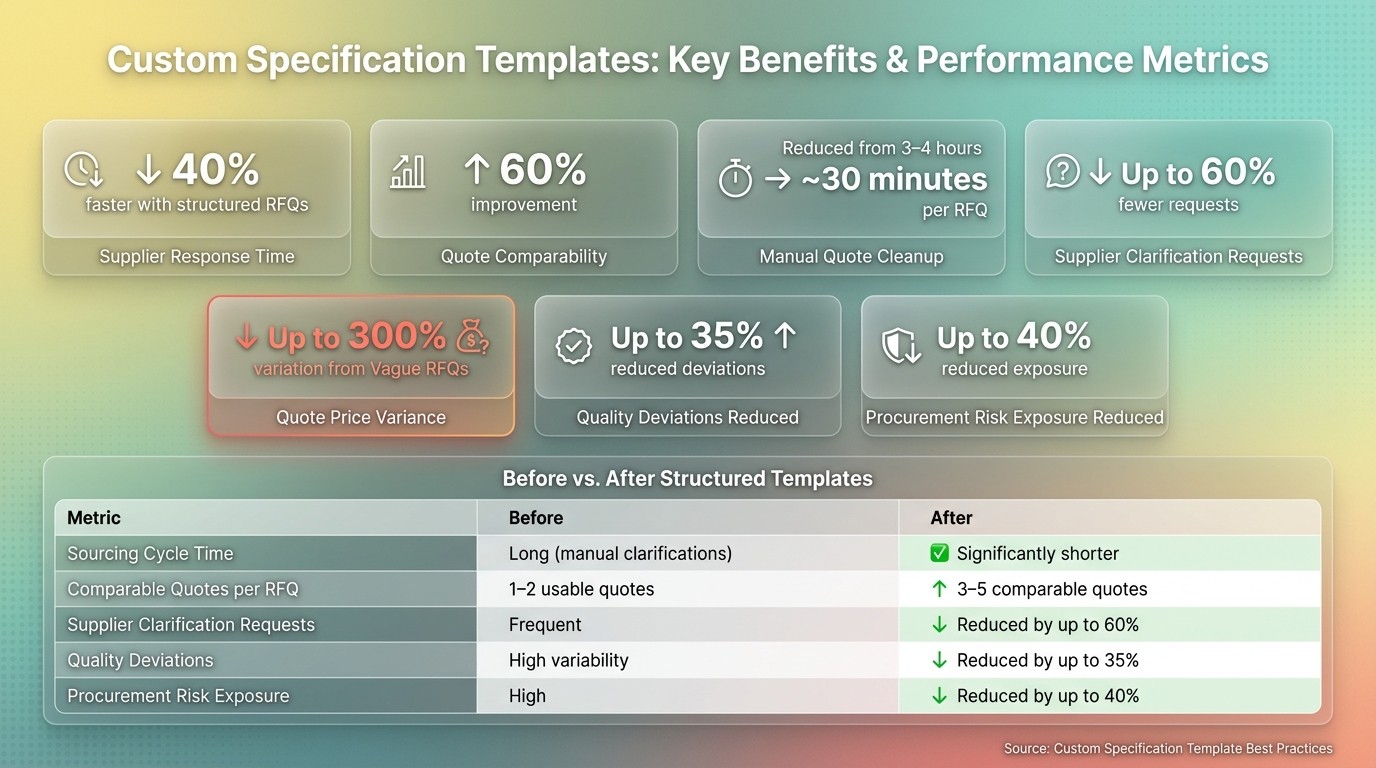
Custom Specification Templates: Key Benefits & Performance Metrics
Procurement Compliance Checklist Template
Checklist 1: Set Governance, Ownership, and Version Control
If no one owns a template and no custom procurement workflows are in place, things go sideways fast. Teams start using local copies, old files hang around, and suppliers end up quoting against out-of-date requirements.
Assign Roles for Drafting, Review, and Approval
Every template needs a named owner. That person is responsible for keeping the master file current, managing access, and tracking approval history. From there, each team should have a clear job so review doesn’t turn into a free-for-all.
Role | Primary Responsibility |
|---|---|
Template Owner | Owns the master template and version control |
Procurement | Runs the process and checks market fit |
QA / Technical SME | Checks technical accuracy and acceptance criteria |
Legal / Compliance | Checks regulatory alignment |
R&D / End Users | Provides functional needs and signs off |
A template should be released only after each role has formally signed off. This ensures you write a procurement specification that meets all internal standards before reaching suppliers. Keep status labels simple and consistent: Draft, Pending Review, Approved, Rejected, and Archived or Superseded.
Set a Versioning and Change Log Standard
Once ownership is set, nail down how revisions are tracked. Each revision should have:
a unique version number
an effective date
a change log entry
Approved versions should be locked, and any replaced version should be marked Archived or Superseded.
Store Templates in One Controlled Location
Store templates in one controlled repository with role-based access and an audit trail from the first save.
Once ownership is under control, the next step is tightening the template fields so every bidder responds in the same format.
Checklist 2: Structure Templates for Clarity, Comparability, and Compliance
Once ownership and version control are set, turn to the template itself. If the structure is loose, vendor responses will be all over the place.
Write Requirements That Are Specific and Verifiable
Write each requirement so it can be checked, not guessed. Tie requirements to known standards like ASTM, ISO, or DIN to cut down on confusion.
Vague Requirement | Specific, Verifiable Requirement |
|---|---|
"316 stainless steel" | "316 Stainless Steel / ASTM A123 Grade B" |
"Fast delivery" | "Delivery within 14 calendar days of PO" |
"Task completion within 3 clicks" | "Task completion within 3 clicks, verified by usability test" |
"Finish must match approved sample and pass salt-spray test" | "Finish must match approved sample; pass 500-hour salt-spray test per ASTM B117" |
Be just as clear with tolerances. A dimension written as "100 mm" leaves room for debate. "100 mm ±0.5 mm" tells the supplier what passes and what does not. Put the unit on every numeric field, and keep each template in a single unit system.
After the base requirements are measurable, split must-haves from nice-to-haves.
Separate Mandatory Requirements from Preferred Features
Use the same labels in every template: Mandatory and Preferred. If a supplier misses a Mandatory item, flag it before scoring starts. If they miss a Preferred feature, reduce points instead.
Add Compliance and Evaluation Tables to the Template
Build the scoring logic into the template from the start instead of asking reviewers to piece it together later. A clear table gives suppliers and evaluators the same setup on day one. If pricing is included, ask for line-item pricing rather than bundled quotes. That way, bids can be compared apples to apples.
Spec ID | Requirement Description | Measurable Criteria/Standard | Mandatory? | Vendor Response (Pass/Fail/Comment) |
|---|---|---|---|---|
SPEC-001 | Material Grade | 316 Stainless Steel | Yes | |
SPEC-002 | Dimensions | 100mm x 50mm ±0.5mm | Yes | |
SPEC-003 | Surface Finish | Ra ≤ 1.6 μm | No | |
SPEC-004 | Certification | ISO 9001 Compliant | Yes |
Evaluation Criteria Table
Evaluation Criteria | Verification Method | Weighting | Minimum Threshold |
|---|---|---|---|
Technical Compliance | Line-by-line spec review | 40% | Must meet all "Mandatory" |
Quality Assurance | Certificate of Analysis (COA) | 20% | Valid ISO certification |
Delivery Timeline | Lead time confirmation | 10% | Max 4 weeks |
Pricing | Total Cost of Ownership (TCO) | 30% | Within 10% of baseline |
For regulated categories, include the required standards and the proof needed to show compliance, such as COAs, compliance reports, or third-party lab results. Procright can automate compliance checks and show transparent compliance scores.
With the template standardized, the next step is tailoring it by category and risk.
Checklist 3: Customize by Category and Risk Level
Generic templates break down fast when you use them across very different categories. A spec for machined parts shouldn't look like one for software licensing or consulting work. The fix is simple: start with category-specific fields, then tie each field to the risk it helps control.
Adjust Technical and Regulatory Fields by Industry
The level of detail in your template should match the category.
For manufacturing and industrial purchases, the template should cover detailed technical specifications like material grades, tolerances, surface finishes, drawing revision numbers, tooling costs, First-Article Inspection (FAI) requirements, and packaging requirements.
For IT and technology purchases, shift the focus to software version numbers, licensed seat counts, SLA commitments, implementation timelines, and warranty or end-of-life support duration.
For professional services, center the template on deliverables, milestones, resource qualifications, billing rate cards, and change-order policies.
Regulatory fields should follow the same logic. Defense procurement may need ITAR clauses. Electronics templates may need RoHS or REACH compliance fields. Other categories may call for ISO certifications or ASTM/ANSI standards.
That structure makes it much easier to sort requirements into Mandatory and Preferred.
Link Requirements to Business Risk and Controls
Each major requirement in the template should connect to a real business risk. That keeps the spec tight and gives you a clear reason for marking a field as mandatory or preferred.
Risk Category | Requirement | Control | Verification Evidence |
|---|---|---|---|
Safety & Quality | Material composition | Material Purchase Specification (MPS) | ISO 9001 certificate / test reports |
Operational Uptime | Lead time and delivery | Lead-time commitment | Shipping logs / milestone dates |
Cybersecurity/IT | Support and maintenance | SLA commitments | Security audit / support tier docs |
Financial Exposure | Total Cost of Ownership (TCO) | All-inclusive pricing, no hidden fees | TCO calculator output |
Regulatory/Legal | Compliance standards | ITAR, RoHS, or REACH clauses | Compliance matrix / certificates |
This mapping also helps with prioritization. Requirements tied to safety, uptime, or regulatory compliance are usually Mandatory. Lower-risk features are often better treated as Preferred and scored that way.
Use AI to Fill Gaps and Improve Consistency
Once the template fits the category, AI can help catch drift before release.
Even solid templates can drift over time as fields get added, renamed, or removed. AI can spot missing fields, contradictions, and uneven terminology before the document goes out. Procright can automate specification creation and standardize category language.
Checklist 4: Review, Test, and Improve Templates Over Time
A template that sits untouched for too long can turn into a problem. Requirements drift out of date, rules change, and suppliers start sending more clarification questions.
Schedule Reviews After Awards and Regulatory Changes
Review master specs once a year against current codes, standards, and internal policies. If a sourcing event shows a gap, update the template right away. The template owner should manage this review cycle.
Some events should trigger an immediate review:
Failed bids
Repeated clarification requests
Code revisions
Standard updates
M&A changes
When one of these happens, use it to pinpoint what needs to change. Then check the fix in the next sourcing cycle.
After each award, log the issue, the root cause, and the revision made. Keep that record in the revision history so the next reviewer can see who approved each version, what changed, and why.
Measure Improvement
The metrics you track should line up with the risks the template was built to control. Keep the set small, and compare results before and after each major revision.
Metric | Before | After |
|---|---|---|
Longer due to clarifications and manual normalization | Shorter with standardized fields | |
Supplier clarification requests | Frequent | Reduced by up to 60% |
Comparable quotes per RFQ | 1–2 usable quotes | 3–5 comparable quotes |
Quality deviations | High variability | Reduced by up to 35% |
Procurement risk exposure | High | Reduced by up to 40% |
These numbers help show whether a revision cut friction or just moved it around.
Conclusion: Core Practices That Make Templates Work
Keep templates versioned, specific, compliant, and easy to review against actual sourcing results. Procright can automate spec creation, flag version inconsistencies, and surface compliance scores so reviews move faster and with less back-and-forth.
FAQs
How do I start building a custom spec template?
Start by defining your goals, your audience, and what success looks like. That gives the template a clear job from the start. It also helps you decide how much detail to include and where to draw the line on scope.
Next, identify the key stakeholders. That might include engineers, vendors, or other people who will use, review, or rely on the document. When you know who the template is for, it’s much easier to set the right level of detail and make its purpose clear.
Use an industry framework or a standard format like MasterFormat to keep sections organized in a consistent way. Consistency matters here. It makes the template easier to read, easier to update, and less of a headache for everyone involved.
If you want to move faster, Procright can help with industry-specific templates. From there, keep refining the template over time based on project feedback and manufacturer input.
What should be marked Mandatory vs. Preferred?
Mandatory items are the must-have compliance, safety, and performance requirements a supplier needs to meet to stay in the running. These can include things like regulatory certifications or specific physical characteristics.
Preferred items describe what you'd like to see, such as desired outcomes, newer features, or design preferences that aren't make-or-break. That gives suppliers more room to suggest different approaches.
How often should I review and update templates?
Review and update templates on a regular basis so they stay in line with market shifts, regulatory standards, and internal business needs.
Don’t wait for a big scheduled rewrite. Update master templates as soon as a need shows up during project work, code revision cycles, reference standard changes, or when new product information comes in.
That approach helps teams avoid drift and keeps documents current when it matters most.
Procright can help by identifying missing requirements and suggesting technical details.
Related Blog Posts
Try it on a real buy
Bring one category. Watch where the flags land.
We use a little analytics to see which pages actually help. Nothing else, no ad trackers.