Contract Renewal Management With AI: Guide
Centralize contracts, standardize metadata, link spend and specs, and use AI to flag risks, send alerts, and speed renewal decisions.
In this article
AI can help you stop missed notice dates, cut manual review, and make renewal calls with more context. In this guide, I’d boil the process down to five steps: put every contract file in one record, standardize key fields, connect contract data to spend and supplier data, use AI to flag clause and date risks, and route each renewal to the right team.
Here’s the short version:
I’d keep executed agreements, amendments, SOWs, order forms, specs, compliance files, and POs in one place.
I’d standardize fields like effective date, expiration date, auto-renewal terms, notice period, and contract value using MM/DD/YYYY dates and U.S. dollar amounts.
I’d connect contracts to spend, usage, PO, and supplier KPI data so renewal decisions are based on facts, not just old terms.
I’d use AI to extract dates, review clauses, flag risks, and send alerts at 90, 60, and 30 days.
I’d route renewals by risk, spend, and compliance level so legal, finance, IT, procurement, and business owners only review what fits their role.
I’d check commercial value, supplier performance, and compliance before signing.
I’d track results with metrics like cycle time, hours saved, on-time notices, and audit trail quality.
A few numbers stand out:
Teams can save about 5.5 hours per week on renewal tracking.
AI-led review can cut decision time from 16 weeks to under 7 days.
Compliance review can move from a manual process to an item-by-item check with cited support.
If a renewal also depends on product fit, specs, or compliance docs, I’d bring in a tool like Procright to review source files and compare current needs against vendor documentation. That helps when the issue is not just the contract, but whether the product still fits the job.
In short, this is not about replacing people. It’s about letting AI handle the repeatable work so your team can focus on renewal, renegotiation, or exit with a clean record and clear ownership.
How to automate contract renewal with Pipefy | Deadlines, alerts and approval workflows
Build the Data Foundation for AI Renewal Workflows
Before you run any automation, bring executed agreements, amendments, SOWs, order forms, specs, support docs, and compliance files into one central record. If those records live in different systems, shared drives, or inboxes, things slip. Deadlines get missed. Recommendations get weaker.
Once everything sits in one place, AI has something it can work with. After that, the next job is clean metadata.
Capture and Normalize Contract Metadata
After documents are centralized, AI still needs standard metadata to do anything useful. In plain terms, it needs the same key fields pulled from every contract and formatted the same way.
That includes:
effective date
expiration date
auto-renewal terms
notice period
contract value in USD
Use MM/DD/YYYY for all dates so reports stay consistent.
This is what lets AI flag notice deadlines, catch auto-renewals before they kick in, and surface contracts that need review. Without clean, standardized fields, those workflows fire unevenly. Once dates and terms are normalized, AI can track notice windows on its own.
Connect Contracts to Spend, PO, and Supplier Performance Data
A contract record by itself only tells part of the story. It doesn't show whether a renewal still makes sense. For that, AI also needs spend data, PO data, usage data, and supplier KPI data.
Say the contract says one thing, but spend and usage show another. That's not a small detail. It's often the clue that tells you whether to renew, renegotiate, or walk away.
AI can surface that signal. A human still makes the call. But that added context is what helps teams decide whether renewal, renegotiation, or exit makes sense from a financial point of view.
Add Specification and Compliance Inputs for Procurement Reviews
Some renewals go beyond price and supplier performance. You may also need to check whether the product, equipment, or technology still fits current business needs. That means pulling in technical specs, compliance certifications, security documentation, and data residency terms.
When a renewal depends on product fit or compliance, contract data alone won't cut it. If the current product no longer meets requirements, the issue isn't just contractual. It's a specification issue.
For renewals tied to technical fit, Procright analyzes specs and checks compliance against source files - PDFs, product manuals, and technical documents - instead of relying on vendor summaries. That gives teams an auditable basis for renewal or replacement.
Use these document types as the minimum renewal dataset:
Document Type | Key Data Points for AI Extraction | Purpose for Renewal |
|---|---|---|
Executed Agreement | Effective/expiry dates, auto-renewal terms | Tracking notice periods and expiration |
SOW / Order Forms | Service levels, unit pricing, quantities | Evaluating commercial value vs. usage |
Compliance Files | Security certs, data residency clauses | Running compliance checks before re-signing |
Technical Specs | Performance requirements, compatibility | Checking if tech still meets business needs |
Purchase Orders | Total spend, PO dates | Linking contract terms to actual spend data |
With those inputs in place, AI can move from simple contract filing to taking action on renewals.
Use AI to Review Clauses, Track Expiry, and Trigger Action
Once your contract data is clean, AI can do more than sort files. It can work through the contracts themselves. That means reading clause language, spotting risk, pulling key dates, and sending tasks to the right people before a deadline slips.
Review High-Impact Clauses Before Renewal
Most renewal risk tends to live in a small set of clauses. AI helps surface those clauses early, so the renewal team can focus on what matters most instead of reading every line by hand.
Clause Type | AI-Detected Risk | Recommended Action |
|---|---|---|
Auto-Renewal | Automatic renewal clauses with short notice windows | Flag for immediate review; set alerts 90 days prior to the notice deadline |
Price Escalation | Uncapped annual increases tied to unclear pricing indices | Extract the maximum % increase; trigger finance review if above threshold |
Termination for Convenience | High exit fees or termination only for cause language | Map exit costs; negotiate termination for convenience during renewal |
Data Privacy & Residency | Compliance exposure; nonstandard data use, transfer, or resale rights | Flag nonstandard clauses for legal review; verify data ownership and residency terms |
SLA / Service Levels | Vague performance metrics or missing penalty triggers | Add clear penalty triggers to the renewal spec |
Liability Caps | Inconsistent frameworks across multiple vendor contracts | Standardize liability language across active agreements |
AI can flag these issues, but legal and procurement still make the final call. The difference is that they start with a tight shortlist instead of a full manual read.
After that clause review is done, AI can turn those findings into alerts, tasks, and approvals.
Track Expiry Dates and Notice Periods Automatically
AI can convert expiry dates into automated alerts at 90, 60, and 30 days. It can also log each alert inside one workflow, which makes follow-up much easier.
When a renewal notice comes in, AI can extract the vendor name, deadline, contract value, and priority level, then create the task on its own. That cuts down on admin work and lowers the odds that a notice gets buried in someone's inbox.
From there, the process moves into approvals and clear ownership.
Route Renewal Tasks Through Approval Workflows
When AI flags a renewal, the next step is routing. The task should move based on risk, spend, and business function. In plain terms: a low-cost tool with no major compliance issues shouldn't follow the same path as a high-risk vendor handling sensitive data.
The table below shows one way to set up trigger rules, notice periods, and escalation logic across contract tiers.
Renewal Trigger Rule | Notice Period | AI Action | Primary Stakeholder |
|---|---|---|---|
Critical Tier / High Risk | 90–120 Days | Extract "Termination for Convenience" terms; trigger legal review if notice window is <30 days | Legal & Procurement |
Standard SaaS / Auto-Renewal | 60 Days | Flag "Price Escalation" caps; compare current spend vs. contract value for Finance | Finance & Business Owner |
Low Value / Non-Critical | 30 Days | Automated check for "Service Level" compliance; route to Business Owner for "Keep/Cancel" decision | Business Owner |
Compliance-Heavy (Data/Privacy) | 90 Days | Scan for updated data residency or security clauses; trigger IT Security audit | IT & Security |
AI also logs each review, timestamp, and evidence source on its own. That audit trail can matter a lot later. If a renewal decision is reviewed three years down the line, the team has a record showing what was flagged, when it was reviewed, and who approved it.
Once AI has flagged clauses, tracked deadlines, and routed approvals, the next step is to test whether renewal still makes commercial and compliance sense.
Make Better Renewal Decisions With AI and Procurement Metrics
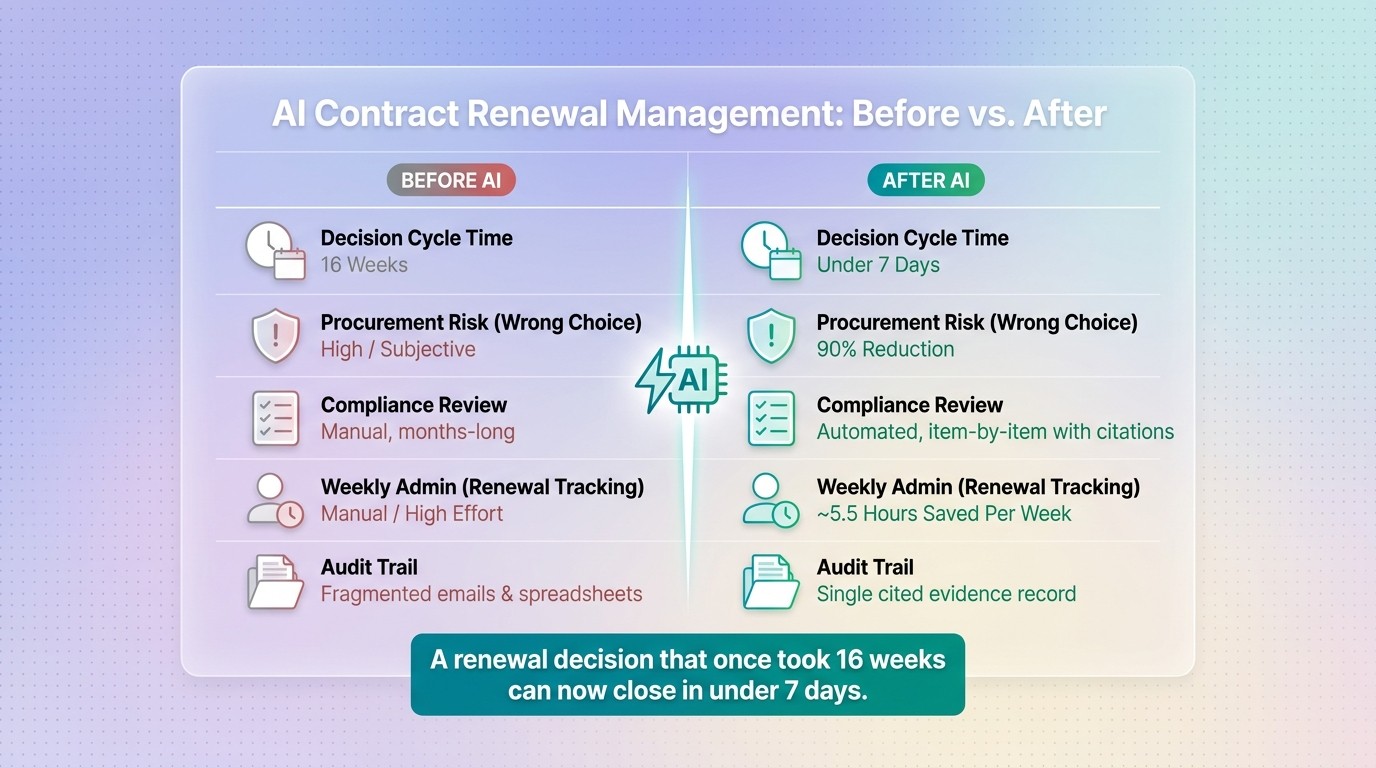
AI Contract Renewal Management: Before vs. After Key Metrics
Evaluate Commercial Value and Supplier Performance
Once AI flags a renewal, the job changes. It’s no longer about finding the contract. It’s about making the right call.
After AI routes the renewal, decide whether to renew, renegotiate, or walk away. To do that well, look at spend history, usage trends, supplier reliability, support coverage, and risk signals to see whether the renewal still makes sense for the next term.
AI can line up past spend and usage trends against the renewal proposal. It can also factor in risk-adjusted total cost, which helps bring hidden costs and exposure into view before anyone signs. That matters because a renewal can look fine on the surface while hiding extra fees, weak service, or growing risk.
Supplier metrics add another layer. Reliability, local support availability, and vendor maturity help show whether the vendor can keep the relationship steady over the next contract term.
Run Compliance Checks Before Signing a Renewal
If the renewal still works from a commercial standpoint, move to compliance checks before signing.
At this stage, AI can verify whether the vendor still meets internal policies, security standards, and regulatory requirements item by item. Instead of relying on a broad vendor promise, the review checks each point directly against the documentation.
AI reviews every requirement and returns Yes, Partially, No, or Not Found, along with cited evidence. Procright uses this method by analyzing the renewal spec against vendor documentation and returning a transparent compliance score with cited evidence. AI platforms can also produce one-page recommendations backed by a cited evidence record, which helps keep the approval path defensible long after the renewal is signed.
"The future procurement winner will not be the vendor with the flashiest demo. It will be the vendor that can clearly explain the controls, the data, the verification process, the audit trail, and the real-world implementation path." - Joe Kramer
Measure Results After AI Implementation
Use a small set of operating metrics to track results after rollout. That gives you a clear view of AI’s impact instead of relying on gut feel.
Metric | Before AI | After AI |
|---|---|---|
Decision Cycle Time | 16 weeks | Under 7 days |
Procurement Risk (Wrong Choice) | High / subjective | 90% reduction |
Compliance Review | Manual, months-long | Automated, item-by-item with citations |
Weekly Admin (Renewal Tracking) | Manual / high effort | ~5.5 hours saved per week |
Audit Trail | Fragmented emails and spreadsheets | Single cited record of evidence |
A renewal decision that once took 16 weeks can move in under 7 days when AI handles extraction, clause review, and compliance checks early in the process. Each decision also stays traceable through a single cited record, rather than getting buried across email threads and spreadsheets.
Conclusion: A Practical Rollout Plan for AI Contract Renewal Management
After data capture, clause review, and approval routing are in place, the rollout should happen in phases.
Start where the risk is highest. Focus first on high-value, high-risk contracts - the ones where mistakes cost the most. And test AI on an active contract portfolio, not a demo.
From there, standardize the data fields that matter most: renewal dates, contract values, exit clauses, liability frameworks, and data ownership/residency terms. AI-driven data validation helps, but it only works when each renewal has a clear owner.
Legal handles liability, exit terms, and compliance.
Finance and Procurement review price, renewal value, and budget impact.
IT and engineering assess technical risk and migration effort.
Executive leadership should step in for exceptions, not routine slowdowns.
Once the workflow is live, AI takes care of the repeatable work while the team handles judgment. With clean data and clear owners, AI can extract metadata, flag risky clauses, trigger renewal tasks, and run evidence-based compliance checks. That shifts Procurement away from chasing paperwork and toward making decisions from a complete, auditable record.
Track renewal cycle time, on-time notice rates, compliance issues avoided, and compliance scores. Then use those metrics to expand the rollout category by category.
FAQs
What contract data should we centralize first?
Start by pulling key terms into one place from your current vendor agreements, such as:
exit clauses
liability frameworks
data provisions
This gives AI a clear base for faster risk mapping. It also helps bring forward the clauses that have the biggest effect on your organization’s exposure.
You can use that same data to spot likely failure modes and build mitigation steps into renewal requirements.
How does AI reduce missed renewal deadlines?
AI helps cut missed renewal deadlines by keeping contract data in one place and tracking expiration dates and renewal windows all the time. That means procurement teams get alerts ahead of time instead of relying on manual spreadsheets or calendar reminders.
With a clear view of what’s about to expire - and fast access to contract terms - teams can decide whether to renew, renegotiate, or look for other options before a deadline slips by.
Who should approve high-risk renewals?
AI can help with high-risk renewals by mapping risk, reviewing clauses, and pulling in compliance data. But final approval should stay with a person.
The people answerable for business outcomes should make that call. Procright supports the process by surfacing compliance data and creating a transparent, audit-ready record that helps teams make informed, defensible decisions.
Related Blog Posts
Try it on a real buy
Bring one category. Watch where the flags land.
We use a little analytics to see which pages actually help. Nothing else, no ad trackers.