How to Integrate Procurement AI with ERP Systems
Treat ERP integration as a data-control project: clean ERP records, assign ownership, sync masters first, then transactions.
In this article
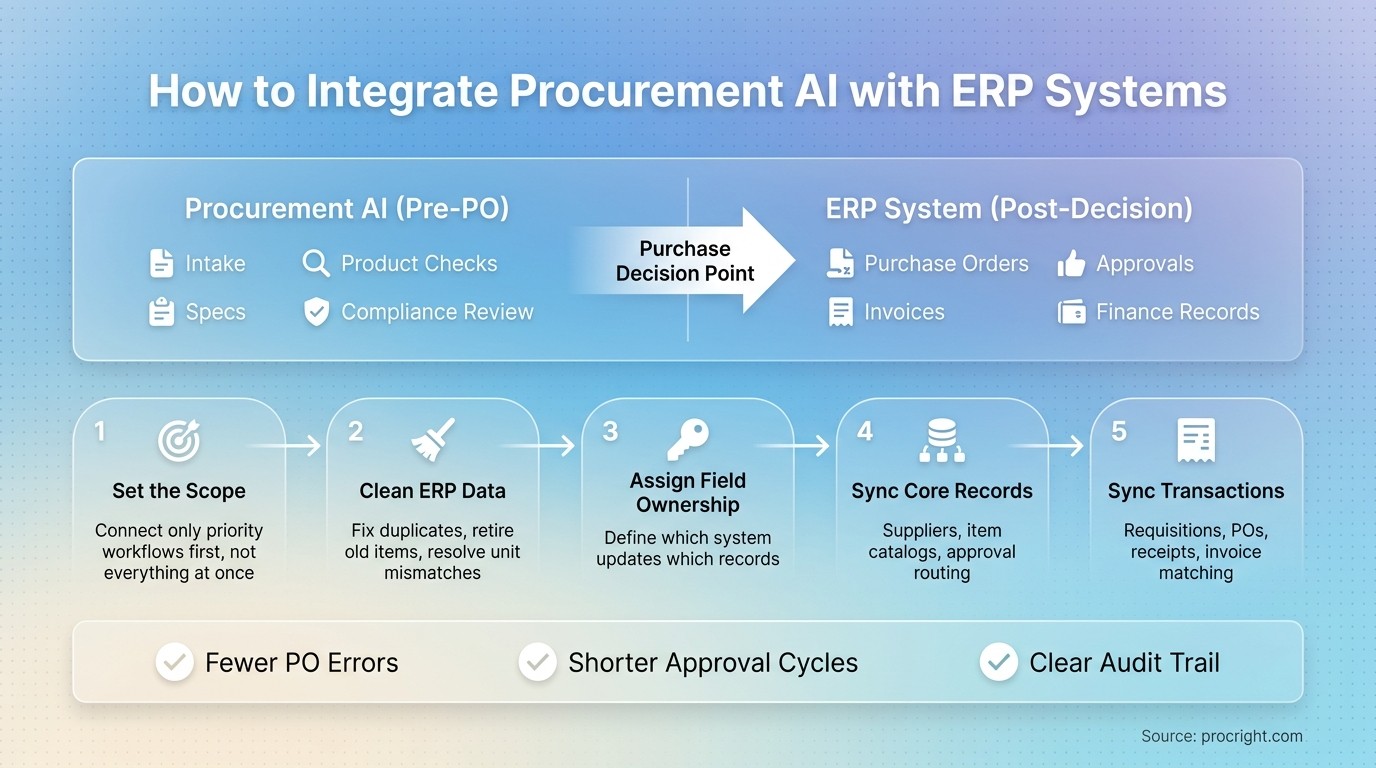
If your procurement AI and ERP are not split by job, your team will do double work. The fix is simple: let the AI handle intake, specs, product checks, and compliance review before purchase decisions are locked, and let the ERP handle POs, invoices, approvals, and finance records after that point.
I’d boil the process down to five steps:
Set the scope first so you do not connect every workflow at once
Clean ERP data first by fixing duplicates, old items, and unit mismatches
Assign field ownership so each system updates only the records it should
Sync core records first like suppliers, catalogs, and approvals
Then sync transactions like requisitions, POs, receipts, and invoices
A poor setup can lead to manual re-entry, failed syncs, stale PO status, and invoice match problems. A clean setup cuts PO errors, shortens approval cycles, and gives you a clear audit trail tied to the same ERP IDs from start to finish.
Here’s the article in one view:
Area | What I’d do |
|---|---|
System roles | Keep AI on pre-PO work; keep ERP on finance and transaction records |
Data prep | Map fields, standardize dates and currency, remove duplicates |
Source of truth | Let ERP own supplier IDs, GL codes, and approval status |
Core syncs | Start with supplier master, item catalog, and approval routing |
Transaction syncs | Add requisitions, PO changes, receipts, and invoice matching |
Risk control | Test in phases, define exception rules, and monitor sync health |
Bottom line: I’d treat ERP integration as a data control project, not just a connector project. If the records, IDs, and ownership rules are clean on day one, the AI layer can support purchasing without creating more cleanup later.
How to Integrate Procurement AI with ERP Systems: 5-Step Process
Digital Procurement Ecosystem Explained | ERP, E-Procurement, Spend Analytics & AI
Prepare ERP Data Before You Connect
Once ownership is set, clean the records that will move between systems. This step stops a lot of integration problems before they start. Map fields, remove duplicates, and fix messy records before the sync runs.
Map Supplier Records, Item Catalogs, and Accounting Fields
Field mapping decides which ERP field fills each AI field. Go object by object, then field by field.
For supplier records, map the supplier or vendor name, supplier ID, tax fields, payment terms, and any other master data you plan to sync. For item catalogs, map item code, description, unit of measure, and category. For accounting, map GL code, cost center, and related accounting fields.
Standardize dates, currency, and number formats before configuration. That helps stop field mismatches when requisitions, POs, and invoices move between systems.
Data Object | ERP Field | U.S. Format Example |
|---|---|---|
Supplier Legal Name | Vendor Master | ABC Technologies, Inc. |
Requisition Date | Transaction Date | 07/24/2026 |
Unit Price | Line Item Cost | $1,250.00 |
Quantity | Order Qty | 50,000 |
GL Code | Chart of Accounts | 1000-500-20 |
Mixed date formats and inconsistent currency notation can trigger failed field validation during sync. Clean that up first, then move into integration setup.
Clean Duplicates, Retired Items, and Unit Mismatches
Duplicate supplier records often lead to sync conflicts. One vendor may show up under slightly different names in different departments, and the AI layer may treat each version as a separate entity. That can skew compliance scoring.
Retired SKUs cause trouble too. An item that is no longer used but still sits in the catalog can show up in requisitions and create mismatches when the AI compares it with current item data. Review the catalog, find retired items, and mark them inactive before syncing.
Unit mismatches can create downstream errors. If the catalog lists an item in feet but a supplier quotes in meters, the AI layer may flag a false compliance issue. Standardize item descriptions and units of measure across the catalog, including mixed imperial and metric units, before connecting the systems.
Assign a Source of Truth for Each Data Object
Unclear ownership leads to sync conflicts after go-live. If both systems can update the same supplier or accounting fields, conflicting values can pile up fast, and then you're left sorting out which one is right.
The rule here is simple:
Supplier IDs, GL codes, and ERP-owned reference data should flow into the AI layer.
Compliance scores and AI-generated technical requirements belong in the AI layer and should not overwrite ERP records.
Write down which system can update which field before you configure anything. Put conflict rules in writing too, so your team can settle sync issues fast. That keeps things clean when the syncs go live.
With the data model cleaned up and ownership set, connect the systems and sync core records.
Connect the AI Tool to ERP and Set Up Core Syncs
Once the data is clean and ownership is clear, the next step is simple: connect the AI layer to the ERP.
Choose APIs or File-Based Interfaces Based on ERP Capabilities
If the ERP supports APIs, use them. That gives you near-real-time sync, which matters when supplier, item, or approval data changes during the day.
Use file-based exchange only when you're dealing with a legacy ERP that can't connect directly. It works, but it's more of a fallback than a first choice.
Configure Supplier, Catalog, and Approval Sync
After you pick the connection method, decide what actually moves between systems.
For supplier master sync, include more than the supplier name and ID. You also need active/inactive flags and payment terms. Without that, the AI layer may read a supplier as usable when the ERP says otherwise.
For item catalogs, sync:
Item status
Any spend thresholds tied to approval routing
Approval status should stay in the ERP. That's the system of record. The AI layer should read that status for routing and visibility, not overwrite it.
Set approval routing by department and spend tier. Then test every route with a live-style requisition before go-live. That step can save you from messy surprises later.
Keep ERP IDs Intact Inside the Procurement AI Layer
Keep every ERP supplier ID, item ID, requisition ID, and PO number exactly as-is inside the AI layer.
That matters more than it may seem. If the AI layer generates compliance scores or specifications from ERP-linked data, those outputs need to stay tied to the original ERP identifiers. Otherwise, the audit trail starts to fall apart.
"Each spec requirement is checked individually, and the source that supports (or contradicts) the compliance claim is cited directly. No black-box scores. No 'trust us' summaries." - Procright
Procright uses ERP-linked supplier and item data to generate specifications and compliance scoring without changing source IDs. Once the core syncs are stable, extend the connection to requisitions, purchase orders, and invoices.
Integrate Requisitions, Purchase Orders, and Invoice Data
After the core syncs are done, the next move is transaction data: requisitions, POs, and invoices. This is where day-to-day purchasing starts to live or die. Requisitions turn into POs, POs drive approval updates, and invoices feed matching. Once master data is lined up, these records need to move across systems using the same IDs.
Send Requisition and Purchase Order Data to ERP
The requisition is the first live transaction layer after supplier, catalog, and accounting syncs are set up. Before a requisition leaves the AI layer and enters the ERP, it has to be complete. That means exact item codes, units of measure, delivery dates, pricing references, cost center or GL allocations, and approver details.
If even one of those fields is missing or off, the ERP may reject the record. Worse, it may accept it and create a transaction that accounting then has to sort out by hand.
Use the AI layer to fill in missing fields before export. Platforms like Procright surface missing technical requirements during the specification stage - things like compatibility standards or load tolerances - so the requisition that reaches the ERP is already complete and verified.
That early spec work matters more than it seems. Incomplete specs at the requisition stage often show up later as PO exceptions and invoice disputes.
Once requisitions land cleanly in the ERP, every status change after that needs to stay synced too.
Keep Approval Status and PO Changes in Sync
A one-way sync sounds fine on paper. In practice, it causes bad transaction data.
Approval status stays in the ERP as the system of record, and the AI layer reads that status for routing and visibility. But if the ERP approves, revises, or cancels a PO and that update never comes back, procurement teams end up working from stale information.
Bidirectional sync must cover:
Approval decisions
PO line-level revisions
Partial receipts
Quantity changes
Cancellations
Each change needs to appear in both systems. Partial receipts need extra care. If a supplier ships only part of an order, both the AI layer and the ERP should show that split. If they don't, reorder logic and budget tracking can drift fast.
Connect Invoice Records for Matching and Exception Review
Invoice matching is usually where bad data from earlier steps finally shows up - and starts costing time and money. Sync the invoice number, supplier ID, PO reference, line amounts, tax amounts, and hold status for matching. Miss any one of those, and someone will likely have to step in manually.
Flag invoice deviations before they turn into disputes. If an invoice line amount doesn't match the agreed pricing reference from the original specification, or if the delivered item fails the compliance criteria checked during sourcing, that gap should be flagged during exception review. Procright uses ERP-linked transactional data to connect compliance scores back to specific invoice lines, which makes it easier to pinpoint where a delivered product or price drifted from what was agreed.
"The future procurement winner will not be the vendor with the flashiest demo. It will be the vendor that can clearly explain the controls, the data, the verification process, the audit trail, and the real-world implementation path. Trust is becoming the product." - Joe Kramer, Parjana Engineering, Inc.
Then test these sync paths against the errors that cause approval, matching, and receipt drift.
Avoid Common Setup Errors and Keep the Integration Running
Fix the Errors That Break ERP-Procurement Sync Most Often
Once requisitions, POs, and invoices start moving between systems, the biggest threat is sync drift.
Most failures come down to a few familiar issues: bad field mappings, inconsistent master data, and weak exception rules. When mappings are off or master data is old, the integration can create bad matches, rejected records, and a pile of manual cleanup.
Before go-live, check:
Field mappings
Approval rules
Source-of-truth assignments
That work matters. It helps make sure the integration produces a complete, cited record for every procurement decision.
Test in Phases and Monitor Sync Health
After the core syncs are live, test the failure points that hit approvals, POs, and invoices. Start with one active category and use real documents. That gives you a clearer picture of how the integration behaves under normal day-to-day use.
After launch, define what counts as an exception, set up automated alerts, and send exceptions to human review. The goal is simple: catch failed syncs before they disrupt purchasing or payment.
Conclusion: Key Steps for a Reliable ERP Integration
Reliable ERP integration depends on clear scope, clean mappings, source-of-truth rules, phased testing, and steady monitoring. Procright supports that flow by verifying specifications and compliance before procurement data enters the ERP.
FAQs
What should we integrate first?
Start with the specification stage. That’s where procurement often goes off track. When specs are incomplete or vague, problems show up early and then spread into everything that follows, including supplier records, item catalogs, purchase orders, and invoice data.
Using Procright to build a complete, standards-aligned specification gives your ERP data a solid starting point. That way, mapping relies on clear, measurable requirements instead of guesswork.
How clean does ERP data need to be?
Your ERP data should be clean enough to give you a dependable base for specifications and supplier records. When data is structured and consistent, it helps stop mistakes from rolling forward into the next step.
Clean item catalogs, supplier files, and past spend data also make records easier to trace and easier to audit. They also help AI tools like Procright map requirements and check vendor claims with more accuracy.
How do we prevent sync errors after go-live?
Use real-time monitoring to keep an eye on integration health between your AI procurement tools and ERP system. Then set up alerts by email, SMS, and webhooks so any mismatch shows up right away.
It also helps to review your integration documentation. Check how data is handled, how compliance is covered, and whether those details still match what’s happening in production. On the technical side, make sure your architecture can support real-time event correlation and analysis.
When these pieces are in place, you’re not left guessing. You can spot issues fast, trace them back to the source, and act before small data problems turn into bigger workflow headaches.
Related Blog Posts
Try it on a real buy
Bring one category. Watch where the flags land.
We use a little analytics to see which pages actually help. Nothing else, no ad trackers.