How to Automate Product Specification Creation
Cut drafting time, reduce errors, and enforce compliance by automating product specification creation with AI-driven templates.
Automating product specification creation saves time, reduces errors, and improves procurement efficiency. Manual processes often lead to delays, scattered data, and costly mistakes. Tools like Procright use AI to centralize data, generate precise specifications in minutes, and ensure compliance with standardized KPIs.
Key Benefits of Automation:
Faster Drafting: Create specifications in ~30 minutes instead of days.
Error Reduction: Cut error rates from 30–40% to under 1%.
Improved Collaboration: Real-time editing and centralized data for all teams.
Compliance Checks: Automated rules ensure regulatory requirements are met.
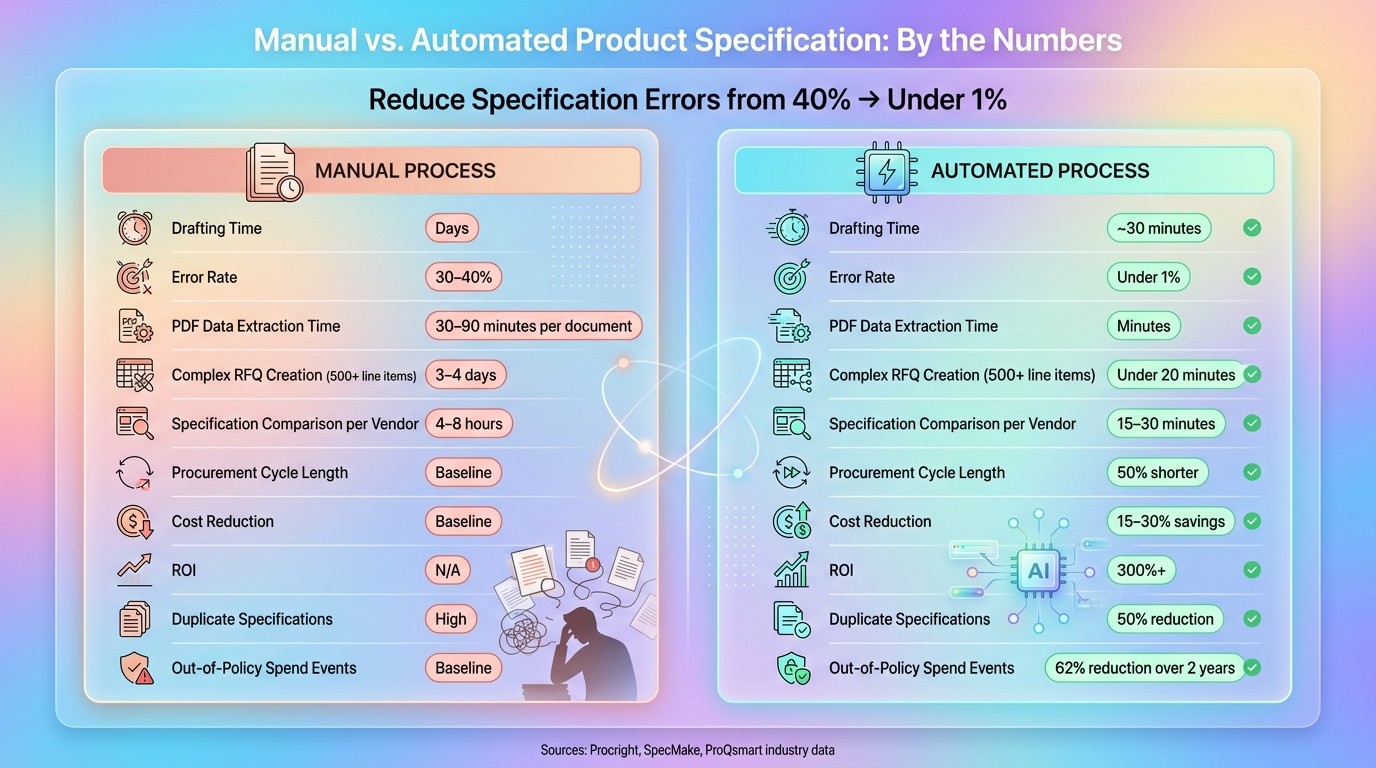
Manual vs. Automated Product Specification Creation: Key Metrics
How to Build an AI Agent to Auto-Generate Google Sheets Product Specs
Understanding Current Specification Workflows and Key Pain Points
Before improving your specification process, you need to take a close look at how it works today - and where things tend to go wrong.
Mapping Manual Processes
The challenges of manual specification creation start with understanding the current workflows. Typically, these workflows begin with a request from an engineer or project manager. Often, this request arrives in a disorganized format - like an Excel file, a PDF, or even an email. From there, a buyer has to manually extract key details such as descriptions, quantities, and unit codes, transferring them into a standardized bid template or an ERP portal.
But that’s not all. Buyers also need to hunt down technical drawings, safety standards, and insurance documents, which are often scattered across multiple locations. Finally, identifying suitable vendors often means relying on outdated spreadsheets or contact lists.
The first step in addressing these inefficiencies is mapping out the entire process. Trace the workflow from the initial material take-off list to the final RFQ. Document every input source - whether it’s PDFs, spreadsheets, or supplier catalogs - along with every person involved and every handoff point. What you’ll likely uncover is a lot of time spent simply moving data around, with little added value.
Identifying Common Challenges
Once the workflow is mapped, the pain points become clear. One of the biggest issues? Data fragmentation. Specification data is often locked away in static PDFs, emails, and spreadsheets, making it hard to establish a single source of truth. Extracting data from PDFs, in particular, is a major headache. As SpecMake explains:
A PDF table is a visual illusion. There's no table tag, no row delimiters, no column definitions... what appears as a table is merely text fragments positioned by X/Y coordinates.
Manually pulling technical values from these PDFs can take anywhere from 30 to 90 minutes per document, with error rates ranging from 1% to 4%.
Here’s a breakdown of where these problems typically occur:
Manual Process Step | Common Pain Points |
|---|---|
Intake | Disorganized source files, fragmented emails, and "Shadow Spend" bypassing procurement |
Extraction | High error rates (1–4%), time-intensive (30–90 minutes per document) |
Contextualization | Misinterpretation of symbols (e.g., ±, Ω) or industry abbreviations (e.g., DFT) |
Assembly | Missing drawings or terms and conditions, increasing liability risks |
Normalization | Inconsistent units (e.g., bar vs. PSI) and varying vendor terminology |
These manual workflows don’t just introduce errors - they also create bottlenecks. Approvals get stuck in inboxes, data requests go unanswered, and deadlines slip. Mapping these challenges reveals key areas where automation can make a real difference.
Creating a Baseline for Improvement
Once the challenges are clear, the next step is to quantify the inefficiencies. Track how much time is spent on manual tasks like data extraction and normalization - per document, per vendor, and per tender. For complex tenders with 500+ line items, this initial phase can take three to four days before suppliers are even invited to bid.
Create a visual diagram of the entire workflow, from intake to RFQ. Develop a checklist to ensure all mandatory attachments are included and submissions are complete. This baseline serves as a reference point, helping you pinpoint the slowest, most error-prone steps and identify where automation could save the most time.
Designing a Standardized Specification Model
Addressing common challenges in specification creation, a standardized model ensures all specifications are thorough, uniform, and meet necessary requirements. This approach creates a reusable framework that guarantees consistency and accuracy across specifications, regardless of the creator or the category.
Defining Core and Category-Specific Attributes
Every specification should start with universal fields like item name, unit of measure, quantity, delivery requirements, and pricing format. Once these are in place, additional fields can be tailored to the specific category. For example:
Industrial and manufacturing components: Include fields for material grade (e.g., 316 stainless steel), surface finish, and dimensional tolerances (e.g., ±0.5 in.).
IT hardware: Focus on performance metrics and compatibility requirements.
Services: Add details like scope-of-work, SLA definitions, and evaluation criteria.
Avoid using vague terms like "high quality" or "durable." Instead, rely on measurable standards such as "ASTM A123 Grade B" or an API response time under 200ms. This level of precision is critical for making quotes comparable. A study on custom manufacturing revealed that less than 25% of rapid quotes are accurate enough for direct comparison, primarily due to vague or incomplete initial specifications. A structured approach is also vital for leveraging AI automation, ensuring specifications are both accurate and consistent.
Adding Compliance and Risk Fields
To safeguard your business and set clear expectations for vendors, every specification model must include compliance sections. These should cover regulatory certifications (e.g., ISO 9001, ASTM standards), safety data sheets, insurance requirements, and country of origin. Automated rules can enforce these requirements at scale. For instance, if a construction project exceeds $50,000, the system could automatically require a safety standards document before publishing the tender, enabling AI-driven validation at every step.
Neha Motaiah of ProQsmart highlights the risks of skipping this step:
"Speed is dangerous if it leads to recklessness. One of the biggest risks in manual RFQ creation is the omission of critical legal or technical documents."
By embedding compliance requirements into the specification process, businesses can reduce procurement risks by up to 40%.
Using Industry-Specific Templates
Templates take standardization a step further by incorporating industry-specific needs. AI procurement tools like Procright's pre-built templates offer buyers a structured starting point. For example, selecting a template for IT hardware or industrial components provides a pre-configured set of fields that reflect both category standards and compliance requirements. These templates are fully customizable, ensuring they meet your team's unique needs. Each template also includes a version number and a last-updated date, so teams always work with the most current, approved data.
Implementing AI-Powered Specification Creation With Procright
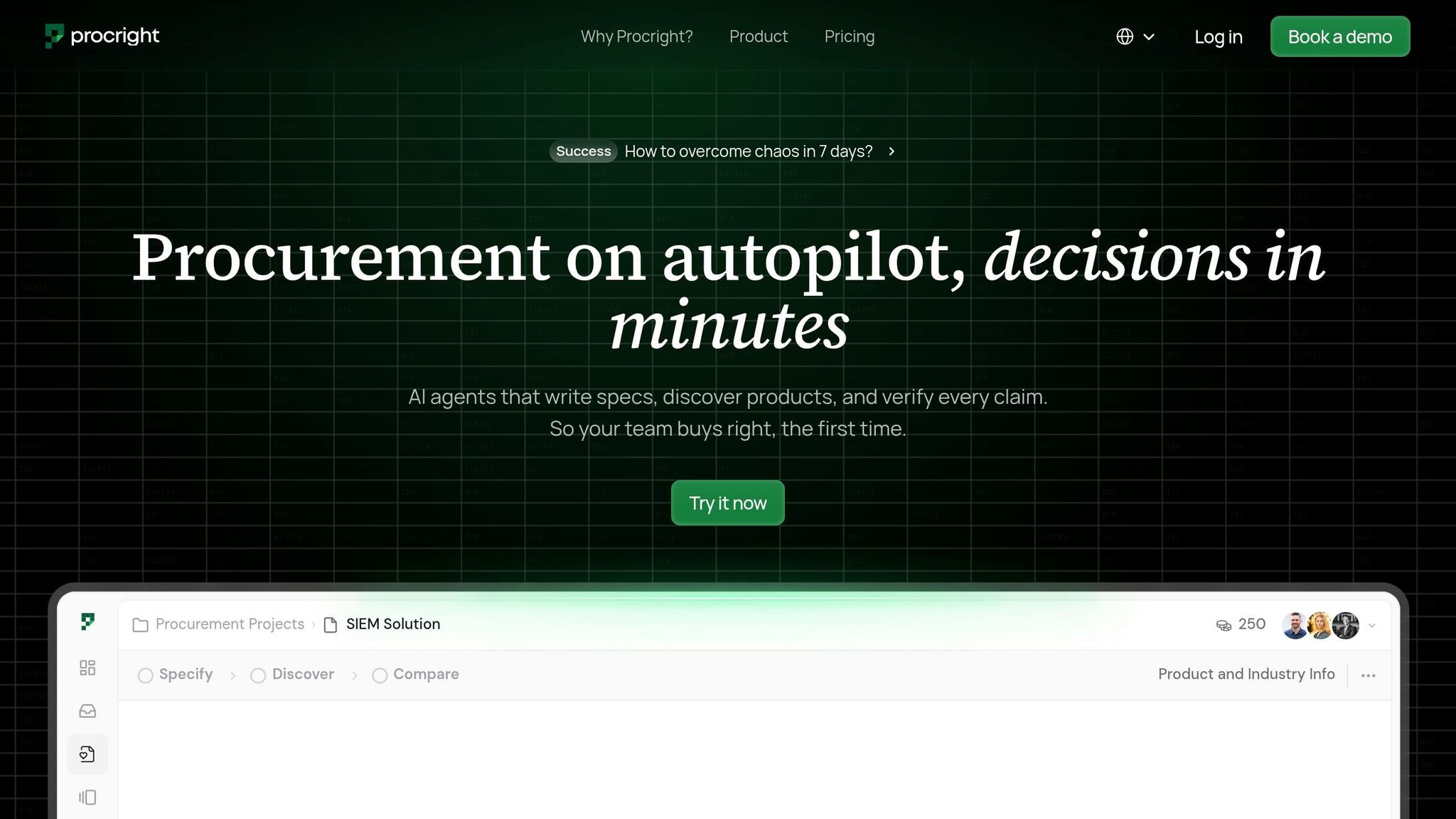
Once workflow inefficiencies are identified and a standardized model is in place, automation becomes the key to streamlining specification creation. Procright simplifies this process by automating data consolidation and specification building, freeing procurement teams to focus on strategic decision-making instead of repetitive data entry.
Connecting Data Sources to Procright
Procright consolidates data from various sources - like spreadsheets and PDFs - into a single, unified platform. By digitizing offline and siloed files, it creates a central "source of truth." Admin-level validation rules ensure data quality by flagging entries that don't meet compliance or quality standards before they can be saved. This stops bad data from entering the specification library. Companies using this method have seen a 50% drop in duplicate specifications and a 10% faster New Product Introduction (NPI) cycle. This consolidated foundation is essential for accurate, AI-driven specification generation.
Generating Specifications Using AI
With the standardized model in place, Procright's AI generates detailed specifications effortlessly. For instance, a user might input, "I need a SIEM solution", and the AI responds with prompts for additional details like cloud compatibility, user volume, and integration needs. It even performs a gap analysis on existing drafts, identifying missing technical details and suggesting necessary additions to ensure the specification is complete. Teams can upload fragmented documents from various departments and merge them into a single master specification, cutting drafting time down to minutes. Pre-built, industry-specific templates further reduce errors by up to 90%.
Collaborating Across Teams
Creating accurate specifications often requires input from multiple departments, such as engineering, legal, quality, and procurement. Procright tackles common challenges like version control and fragmented communication by enabling real-time collaboration. Team members can edit the same document simultaneously, with updates instantly visible to everyone.
To streamline reviews, teams can prioritize individual items by marking them as "must-have" or "nice-to-have." This allows legal and compliance teams to focus on high-risk areas without sifting through the entire document, speeding up sign-offs and reducing back-and-forth emails.
Feature | Collaborative Benefit | Impact on Accuracy |
|---|---|---|
Real-Time Editing | Prevents version conflicts and email overload | Ensures everyone works on the latest version |
Merge/Upload | Combines data from various departments | Creates a unified, accurate master document |
AI Gap Analysis | Acts as a digital consultant for all teams | Highlights overlooked technical or compliance issues |
Item Prioritization | Focuses team attention on critical areas | Ensures high-risk items are thoroughly reviewed |
"Having more people access data allows us to put world class operating procedures in place." - Kris Corbin, Chief Supply Chain Officer, Bright Future Foods
Automating Compliance Verification and Version Control
Keeping up with compliance can feel like a moving target, especially when regulations, ingredients, and packaging requirements are constantly changing. Without the right tools, it's easy for errors to sneak in. That’s where Procright steps in, integrating compliance checks and version control directly into the specification process.
Setting Up Compliance Rules
Procright allows administrators to set up validation rules and process blockers tailored to each product category. These rules work in real time, flagging errors immediately if data entries don’t meet required standards. This proactive approach ensures compliance is addressed as data is entered, rather than during a later audit.
For industries like food or cosmetics, where compliance can get tricky, Procright simplifies things by automatically pulling allergen and claims data from ingredients into the final product specifications. This ensures labels accurately reflect requirements like "Contains" or "May Contain". On top of that, its connected data structure means any changes - whether in raw materials or regulations like a new extended producer responsibility (EPR) law - automatically ripple through to all affected products.
Managing Specification Versions
Version control is another area where Procright shines. Every time a specification is updated, the system automatically creates a new version while preserving the old ones. This ensures that teams and suppliers always have access to the latest, most accurate information, eliminating the risk of outdated specs being used. For teams juggling multiple active specifications, this feature keeps everyone aligned without the need for manual tracking.
Maintaining Audit and Historical Records
Procright also simplifies audit preparation with a built-in change history. It records every update - what was changed, when, and by whom. Pair that with structured naming conventions (like ProductName_Category_v2.1_2026-05) and searchable fields, and retrieving the right record becomes a breeze. This is especially critical in regulated industries like food, beverage, and cosmetics, where documentation of allergen disclosures or formula changes is non-negotiable. Forget digging through emails or shared drives - everything is centralized and easy to access.
The results speak for themselves. Organizations using structured specification management report over a 300% return on investment and a 40% reduction in procurement risks. By catching compliance gaps and version mix-ups early, Procright helps businesses avoid costly mistakes and ensures specifications integrate seamlessly into broader procurement workflows.
Integrating Automated Specifications Into Procurement Workflows
Once you have automated, compliant, and version-controlled specifications in place, the next step is to weave them seamlessly into your procurement workflows.
Exporting and Mapping Specifications
With Procright's Enterprise plan, you can directly push finalized specification data into ERP systems like SAP, Oracle, NetSuite, or Microsoft Dynamics to generate purchase orders. This integration streamlines the entire process, cutting down on manual effort and minimizing errors. Manual data transfers often result in a 30–40% error rate due to inconsistencies in terminology and document formats.
Before exporting, it's essential to write technical procurement specifications and standardize measurements - such as converting horsepower (HP) to kilowatts (kW) or PSI to bar. Without this step, vendors may end up comparing mismatched data, leading to bid discrepancies and project delays.
Improving Procurement Processes
AI-generated specifications bring speed and precision to sourcing. For example, automated RFQ tools can create complex tenders with over 500 line items in less than 20 minutes, a task that traditionally takes procurement teams three to four days. Clear, standardized specs not only improve supplier responses but also cut down the time spent on reconciliation.
The benefits of these efficiencies add up fast. Companies that integrate AI into their procurement workflows report 50% shorter procurement cycles and 15–30% cost reductions. Tasks like specification comparison, which previously required 4–8 hours of manual effort per vendor, can now be completed in just 15–30 minutes.
"Manual specification comparison is the single biggest time sink in modern procurement. Teams that spend 6–8 hours per RFP cycle building vendor spreadsheets have no bandwidth left for strategic sourcing." - Senior Director of Strategic Sourcing, Fortune 500 Manufacturing Company
To maximize these advantages, focus on automating areas where the impact will be most immediate.
Focusing on High-Impact Categories
Start with categories that involve high spending, complex documentation, or significant compliance risks. Areas like construction, manufacturing, and IT infrastructure are ideal since their specifications are often dense, variable, and prone to errors.
Procurement teams using AI-driven platforms have reported 10–15% savings on analyzed spend categories. Additionally, businesses that enforce automated policies at the intake stage have seen out-of-policy spending events drop by 62% over two years. By targeting high-impact categories first, you can deliver measurable ROI quickly and then scale automation across other areas.
Measuring Results and Refining the Process
Key Metrics to Track
Once you've streamlined your workflows, the next step is to measure the impact of automation. To ensure automation is driving results, focus on tracking metrics like speed, accuracy, manual effort, and financial return.
For speed, compare the time your team spends drafting specifications before and after automation. Companies using robust productivity systems often achieve a 30–40% reduction in time-to-market. Product managers also report saving an average of 33 hours per week by automating repetitive tasks. Accuracy is another critical metric - manual specification methods typically have a 30–40% error rate, but automated workflows can reduce this to under 1%. Lastly, calculate your return on investment (ROI). Many intelligent specification management platforms deliver an average ROI exceeding 300%.
Metric Category | KPI | Target Improvement |
|---|---|---|
Speed | Time-to-market reduction | 30–40% |
Accuracy | Specification error rate | < 1% (vs. 30–40% manual) |
Manual Effort | Reduction in manual hours | ~8 hours per project |
Financial | ROI from automation | 300%+ |
Using Procright Analytics
Procright's analytics tools go beyond just presenting numbers - they help uncover why gaps exist. For example, they can highlight missing data fields like environmental ratings or API limits, as well as pinpoint bottlenecks caused by delayed approvals in stakeholder inboxes.
"The most dangerous specifications aren't the ones that fail to meet your requirements. They're the ones that aren't there at all." - Priya Sharma, Procurement Technology Lead
Procright also allows you to analyze compliance pass rates, helping you determine whether vendors are struggling with overly strict specifications or if your vendor pool needs to expand. Additionally, tracking Total Cost of Ownership (TCO) accuracy - comparing estimated costs with actual post-purchase spending - provides valuable insights for refining your financial models over time. These analytics create a foundation for disciplined, periodic evaluations of your automation strategy.
Setting Up a Regular Review Process
To keep your automation workflows effective, establish a quarterly review process. Each review should focus on three key areas: updating specification templates to address recurring issues identified in analytics, revising compliance rules to reflect new regulations or internal policies, and gathering feedback from engineers, end-users, and procurement staff who work with the specifications daily.
Additionally, audit for maverick spend - unapproved purchases made outside the automated system - to identify gaps in your process. Small, consistent adjustments each quarter can have a big impact over time, ensuring your automation evolves alongside your business needs.
Conclusion
Relying on manual specifications is not just time-consuming - it’s prone to mistakes and pulls valuable resources away from strategic priorities. Automation flips this dynamic entirely. Tasks that once dragged on for 8 hours can now be completed in just 15–30 minutes, while procurement cycles can be cut by up to 50%.
When AI takes over the labor-intensive work of drafting, extracting, and verifying specifications, your team can stop chasing data and focus on making data-driven procurement decisions.
That’s where Procright steps in. By centralizing product data into one system of record, automating compliance checks, and enabling real-time collaboration, it eliminates the bottlenecks that slow procurement down - all while keeping critical decisions firmly in human hands.
The results speak for themselves. Companies using intelligent specification management platforms report an average ROI of over 300%. Plus, precise AI-generated specifications can reduce product returns by up to 25%. Automating specification creation isn’t just a process improvement - it’s the cornerstone of a modern procurement strategy. This shift accelerates workflows and sharpens decision-making, delivering lasting benefits to your organization.
The best way to start? Focus on your highest-volume, most labor-intensive category, measure the results, and then expand automation across other processes.
FAQs
What data do I need to automate specs?
To streamline the creation of product specifications, start by collecting detailed requirements and technical details about the product or service. Important information to include: technical specifications, delivery terms, payment conditions, evaluation criteria, and any applicable standards. Providing clear descriptions of your needs and using customizable templates tailored to different purchase categories can improve accuracy, maintain consistency, and make the process more efficient.
How does AI keep specs compliant?
AI plays a key role in keeping product specifications compliant by handling tasks like organizing, verifying, and standardizing data automatically. It can extract technical details, convert measurement units, and apply uniform formats to ensure everything meets regulatory and technical standards. This reduces manual errors, improves accuracy, and simplifies the creation process, ensuring specifications meet compliance requirements seamlessly.
How do automated specs sync to my ERP?
Automating the synchronization of specifications with your ERP system is now easier with AI-driven tools. These tools can generate and organize technical specifications, seamlessly integrating them into your ERP workflows. You can import product data, create detailed specs, and export them in formats like PDFs or CSV files - or even connect directly through APIs. This approach ensures consistent data, cuts down on manual work, and simplifies your procurement processes.