Privacy Impact Assessment Automation Guide
How to automate PIA intake, data mapping, vendor review, and risk scoring while keeping humans for high-risk decisions.
In this article
A good PIA process should do five things: screen the project, collect the right facts, map data use, score risk, and save a clear decision record. If any one of those steps is weak, reviews slow down, evidence gets lost, and audits get harder.
If I were setting this up, I’d focus on a simple workflow that helps teams answer three questions fast:
Does this project need a full PIA?
What data, systems, and vendors are involved?
Who needs to review it, and why?
The article’s main point is straightforward: automation helps with intake, evidence collection, routing, reminders, and recordkeeping, but people still need to approve high-risk cases. It also makes clear that AI fits best in vendor document review, evidence matching, and change monitoring - not in final judgment calls.
A few points stand out right away:
Screening should stop low-risk work from turning into a full review
Intake forms should use required, optional, and conditional fields
Vendor and AI details should be part of the same workflow
Risk scores should link back to source proof
Closeout files should include dates, comments, approvals, and version history
Reassessment should start only when a change trigger appears
One practical stat in the piece is the use of three review paths - low, medium, and high risk. That matters because a fixed path cuts delay and keeps decisions consistent across teams.
If you want the short version, it’s this: PIA automation is about turning a messy review into a repeatable workflow with clear inputs, clear rules, and a file you can read months later without guessing what happened.
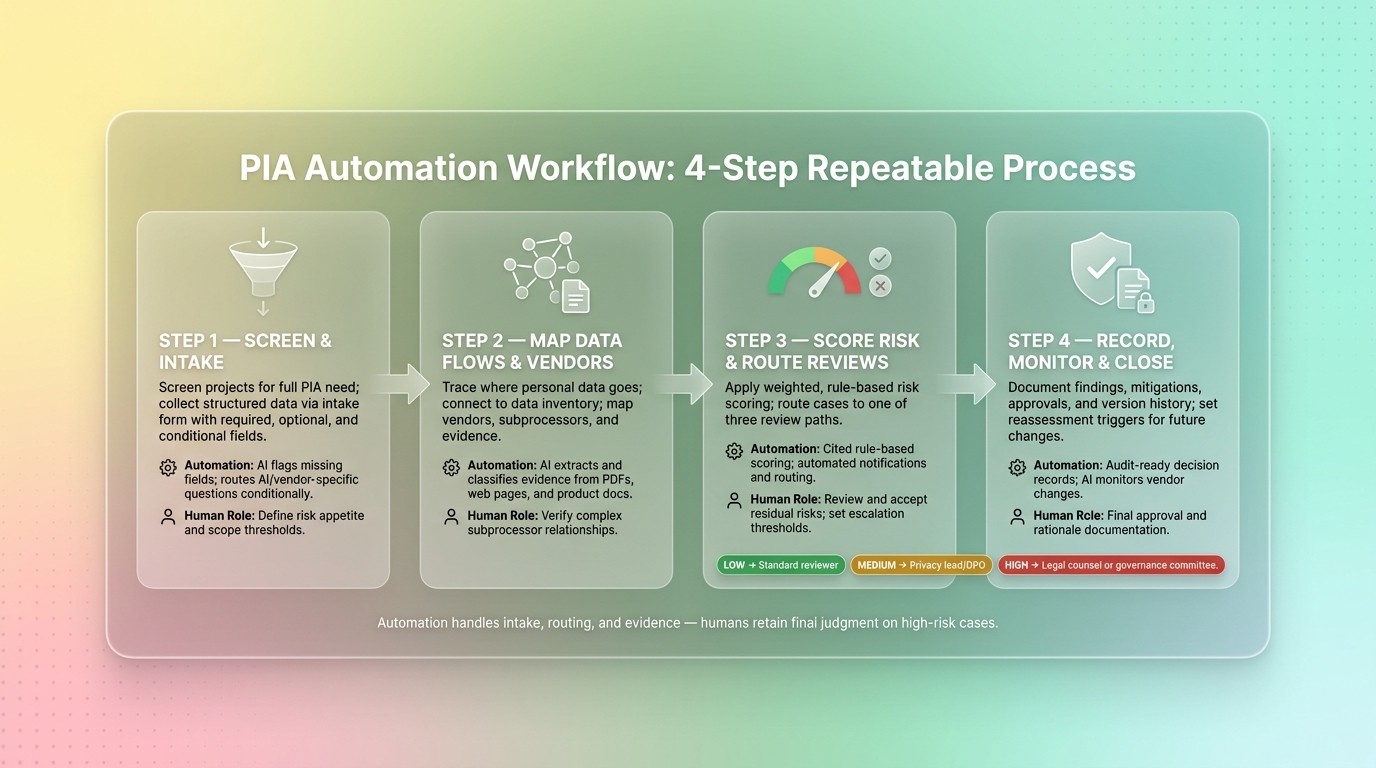
PIA Automation Workflow: 4-Step Repeatable Process
1. Confirm Scope and Build the Intake Form
Screen Projects Before Starting a Full Assessment
Start with screening. It helps you send each project down the right path: no review, a light review, or a full PIA.
A project should move to a full PIA when screening shows sensitive data, high-volume processing, U.S. state privacy law triggers, sector rules, or third-party access. If a project stops at screening, keep a short written reason on file for auditability. Once a project clears that step, send it into the intake questionnaire.
Build a Structured Intake Questionnaire
After screening confirms a full PIA, the intake form should gather the minimum details needed to run the review the same way every time. The aim is simple: business teams should be able to fill it out without needing legal training.
Each field needs a job. Required fields set the baseline. Optional fields add context for scoring. Conditional fields should appear only when a trigger is present, like AI use or automated processing.
Field Type | Example Fields | Purpose |
|---|---|---|
Required | Project name and purpose, system type, data categories, security controls | Captures the core facts needed for review |
Optional | Supporting evidence uploads (PDFs, DOCX), secondary stakeholders, deadlines | Adds context for scoring |
Conditional | AI model details, automated decision logic, human review process, bias testing | Appears only if the project involves AI or automated decision support |
Two practical rules make the form easier to use.
Avoid vague prompts. Answers like enterprise-grade security don't give reviewers much to work with.
Send sections to the right owners at the same time. Legal, IT, and the business team should review in parallel so the process doesn't stall.
Those fields should flow straight into risk scoring and review routing.
Add AI-Specific Intake Questions When Needed
If a project uses AI or automated decision support, add a second layer of questions.
Capture decision autonomy, human review, data provenance, performance validation, auditability, and bias testing. For vendor-provided AI tools, also collect data residency clauses, applicable compliance standards, and discontinuation handling in the same pass. One last question is often worth adding: what happens if the tool fails, and what is the fallback? That tends to surface risk early, before the project picks up speed.
Use those answers to map the data flows, systems, and vendors tied to the project. After intake is done, map each model, system, and vendor to the data it touches.
2. Map Data Flows, Systems, and Vendors
Connect the Assessment to Data Mapping
Once intake is done, the next step is to trace where personal data goes. Connect the assessment to your current data inventory and system records so teams don't have to enter the same project details again. That shared record then serves as the base for risk scoring and routing.
Include Vendor and Procurement Review in the Map
Third parties should sit in the same map as internal systems. Vendor data matters here because it affects privacy review, contract terms, and approval routing. For each vendor, capture:
the data elements shared
the privacy and security evidence on file
any subprocessors or third-party dependencies
whether the vendor meets required privacy and security controls
Capture those details once so reviewers can route approvals without rebuilding the vendor picture each time.
Use AI to Extract and Classify Evidence
Manual review of vendor documentation takes time, and it's easy for teams to handle it differently from one review to the next. Use AI to pull evidence from web pages, PDFs, manuals, and videos, then map each claim to the requirement it supports.
Procright supports that stage by helping teams build precise specifications, compare vendor products against those requirements, and verify compliance claims through automated analysis of web pages, PDFs, and product documentation.
Set the match criteria before reviewing vendor claims. That keeps procurement decisions tied to defined criteria.
Use the completed map as the input for risk scoring in the next step.
3. Score Risk and Route Reviews
Apply Rule-Based Privacy Risk Scoring
Turn the finished data map into a risk score you can trace back to the source. The goal is simple: use the same weighted factors for every project so people reviewing cases land on the same call, not different ones based on gut feel.
Assign weighted scores to each intake and data-map factor with Yes, No, or Partial labels. Give the most weight to sensitive data processing and cross-border transfers. Every score should point back to the answer, document, or other proof that supports it.
Route Low-, Medium-, and High-Risk Cases
Once you have a score, send the case down a set review path. That takes the guesswork out of who needs to review what and makes the process easier to follow.
Risk Level | Reviewer Type | Review Path |
|---|---|---|
Low | Standard privacy/procurement reviewer | Automated approval or quick sign-off |
Medium | Privacy lead, security team, or DPO | Deeper documentation review; vendor clarification |
High | Legal counsel or senior governance committee | Immediate escalation; audit-ready justification required |
Use medium-risk review to fix gaps in vendor documentation or sort out data residency questions. Move high-risk cases to legal counsel or a senior governance committee with a cited evidence record. Stop the workflow if claims conflict, required data is missing, or reviewers can't agree on requirements.
High-risk PIA decisions need documented controls, evidence, and an audit trail.
Automate Reminders, Deadlines, and Escalations
Set deadlines, reminders, and escalation rules as soon as a case is assigned. That way, unresolved items move up on their own, and reviewers can spend their time making decisions instead of chasing updates.
Pause high-risk cases until a person signs off. That approval record should go straight into the closeout file.
BigID's Agentic Data-Driven Risk Assessments for AI and Privacy Compliance

4. Record Decisions, Monitor Changes, and Close the Assessment
After routing and approval, wrap up the workflow with a clear decision record and a set of monitoring triggers.
Document Findings, Mitigations, and Approval Rationale
Once approval is in place, close the PIA with a short recommendation that will still make sense months from now. Record each requirement or risk item on its own, note any mitigation that was applied, and state the residual risk after controls are in place. List the approvers, show who reviewed which sections, and note any conditions tied to the approval. Include the final decision along with the original risk level and the reviewers the case was routed to.
Skip vague scoring. Use item-by-item labels such as Yes, Partially, No, or Not Found so anyone reading the file can see where requirements were met and where gaps are still open. Link each approval item to the source evidence already on file.
Keep the closeout note short, cited, and easy to read later.
That record becomes the starting point for any future reassessment.
Keep Complete Records
Keep the full record together:
The original intake submission
Version history
Evidence attachments
Reviewer comments
Decision basis
Timestamps
Use MM/DD/YYYY dates so the timeline is clear for audits and incident response.
Set Reassessment Triggers and Ongoing Monitoring
Use the closeout record to reopen only the sections touched by a change.
Reopen the PIA when conditions shift. Common triggers include changes to technical specs, new or updated data categories, data retention updates, cloud environment changes, regulatory or standards updates, and vendor acquisition, financial distress, or support changes.
AI can track vendor changes across websites, PDFs, and product videos that affect the original risk score. When a trigger fires, reopen the affected PIA section instead of starting from scratch.
Conclusion: Build a Repeatable PIA Workflow
A durable PIA workflow ties together screening, intake, data mapping, risk scoring, review, and closeout. Once monitoring triggers are in place, that workflow can run as a repeatable cycle.
Automation should cut intake chasing, document review, and routing delays, not replace judgment. In procurement-heavy PIAs, it should speed up evidence collection and routing while people keep the final call on risk. That balance matters most in high-risk cases.
Here’s where automation does the most work, and where people still need to stay in the loop:
Workflow Stage | Automation Benefit | Human Role |
|---|---|---|
Intake/Screening | AI flags missing requirements early. | Define risk appetite and scope. |
Data/Vendor Mapping | Automated evidence extraction from vendor materials. | Verify complex subprocessor relationships. |
Risk Scoring | Cited, rule-based scoring. | Review and accept residual risks. |
Review Routing | Automated notifications and routing. | Set approval thresholds and escalation rules. |
Decision Recording | Audit-ready decision records. | Final approval and rationale documentation. |
The goal is a repeatable, auditable workflow that can reopen fast when conditions change.
FAQs
How do I know if a project needs a full PIA?
A full Privacy Impact Assessment (PIA) is usually needed when a project collects, processes, or stores personal or sensitive data. That’s often the case in high-value or more complex enterprise purchases, where the stakes are higher and teams need a clear view of how data will be handled.
It also matters when you need an auditable, traceable record of compliance and data-handling practices. The same goes for projects that carry serious risk or don’t have clear, documented compliance in place.
What should a PIA intake form include?
A PIA intake form should cover the core details teams need to spot risk early in procurement: data processing activities, the types of data involved, and the purpose of the engagement.
It should also make room for trigger-based reassessments over time instead of treating privacy review as a one-and-done task. That way, teams can keep an audit-ready record and make reliable, data-driven decisions as things change.
Where does AI help in PIA automation?
AI helps move privacy risk checks to the start of procurement instead of leaving them until after a vendor has already been picked.
In platforms like Procright, AI can support stakeholder intake, build compliance and risk criteria into the specification, and review vendor materials against those requirements. That gives teams a clear, auditable record they can use to spot privacy risks and confirm vendor capabilities before contracts are signed.
Related Blog Posts
Try it on a real buy
Bring one category. Watch where the flags land.
We use a little analytics to see which pages actually help. Nothing else, no ad trackers.