6 AI Tools for CAPA and SCAR Tracking
Compare six AI tools that detect issues, map supplier evidence to requirements, score compliance, and automate CAPA/SCAR workflows.
In this article
If your team still tracks CAPA and SCAR by hand, you’re likely spending too much time on missing specs, supplier follow-up, and audit prep. I’d look for six things first: issue detection, document matching, supplier follow-up, status tracking, compliance scoring, and audit trail support.
Here’s the short version:
Procright focuses on finding spec gaps before they turn into supplier issues
Synesis AI eQMS maps supplier files to requirements for source-linked proof
Claimlane sorts incoming defects into the right path: corrective action, CAPA, or SCAR
Net-Inspect flags nonconformances during supplier inspections and FAI
ETQ Reliance Supply Chain Quality scores supplier evidence line by line
CAPA Engine pulls scattered supplier records together for review and scoring
If I were comparing these tools, I’d keep one question in mind: where does your process fail most often?
That answer usually points to the right fit.
Quick Comparison
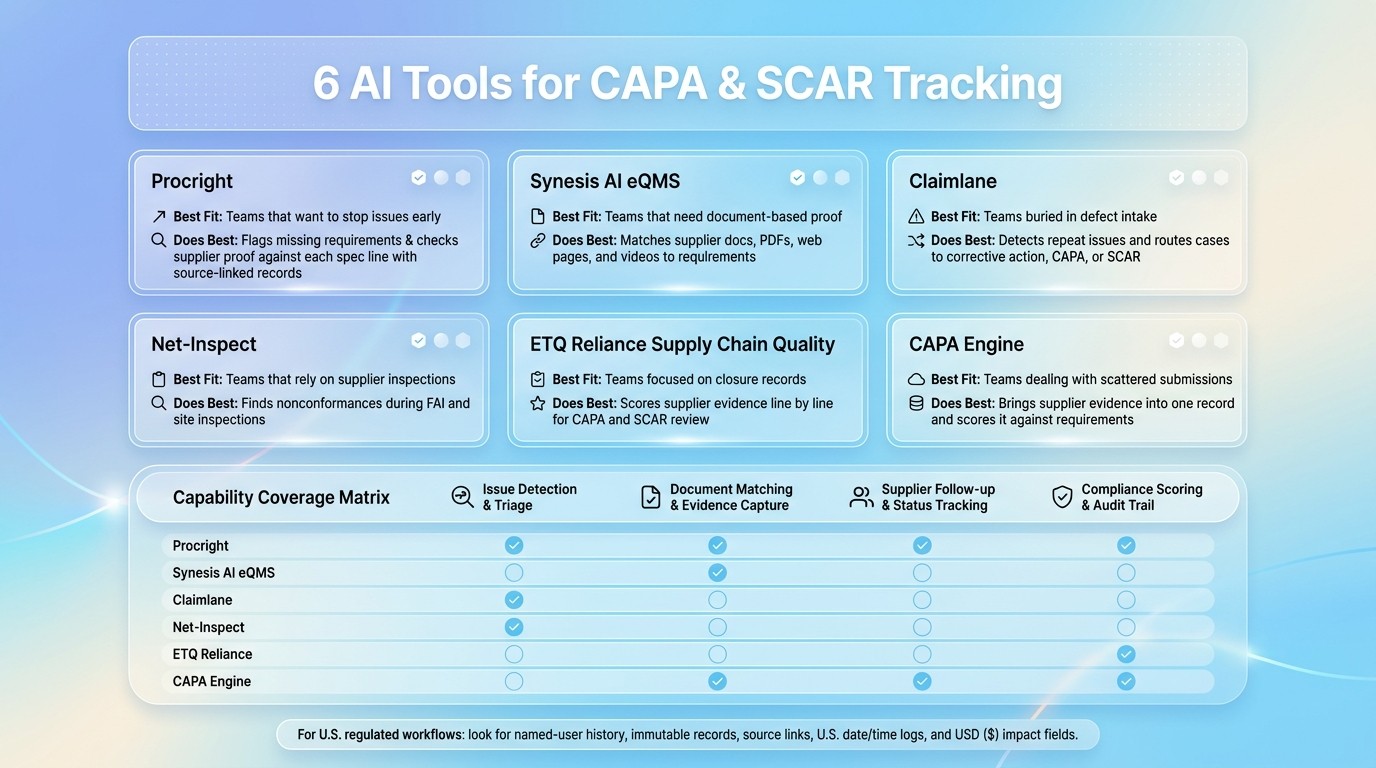
6 AI Tools for CAPA & SCAR Tracking: Feature Comparison
Tool | Best fit | What it does best |
|---|---|---|
Procright | Teams that want to stop issues early | Flags missing requirements, checks supplier proof against each spec line, and keeps source-linked records |
Synesis AI eQMS | Teams that need document-based proof | Matches supplier docs, PDFs, web pages, and videos to requirements |
Claimlane | Teams buried in defect intake | Detects repeat issues and routes cases to corrective action, CAPA, or SCAR |
Net-Inspect | Teams that rely on supplier inspections | Finds nonconformances during FAI and site inspections |
ETQ Reliance Supply Chain Quality | Teams focused on closure records | Scores supplier evidence line by line for CAPA and SCAR review |
CAPA Engine | Teams dealing with scattered submissions | Brings supplier evidence into one record and scores it against requirements |
A strong setup should also keep named-user history, immutable records, source links, U.S. date/time logs, and USD ($) impact fields in one place. In regulated U.S. workflows, that’s not a nice-to-have. It’s part of staying ready for review.
What AI Should Handle in CAPA and SCAR Tracking
Six AI jobs matter most in CAPA and SCAR workflows.
First up: specification gaps. Missing load tolerances, undefined compliance standards, and other technical details should get flagged during spec creation, not weeks later after a corrective action is already open. AI can pull in procurement inputs during spec development so missing requirements show up early. Then it should compare supplier responses against that full requirement set.
Once an issue is open, the next big job is document matching. AI should scan unstructured files like PDFs, product manuals, and videos, then map supplier claims to the exact requirement lines they relate to. That gives quality teams evidence-backed answers instead of taking vendor claims at face value. From there, the system should feed that comparison into a line-by-line compliance score.
Compliance scoring is where this gets much more useful. A simple pass/fail doesn’t tell the full story. Strong AI tools should show line-by-line results such as Yes, Partially, No, or Not Found, with each result tied to the source document. That makes SCAR scoring more objective and much easier to defend.
For U.S. quality teams, audit trail creation isn’t optional. Every AI-driven review should be time-stamped in local U.S. time and linked back to the exact page or section in the source file. If something is missing, the system should also trigger follow-up on its own.
That leads to another key function: automated supplier follow-up. When a supplier response is missing or incomplete, AI should flag it right away and send it back for follow-up, instead of waiting for someone to notice the gap later.
1. Procright
Procright takes those core CAPA and SCAR workflows and moves them earlier in the process: procurement. Instead of waiting for a problem to show up after a purchase order is sent, Procright helps teams catch missing requirements during spec creation.
Its AI agent interviews stakeholders and flags gaps before they turn into formal nonconformances. That can include missing load tolerances, unclear compliance standards, and other spec issues that are easy to miss at the start.
It also compares web pages, PDFs, manuals, and videos against each specification line. The output is simple: Yes, Partially, No, or Not Found. Each result links back to the exact source, including the right document section or video timestamp. So this isn't just a document check. It's a line-by-line requirement review tied to the compliance score.
That matters when a quality team needs to issue a SCAR. If a supplier misses a requirement, the team can export cited evidence, such as a page number or video timestamp, to back up the SCAR. Teams can also weight critical requirements, which helps push safety and regulatory items to the top.
The same traceability helps during audits too. Every comparison creates a source-linked audit trail, with each result tied to the exact page or section in the source file.
Useful when procurement decisions come with high compliance risk. This is especially critical for supplier risk monitoring where early detection prevents downstream failures.
2. Synesis AI eQMS
Synesis AI eQMS turns supplier documents into source-linked CAPA and SCAR evidence. It’s built for teams that need that proof fast during CAPA and SCAR reviews.
On the document matching side, the system uses AI tools for data validation to check specifications item by item and maps them to supplier documents, manuals, and data sheets . It also reviews web pages, PDFs, and product videos to find supporting evidence . Each match links back to the source.
The system also scores each requirement against supplier evidence pulled from web pages, PDFs, and video content. Teams can use it to document supplier responses, support SCAR closure, and keep audit-ready evidence in one place. This centralized documentation is a core component of broader AI-driven supplier risk assessment strategies. That helps speed up review and closure when suppliers need to prove compliance line by line.
3. Claimlane
After document evidence comes triage. That’s where Claimlane steps in.
Claimlane handles issue detection and triage for CAPA and SCAR. It scans defect descriptions and visual evidence to spot repeat nonconformances, which helps procurement teams catch and route supplier nonconformances early.
From there, it sends each nonconformance to the right path:
corrective action
CAPA
SCAR
In plain terms, it helps teams solve common procurement issues without playing guessing games. Instead of sorting every case by hand, they can move faster and send each problem where it belongs.
4. Net-Inspect
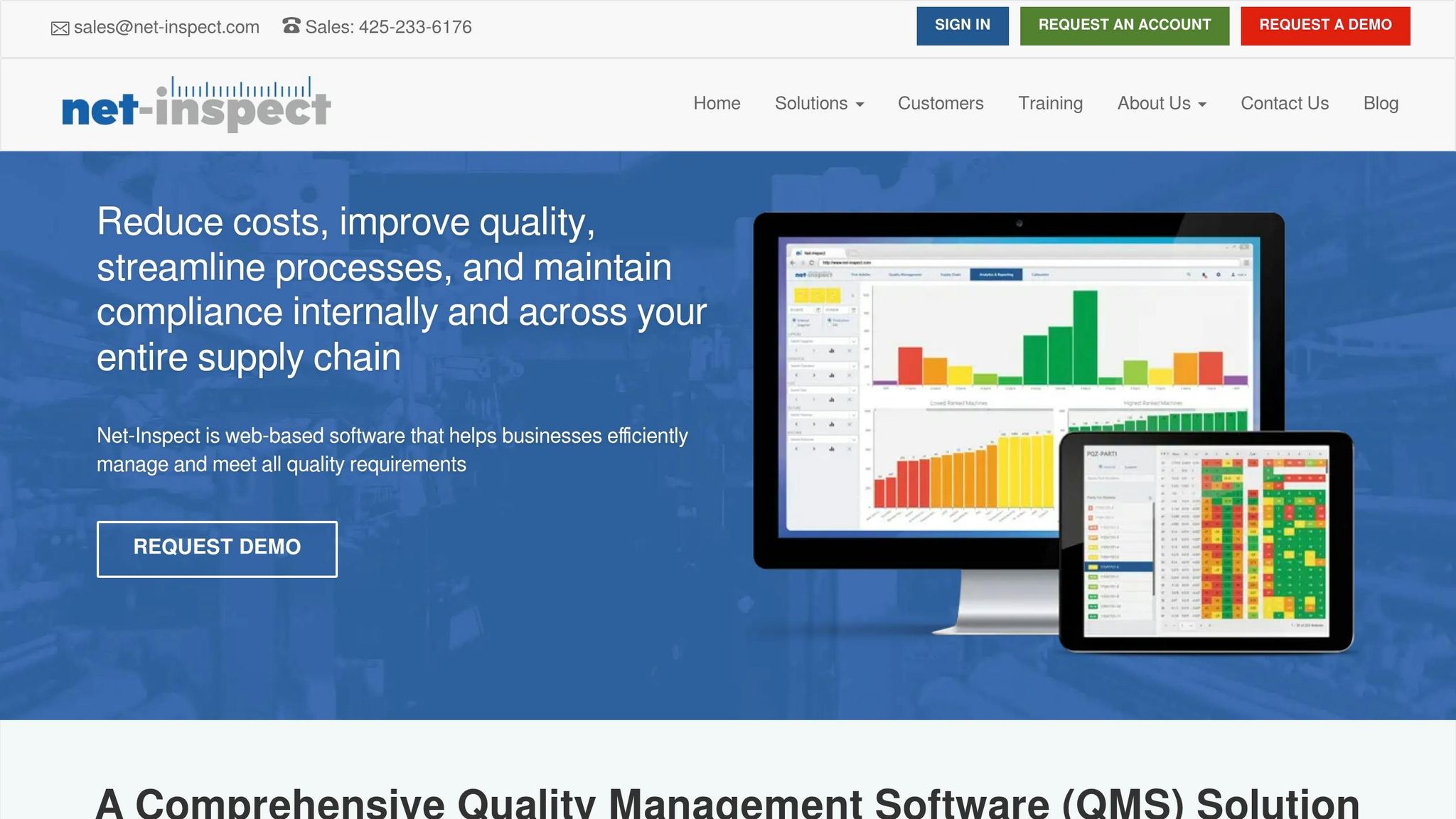
Net-Inspect works differently from document-based review. Instead of waiting for paperwork to show a problem, it flags nonconformances during supplier inspections, including First Article Inspections (FAI) and supplier-site inspections.
When the platform finds a nonconformance, it sends the issue to CAPA or SCAR based on severity and issue type. It also records inspection data at the supplier’s facility, which helps teams spot nonconformances before shipment.
5. ETQ Reliance Supply Chain Quality
After teams spot nonconformances, ETQ Reliance Supply Chain Quality helps them score supplier evidence against each requirement. It checks technical specifications line by line and returns clear outcomes like yes, partially, or no. That makes reviews easier to track and keeps records in order for CAPA and SCAR closure.
6. CAPA Engine
For teams handling supplier nonconformances, CAPA Engine turns scattered evidence into records that are ready for review. It pulls supplier submissions into one place, checks that evidence against requirements, and scores compliance line by line.
That helps teams move through reviews faster, keep SCAR documentation cleaner, and make CAPA decisions with more consistency.
As a result, it’s easier to compare top AI procurement tools based on how they handle evidence, scoring, and audit support.
Tool Capability Comparison
Use this table to line up each tool with the CAPA and SCAR job it handles best.
Tool | Issue Detection & Triage | Document Matching & Evidence Capture | Supplier Follow-up & Status Tracking | AI Supplier Scoring & Audit Trail |
|---|---|---|---|---|
Procright | Flags missing requirements and technical gaps before vendor contact | Scans web pages, PDFs, and videos; maps evidence to individual spec lines | Speeds verification and status tracking | Line-by-line scoring (Yes/Partially/No/Not Found) tied to cited sources |
Synesis AI eQMS | - | Matches supplier documents to requirements and supports evidence-backed SCAR closure | - | - |
Claimlane | Triages defects and routes them to corrective action, CAPA, or SCAR | - | - | - |
Net-Inspect | Flags nonconformances during FAI and supplier-site inspections | - | - | - |
ETQ Reliance Supply Chain Quality | - | - | - | Scores supplier evidence line by line for CAPA and SCAR closure |
CAPA Engine | - | Consolidates submissions and verifies evidence | - | Scores compliance line by line |
Next, use these functions to check deployment fit for U.S. procurement and quality teams.
Deployment Considerations for U.S. Procurement and Quality Teams
After you compare tool features, the next step is simple: make sure the platform fits the way your team actually approves work and stores records. A good system should keep requirements, evidence, and approvals tied together in one record. That cuts down on back-and-forth and makes reviews much easier.
In regulated settings, role-based access is a must. Procurement, Engineering, IT, and Quality should only be able to edit the fields assigned to them. That keeps ownership clear and helps prevent accidental changes.
Just as important, every status change, approval, and evidence submission should be logged to a named user with an immutable history. If someone needs to check what happened, who approved it, or when a file was added, the record should show it without gaps.
For supplier records, check that the system supports both imperial and metric units. It should also use consistent compliance labels such as Yes, Partially, and No. On the finance side, impact fields should be set to USD ($) so financial impact can flow into spend and budget reporting without extra cleanup.
Traceability is where all of this comes together. When a team has to reopen a closed case, the record should still preserve source traceability for later review.
Conclusion
The strongest AI tools for CAPA and SCAR tracking bring issue detection, evidence checks, scoring, and audit trails into one workflow.
So the main question isn't which tool has the longest feature list. It's where your workflow tends to break: before purchase, during supplier review, or at CAPA closure.
For Procright users, the fit comes down to one thing: can the platform stop requirement gaps before they turn into nonconformances? Procright makes the most sense for teams that need to spot requirement gaps early and keep compliance evidence linked to the source.
The right pick fixes the gap that creates the most compliance risk.
FAQs
How do I choose the right AI tool for my CAPA or SCAR workflow?
Choose the AI tool based on the biggest friction points in your team’s buying cycle, especially before the purchase happens. In most cases, that comes down to decision quality, side-by-side comparison, and documentation you can defend later.
Put the most weight on tools that support:
Automated specification drafting
Structured product discovery
Transparent compliance scoring with cited evidence
Audit trail support
It also helps if the platform works with your internal templates and lets stakeholders work together early, not at the very end when feedback gets messy and slow.
What audit trail features should I require?
Require an audit trail that shows the full, cited path behind each decision. Every requirement should tie back to clear evidence, such as source documents, web pages, or videos, so anyone reviewing the file can see exactly what data led to each conclusion.
Also check for logs that show who reviewed the materials, when they reviewed them, and how exceptions or conflicting information were resolved. That way, the process is traceable, easier to defend, and ready for an audit.
Can AI help prevent SCARs before they start?
Yes. AI can help prevent Supplier Corrective Action Requests (SCARs) by catching common root causes early, especially incomplete or vague technical specifications that lead to poor product-to-requirement matches.
Procright does this by spotting missing requirements and gaps in draft specifications before sourcing starts. That gives teams a better shot at writing complete, standards-aligned, technically precise specs and cuts the risk of downstream issues that can trigger corrective actions.
Related Blog Posts
Try it on a real buy
Bring one category. Watch where the flags land.
We use a little analytics to see which pages actually help. Nothing else, no ad trackers.