How AI Automates Supplier Risk Scoring
How AI collects, normalizes, and scores supplier data to automate risk-based approvals, alerts, and continuous monitoring.
In this article
AI supplier risk scoring helps me check suppliers faster, spot issues earlier, and keep a clear record of why a supplier was approved or flagged. That matters more now because 97% of global organizations had at least one supply chain breach in 2025, up from 81% the year before.
Here’s the short version:
I start by setting risk groups: financial, compliance, supplier concentration, and day-to-day delivery risk
I sort suppliers by spend, business impact, and how hard they are to replace
I pull data from ERP, onboarding, quality, outside watchlists, news, and supplier documents
I clean names, IDs, dates, and files so each supplier has one record
I turn that data into simple status checks like Yes, Partially, No, and Not Found
I apply score weights and risk bands to decide who gets auto-approved, who needs review, and who must be escalated
I set re-scoring triggers for things like expired documents, sanctions hits, ownership changes, defect spikes, and cyber reports
I send high-risk or incomplete cases to people for the final call
A few points stand out. Good data comes first. If supplier names, records, or documents are messy, scores can be wrong, which is one of the supplier scoring challenges solved by AI. Monitoring between annual reviews also matters, because supplier risk can change fast. And AI should support decisions, not replace human approval for high-risk cases.
If I had to sum it up in one line: AI makes supplier risk scoring a live process instead of a once-a-year spreadsheet task.
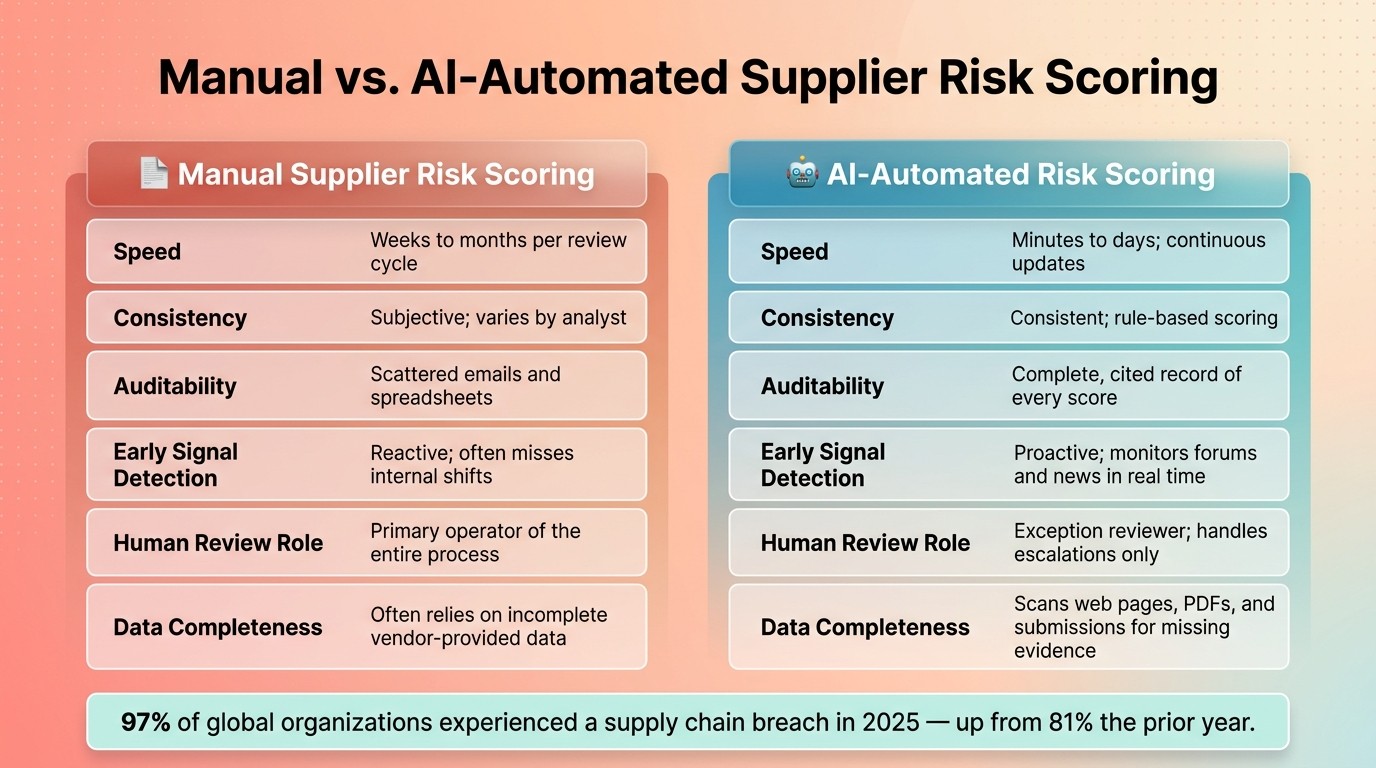
Manual vs. AI Supplier Risk Scoring: Key Differences
ML-Driven Supplier Risk Score Analytics | AI for Business
1. Define risk categories, supplier segments, and data requirements
Start by setting your risk categories. That gives AI a steady way to score suppliers during onboarding, approval, and monitoring.
Choose the risk dimensions the model will score
Use four core dimensions: financial, operational, compliance, and concentration. Each one needs clear indicators up front. If the signals are vague, the scoring will be inconsistent.
Risk Dimension | Key Indicators |
|---|---|
Financial | Credit health, financial pressure, years in business, cash flow, debt load, or default risk |
Operational | On-time delivery rates, missing capabilities, support availability, capacity constraints |
Compliance | Sanctions exposure, safety records, environmental certifications |
Concentration | Single-source status, geographic location, country or region risk |
For U.S. teams, compliance mapping often includes OFAC sanctions, OSHA safety records, and EPA environmental certifications.
These dimensions feed the model in the next step. Think of them as the scorecard before any score gets assigned.
Segment suppliers by spend, criticality, and replaceability
Not every supplier deserves the same amount of review. Put more attention on high-spend suppliers, any single-source supplier, and any supplier connected to regulated products or sensitive data systems.
Spend is only part of the picture. Replaceability matters too. A supplier you can switch in two weeks is a very different case from one your business leans on for years. If a supplier is hard to replace and tied to a key process, approval rules should be tighter than they are for a routine indirect vendor.
This is where segmentation pays off. It helps your team spot concentration risk across the full supplier base, not just one supplier at a time.
In practice:
High-impact suppliers need stricter approval rules and more frequent monitoring
Low-risk suppliers that are easy to replace can move through a lighter process
That segmentation also tells the system how often to score each supplier and how strict the workflow rules should be.
Prepare clean supplier master data and historical records
AI scoring starts with clean supplier master data. Before the first run, clean up duplicates, assign a single supplier ID to each record, standardize legal entity names and site addresses, and load 12 to 24 months of structured history from ERP, quality, and onboarding systems.
If IDs are messy or names don’t match, the system can miss ownership changes, stale documents, or duplicate suppliers. That’s where things go sideways fast. You should also require suppliers to report ownership changes, cyber incidents, and other material changes so the system can re-score on its own.
Once the baseline data is clean, the system can combine internal records with external signals without mixing up suppliers. Then you’re set up for the next step: collecting the data that powers those risk definitions.
2. Collect and consolidate supplier data from internal and external sources
Once risk categories are set, the model needs one clean data stream before scoring starts. The next move is to pull internal and external data into a single supplier record.
Pull internal data from ERP, quality, and onboarding systems
Start with your ERP. It usually holds purchase orders, invoices, delivery dates, and late shipments - the basic inputs for supplier reliability scoring. Quality systems add nonconformance records. Onboarding systems fill in completed questionnaires and uploaded compliance documents.
One small step makes a big difference here: standardize dates before ingestion. If dates aren't aligned, event timing gets messy fast, and stale-data checks can drift off course.
Internal systems show past performance. External sources help you spot risk that's just starting to surface.
Enrich records with external financial, regulatory, and news data
AI can add outside signals to supplier records, including financial health, regulatory status, sanctions exposure, litigation, and news sentiment. It can also scan employee forums for signs of security, compliance, or workplace issues that don't show up in formal reports.
That matters because 97% of global organizations experienced at least one supply chain breach in 2025, up from 81% the year before. At this point, waiting for a supplier to report its own problem is not a workable plan.
After collection, the data needs to be matched and normalized so each supplier ends up with one record, not five versions of the same company.
Normalize names, locations, and documents before scoring
Match supplier names, locations, and IDs across systems so one supplier doesn't appear as several records. For example, "Acme Corp" and "ACME Corporation" need to resolve to the same entity. If that match fails, the AI can miss ownership changes, stale documents, and duplicate risk signals.
Normalization also applies to documents. AI can pull key fields from PDFs and map each field to a risk item with a source citation. If a document doesn't support a claim, label it "Not Found" instead of compliant. Procright can analyze PDFs and technical manuals, then link each extracted field to its source.
With the data in one place, the next step is to map those signals to scoring rules and AI models.
3. Map risk factors to scoring rules and AI models
Convert supplier data into measurable risk features
Raw supplier data only starts to matter when AI turns it into clear risk features. For supplier onboarding and approval workflows, that usually means mapping each requirement to simple statuses like Yes, Partially, No, or Not Found.
AI can also pull signals from web pages, forums, and other unstructured sources. That helps teams spot risk signals that don't show up in forms or documents. From there, group those features into practical risk buckets such as compliance, operational, financial, and security-practice risk. Think capacity, log retention, support coverage, financial health, and employee sentiment from forums.
Apply weighted scoring rules and threshold bands
After the features are set, procurement teams assign weights based on what matters most in the supplier relationship. A critical compliance item should count more than a routine check. And those weights can change based on supplier criticality and replaceability.
Threshold bands then turn the score into an action signal. A common setup uses low, medium, and high bands so the team knows when to approve, monitor, or escalate. The key is consistency. Use the same cutoffs across suppliers and review cycles, and tie those thresholds to re-scoring and escalation rules.
Use AI to predict risk changes and explain the result
Once scores are live, AI can keep them current when new material appears or external risk changes show up between reviews. It can also flag odd response patterns or weak evidence quality.
Explainability isn't optional here. A score only works if the team can trace each change back to source evidence.
Treat forum sentiment as supporting evidence, not a stand-alone risk trigger.
Procright links each compliance indicator to its source document or data point, so procurement can defend onboarding and approval calls.
4. Automate scoring runs, gap flagging, and monitoring
Run initial scoring and re-scoring as new data arrives
Once your thresholds are set, the next step is simple: decide when scores run and what causes a re-score.
The first score usually happens during supplier onboarding. At that point, each supplier is checked against your stated requirements and assigned a risk tier right away. That first result becomes your baseline, and later reviews build from it.
After that, re-scoring should happen on its own when new data shows up. A new audit result, a ransomware incident, or a mismatch between a supplier's claims and updated documents can all trigger a new score without anyone having to line up a manual review. If your contracts require suppliers to report material events like cyber incidents or ownership changes, the system can re-score as soon as that notice comes in. In practice, that means using event-driven re-scoring between scheduled reviews.
That baseline score then feeds day-to-day monitoring and the approval steps that come after it.
Flag missing documents, stale data, and sudden risk shifts
This is where continuous monitoring starts to pull its weight.
The system can watch for expired certifications, missing requirements, stale data, and conflicts in supplier claims. The threshold bands from the prior section decide which issues should trigger alerts, so analysts spend time on exceptions instead of chasing routine follow-up. And when documents are missing, the supplier should move into a correction queue, not just generate another alert that sits in someone's inbox.
The same applies to sudden risk shifts. An unexplained jump in defect rates, a sharp drop in on-time delivery, or a change in supplier ownership can all trigger an immediate alert and a re-score. AI can also scan public forums and news sources for early warning signs, such as complaints about security practices or signs of operational instability, that standard questionnaires often miss.
Compare manual review and AI monitoring side by side
Automated monitoring improves speed, consistency, and auditability.
Feature | Manual Supplier Risk Scoring | AI-Automated Risk Scoring |
|---|---|---|
Speed | Weeks to months per review cycle | Minutes to days; continuous updates |
Consistency | Subjective; varies by analyst | Consistent; rule-based scoring |
Auditability | Scattered emails and spreadsheets | Complete, cited record of every score |
Early Signal Detection | Reactive; often misses internal shifts | Proactive; monitors forums and news in real time |
Human Review | Primary operator of the process | Exception reviewer; handles escalations |
Data Completeness | Often relies on incomplete vendor-provided data | AI scans web pages, PDFs, and supplier submissions for missing evidence |
Side by side, the shift is pretty clear. Manual review often drags because people are piecing things together from emails, spreadsheets, and supplier responses. Automated monitoring keeps the process moving and leaves a cited trail behind each score.
That also changes the role of human reviewers. Instead of running the whole process by hand, they become decision architects. They step in when AI flags an exception or when a high-value purchase needs a defensible, auditable judgment call.
Alerts from monitoring should flow straight into onboarding or review queues. Those alerts and re-scores then feed the approval workflow in the next step.
5. Use risk scores in supplier onboarding and approval workflows
Route suppliers by risk tier during onboarding
Once scoring is done, the score should shape the approval workflow right away. Put simply, each supplier should go down the path that matches its risk tier.
Low-risk suppliers can move through automated checks. Medium-risk suppliers should go to management review. High-risk suppliers need legal, security, and executive sign-off. That shift matters because it turns risk scoring from a static report into a live approval rule.
Embed scores in purchase order approvals and supplier reviews
The same score should stay with the supplier across every approval screen. Show it in supplier profiles, sourcing screens, ERP workflows, and PO approvals. And don’t stop at the score itself. Add a direct link to the source evidence behind each score so reviewers can see what’s driving the result.
When new material data comes in, the score should update on its own. That way, buyers and approvers aren’t working from stale information.
Workflow rules, oversight, and key takeaways
Here’s how each risk tier maps to the approval path, the documents needed, and the final reviewer:
Risk Tier | Approval Path | Required Documentation | Reviewer/Approver |
|---|---|---|---|
Low (0–30) | Auto-approval | Business license, tax ID, COI | Auto-activation; periodic spot checks |
Medium (31–70) | Manager review | Security questionnaires, financial statements, ESG data | Department head; AI-flagged gap review |
High (71–100) | Executive review | Site visits or virtual audits, legal review, financial health assessment | Legal Counsel / Risk Committee |
Incomplete Data | Pause for missing data | AI-flagged missing specs or stale documents | Supplier (self-service) / Buyer |
Material Change | Re-score after material change | Updated risk assessment, material change report | Original approver / Risk Committee |
High-risk approvals and exception handling should stay with human reviewers. If the score is high or the evidence is incomplete, the final yes-or-no decision belongs to a person.
Procright can support this workflow by assigning Yes, Partially, No, or Not Found to each requirement and linking the underlying source evidence.
FAQs
How much data do I need to start AI risk scoring?
You don’t need a huge historical dataset to start AI risk scoring with Procright.
It starts with your procurement requirements, either pulled from an uploaded specification or built inside Procright through its AI-guided team interview.
Once those requirements are set, the platform uses them to review relevant documents and technical sources. It then produces transparent, cited compliance scores without needing years of past transaction data.
What should trigger automatic supplier re-scoring?
Automatic supplier re-scoring should kick in when the data behind a supplier’s compliance and risk profile changes in a meaningful way, or when key information is missing.
That can happen when new evidence conflicts with an earlier assessment, when vendor documents like data sheets or certifications are updated in a way that affects risk, or when the first set of specifications is vague or incomplete. If the starting data is shaky, the risk score can be off too.
When should human review override the AI score?
Human review should override the AI score when procurement decisions carry high stakes and demand trust and auditability.
Teams need to step in when AI flags missing data, points out contradictions, or needs expert judgment to check partial compliance and confirm that the evidence matches what’s required in practice.
Related Blog Posts
Try it on a real buy
Bring one category. Watch where the flags land.
We use a little analytics to see which pages actually help. Nothing else, no ad trackers.