AI Error Detection in Procurement: 7 Use Cases
AI flags procurement risks early-spec mismatches, duplicate buys, wrong SKUs, missing docs, price anomalies, and policy breaches.

Procurement errors cost money fast. In this article, I’d sum it up like this: AI helps me catch mistakes before they turn into delays, extra spend, or audit issues.
Here’s the core point in plain English:
AI checks specs against supplier offers
AI flags duplicate orders and duplicate expenses
AI spots wrong parts, SKUs, and catalog items
AI finds missing documents and missing proof
AI detects supplier data gaps
AI flags price issues against contracts and past spend
AI checks for policy breaches like off-channel buying
A few numbers stand out: maverick buying can eat up 1.8% of annual purchase value, and AI can cut long purchase reviews from 16 weeks to under 7 days. The article also says AI can reduce wrong product selection risk by up to 90%.
What I like here is the role AI plays: it does the checking, and people make the call. That means you get fewer blind spots, clear source-backed flags, and a shorter list of items that need review.
Quick Comparison
Use Case | What AI Checks | Main Outcome |
|---|---|---|
Spec mismatches | Requirements vs. supplier files | Fewer bad-fit offers |
Duplicate orders | POs, invoices, expense data | Less double buying |
Wrong part selection | SKUs, models, technical details | Better item fit |
Missing documents | Certificates, quotes, proof files | Fewer workflow stalls |
Supplier data gaps | Master data, supplier records | Cleaner supplier records |
Price anomalies | Contract rates, line items, spend history | Less overpayment |
Policy breaches | Approval rules, vendor lists, channel use | Better policy control |
If I were starting with this, I’d focus first on spec comparison, duplicate detection, and price checks. Those three areas often hit budget, cycle time, and review effort the hardest.
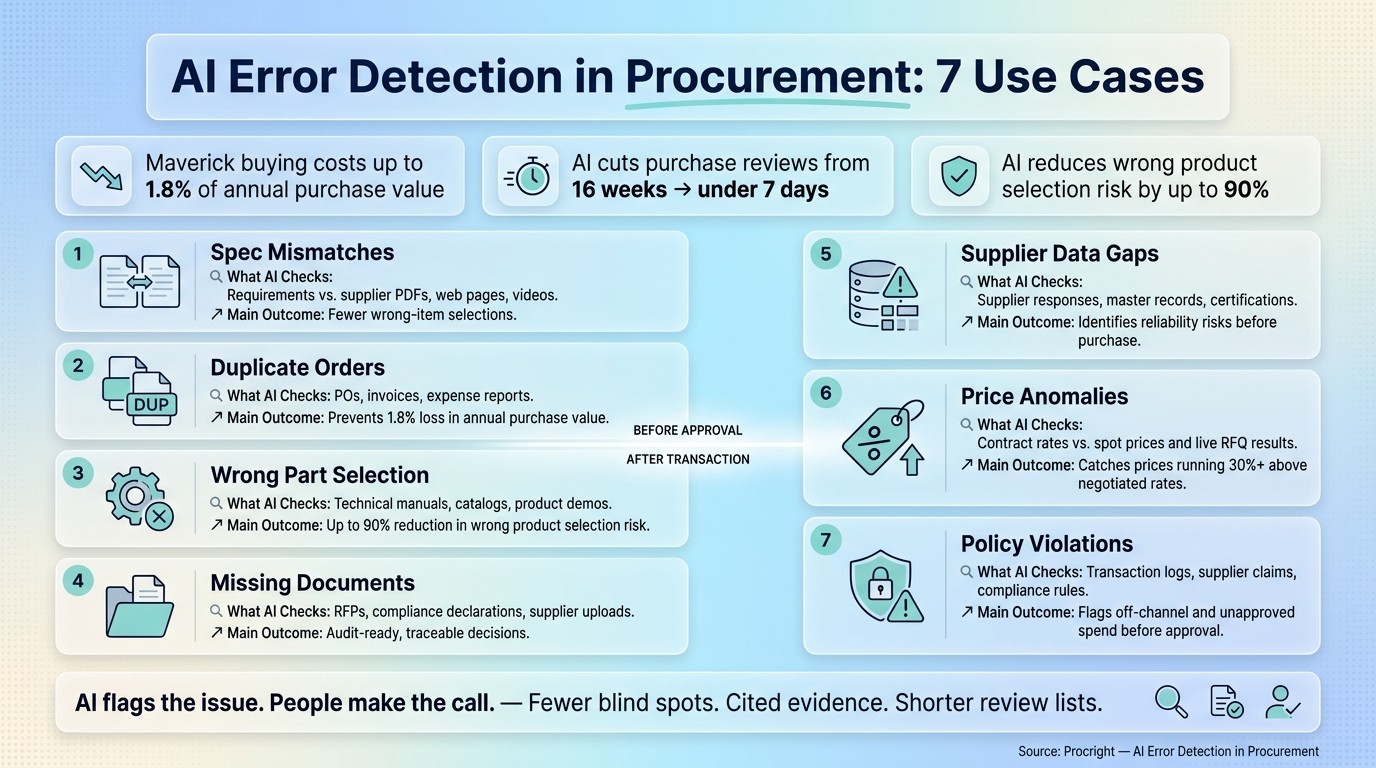
AI vs. Manual Procurement Error Detection: 7 Use Cases at a Glance
AI Functional Use Cases Procurement
Where AI Fits Into the Procurement Review Process
AI adds review checkpoints at the spots where procurement mistakes tend to sneak in. The seven use cases below show how those checkpoints work in practice.
Before a Transaction Is Created: Requisitions, Specs, and Supplier Comparisons
Before a purchase order goes out, AI can spot problems that often begin in the requisition itself. It flags missing requirements, like load tolerances or compliance standards, before vendors are even contacted. And that matters, because a spec that leaves out details like those can easily lead to buying the wrong product by writing a technical procurement specification that covers every detail.
During supplier comparison, AI reviews supplier web pages and PDFs and matches each offer against the stated requirements line by line. It flags conflicts and standardizes technical details, such as converting millimeters to inches, so teams are making a like-for-like comparison instead of comparing apples to oranges. For high-value requisitions, it can also send the request to extra technical or policy review before anything moves ahead.
These pre-transaction checks connect directly to the specification and selection errors covered next.
After a Transaction Is Created: POs, Invoices, Supplier Records, and Policy Checks
Once a transaction is in motion, AI keeps watch across the paperwork and records that follow. It checks issued purchase orders against contract terms, reviews invoice line items for price differences, and scans supplier master records for missing information or signs that a supplier may lack the capacity or stability to fulfill the contract.
It also tracks whether purchases were made through approved channels, which helps teams catch maverick spend before it starts piling up. At this stage, AI helps spot:
Duplicate activity
Missing documents
Supplier data gaps
Price anomalies
Policy violations
AI can also standardize incoming dates and units for U.S. workflows. For example, it can convert metric measurements and normalize dates to MM/DD/YYYY so invoice matching and policy checks don’t break over formatting differences.
The next use cases focus on the post-order errors AI catches in POs, invoices, supplier records, and policy checks.
Human Review Stays in Control
AI flags issues. People make the call.
It surfaces likely problems with cited evidence so procurement, finance, and compliance teams can review the facts and decide what to do.
"Speed may open the door, but trust is what gets a solution adopted... Can you prove it? That means showing where the data comes from." - Joe Kramer
The point isn’t automation for its own sake. It’s to give your team a shorter, more focused list of items that need attention, so reviewers spend their time on actual problems instead of routine checks.
1. Specification Mismatches Between Requirements and Supplier Offers
Error Source
Spec mismatches often begin inside your own process. Reused wording, generic templates, and vendor datasheets can shape the RFP before procurement even sends it out. And in many teams, the spec gets treated like a draft instead of a firm requirement.
"The spec document is treated as a starting point, not a contract with yourself. Requirements get copied from last year's purchase... Nobody asks the hard clarifying questions because nobody has time." - Procright
When requirements are vague - like saying "enterprise-grade security" instead of naming a specific compliance standard - vendors tend to fill in the blanks in whatever way makes them look compliant.
How AI Detects It
This is the first point where AI gives the team more control: the spec itself.
Before vendor outreach, AI can prompt the team to fill in missing requirements, including load tolerances, compatibility constraints, and specific compliance standards that often get skipped in a rushed meeting.
Then, during supplier comparison, AI scans vendor PDFs, web pages, product manuals, and videos. It maps supplier data against each requirement and labels every item as Yes, Partially, No, or Not Found, with a cited source behind each decision.
Typical Procurement Signals
The warning signs are usually pretty clear once you know where to look. A flood of clarification emails is one. Subjective scoring is another. Both usually point to the same problem: the original requirements were too vague.
Control Gained by the Team
The team moves from guesswork to auditable requirement documents backed by traceable evidence. Each conclusion links to a source - such as a manual, product video, or technical document - so the decision is ready for audit.
Once the spec is cleaned up, the next risk is duplicate ordering.
2. Duplicate Purchase Orders and Expenses
Error Source
Once AI fixes spec mismatches, it can also spot when the same need gets bought twice.
This usually starts with slow procurement. A team needs something, waits too long, then buys it straight from a vendor site or submits it as an expense even though it should have gone through procurement.
Scattered request data makes the problem worse. When needs are split across departments and buried in old documents, two teams can order the same solution without knowing another request is already in motion.
How AI Detects It
Manual reviews often miss duplicates when product names or descriptions don't match word for word. AI uses semantic mapping to connect new requests with existing spec lines and past purchase orders, even when the language changes.
It can also pull data from PDFs and DOCX files into a single record. That makes hidden overlap much easier to spot.
In most cases, these patterns appear before the second order gets approved.
Typical Procurement Signals
A few signals tend to show up again and again:
An employee expenses a purchase that looks a lot like one already in the system
A department buys software licenses straight from a vendor website instead of using the procurement queue
Two teams submit requests for the same tool under different descriptions
Control Gained by the Team
When compliant buying is simple, side routes tend to drop off. AI flags duplicate spend early and gives the team one audit trail for each request.
It also flags maverick spend and helps keep each transaction audit-ready.
The next risk is selecting the wrong catalog item.
3. Wrong Part Selection and Catalog Item Mismatches
Error Source
Even after a request gets approved, the wrong catalog item can still slip through. The issue here isn't quantity. It's the item itself: the SKU, model, size, or configuration doesn't match what's needed.
This kind of failure shows up after the need is already clear. The request passes approval, but the catalog item picked doesn't line up with the actual requirement - maybe it's the wrong model number, an incompatible configuration, or a substitute part that misses the technical spec.
How AI Detects It
AI checks the item itself, not just the vendor description. Instead of matching a vendor summary to a spec at a glance, it breaks the specification into individual requirement lines and matches each one against technical data pulled from manuals, PDFs, product videos, and web pages. Each line gets a label - Yes, Partially, No, or Not Found - along with a cited source.
That line-by-line check matters. One missed detail can throw off product selection and lead to rework or delays.
Typical Procurement Signals
Common signs of a catalog mismatch include:
Model numbers in the request and selected item don't match
Dimensions or units in the catalog entry are off
Accessory or configuration fields don't fit the stated requirement
Vendor responses to the same requirement line are inconsistent
When those signals show up, there's a good chance the selected item isn't the right fit.
Control Gained by the Team
Reviewers make the call based on source evidence, not vendor wording. Every compliance claim is tied to a cited source - a specific PDF page, video timestamp, or technical guide - so the team can check the conclusion directly instead of taking a vendor score at face value.
Teams can also give more weight to critical requirements than to minor ones. So if a critical requirement is off, it matters more than a gap on a lower-priority line. That gives reviewers a documented reason to approve or reject the item.
4. Missing Documents in Procurement Workflows
Error Source
Even when the item itself is correct, the process can still grind to a halt if the file set is incomplete. This usually shows up in familiar ways: a missing compliance certificate, an outdated quote, or no clear review trail.
How AI Detects It
AI spots missing documents at two stages.
Before the workflow moves ahead, it prompts teams to gather the required files up front. That includes compliance certificates, version-controlled quotes, and sign-off records.
After the specs are sent, AI scans supplier PDFs, product manuals, and videos and maps the evidence against specific requirements. If it can't find a required certification or technical proof, the item is flagged as "Not Found". There’s no guessing. The gap stays visible.
Typical Procurement Signals
A high volume of vendor clarification emails is often a sign that the documentation was incomplete.
Control Gained by the Team
When AI flags missing evidence early, teams no longer have to lean on vendor claims alone. Each compliance claim is tied to a specific source, such as a PDF page, a manual section, or a video timestamp, so incomplete files are easy to spot and track.
Reviewers also get a cited record showing what was missing, what was checked, and why the decision changed.
Once the file set is complete, the next check is validating supplier data to ensure records match.
5. Supplier Data Gaps and Inconsistencies
Error Source
After document completeness, the next supplier risk is simple: does the supplier data line up across every field?
This is where things often start to drift. Teams may pull details from vendor datasheets or marketing materials, while the original requirements are only partly filled in. In that setup, it’s easy for records to clash. Vendors may spotlight favorable certifications and leave out less helpful details. Supplier records can also fall apart when master data is missing fields or uses inconsistent entries.
How AI Detects It
AI checks supplier responses, uploaded files, and master-record fields against the attributes that are required, then flags contradictions and missing information. It can also infer which fields should exist for a given category - such as load tolerances, compatibility requirements, or regional support coverage - and call out anything that isn’t there.
That gives reviewers a cleaner record before price and policy checks start.
Control Gained by the Team
When these gaps are named early, reviewers can work from verified evidence instead of vendor descriptions. Each compliance claim is tied to a source, and any claim that can’t be verified is flagged plainly.
The result is a defensible audit trail.
6. Price Anomalies in Purchase Data
Error Source
After supplier and document checks, AI can compare what was ordered with what was actually contracted.
Price anomalies often come from maverick spend, vague specs, and fixed-term contracts that no longer line up with current rates. When employees skip approved channels and buy straight from a vendor's website, they often end up paying list prices that can run 30% above negotiated rates. In plain terms, maverick spend and stale contracts can leave teams paying more than they should.
How AI Detects It
AI detects price anomalies by comparing purchase data against negotiated contract terms, real-time commodity data, and real-time spend analysis. It flags contract-to-PO price mismatches and outlier line items. This process often involves benchmarking products across sectors to ensure pricing remains competitive. It also spots missing rate terms, unit mismatches, or line-item outliers.
This is where line-item scoring helps a lot. Instead of leaning on one overall match score, AI shows the exact place where a vendor's offer drifts from the stated requirements. That's usually where hidden costs sneak in.
Typical Procurement Signals
Frequent vendor clarification emails are often a sign that the spec is too vague. And when the spec is fuzzy, pricing risk tends to show up before the PO is even issued.
Control Gained by the Team
When AI flags anomalies before approval, reviewers can work from current data instead of stale estimates. Each flagged deviation is tied to evidence, which makes the decision traceable and defensible during an audit. Teams can also check current market rates against the PO before approval, while there’s still time to fix the issue.
Once price is validated, the next check is whether the purchase violates policy.
7. Policy Violations and Non-Compliance
The last error type is policy. A purchase can be priced correctly and still fail approval rules.
Error Source
Policy issues usually show up in a few familiar places: skipped approvals, unapproved vendors, or purchases made outside the platform.
Maverick buying is one of the most common leaks. It often leads to spend that could have been avoided.
How AI Detects It
AI checks transactions in real time against approved vendor lists, spend limits, and authorization rules. It flags signals such as unusual card spend, purchases sent outside the platform, and missing approval records.
For GDPR or SOC 2 checks, AI scans vendor documents, PDFs, and product pages for proof. If something is missing, it marks that item as Not Found.
Line-level scoring shows exactly which control failed.
Typical Procurement Signals
One of the clearest signs is off-channel language in the approval trail, like "I just expensed it", or purchases routed through vendors outside the platform.
Control Gained by the Team
If AI flags a violation before approval, reviewers still have time to step in and redirect the purchase. AI flags the issue; reviewers decide whether an exception should be allowed. Each flagged item is tied to a specific source, such as a document, a video, or a product page, so the decision can be traced back later.
That gives procurement, finance, and compliance a clear record for exceptions.
The comparison tables below show how that traceability changes review effort.
How Procright Supports AI Error Detection in Procurement
Procright adds a pre-purchase review layer for the error types covered above: spec mismatches, wrong-part selection, missing evidence, and supplier comparison gaps. That matters most before approval, when mistakes are still easier to catch and fix.
Specification Review and Product Comparison
Procright uses an AI agent that asks procurement teams follow-up questions to bring missing requirements to the surface. From there, it matches supplier materials line by line against the final spec using evidence from web pages, PDFs, manuals, and product videos.
Each match or mismatch includes cited source evidence, so reviewers can check the result for themselves instead of taking the system's word for it. That's a big deal in procurement, where a small spec gap can turn into the wrong purchase.
Compliance Verification and Missing Evidence Checks
For each requirement, Procright labels evidence as Yes, Partially, No, or Not Found, and it flags unsupported claims with links to the exact source. That gives reviewers a clear way to spot missing evidence and compliance issues before approval.
Instead of digging through supplier files by hand, teams can see where a claim is supported, where it's only partly supported, and where no proof shows up at all.
Transparent Scoring for Better Review Decisions
Procright scores each line of the spec, lets teams give more weight to the requirements that matter most, and outputs a cited one-page recommendation. In plain English, it helps reviewers focus on the items that carry the most risk.
The comparison tables below show how these checks cut down manual review and help teams move to a decision faster with automated workflows.
Comparison Tables for a Quick Look at Each Use Case
The sections above break down each error type in detail. The tables below pull those seven use cases into a fast side-by-side view of inputs, detection methods, and control gains.
Put simply, the seven use cases roll up into three core questions: what AI checks, what data it uses, and what control it gives back.
Manual Checks vs. AI-Driven Monitoring for Duplicate Orders
Feature | Manual Checks | AI-Driven Monitoring |
|---|---|---|
Coverage | Sample-based; limited to high-value spot checks | Coverage across all relevant transactions, POs, and invoices |
Speed | Weeks of analyst time | Decisions in minutes or under 7 days |
Alert Quality | Subjective judgment | Transparent scoring tied to cited evidence |
Review Effort | High manual effort | AI automates discovery and item-by-item matching |
Supplier Data Gap Types and the AI Techniques Used to Detect Them
Supplier data issues usually land in three buckets: missing fields, conflicting records, and stale information.
Gap Type | Description | AI Detection Technique |
|---|---|---|
Missing Values | Critical requirements or fields left blank in vendor responses | AI prompts for missing fields and checks whether required requirements are present |
Inconsistent Fields | Vendors providing data in different formats or framing answers favorably | AI maps disparate answers to specific spec lines to surface contradictions |
Outdated Records | Supplier certifications or financial health data that is no longer valid | AI scans supplier sources for expired certifications or stale company data |
Summary Matrix: Seven Error Types, Data Sources Reviewed, and Control Benefit
This matrix links each error type to the data AI reviews and the control it puts back in place.
Error Type | Data Sources Reviewed | Main Control Benefit |
|---|---|---|
1. Spec Mismatches | Requirements vs. supplier PDFs, web pages, and videos | Fewer wrong-item selections |
2. Duplicate Orders | POs, invoices, expense reports | Prevents 1.8% loss in annual purchase value |
3. Wrong Part Selection | Technical manuals, catalogs, product demos | Improves line-level technical-spec verification |
4. Missing Documents | RFPs, RFQs, compliance declarations, supplier uploads | Audit-ready decisions traceable to cited sources |
5. Supplier Data Gaps | Supplier responses, master records, and certification files | Identifies reliability risks before the point of purchase |
6. Price Anomalies | Contract rates vs. spot prices and live RFQ results | Checks live market prices against contract rates |
7. Policy Violations | Transaction logs, supplier claims, internal compliance rules | Audit-ready decisions |
Conclusion
These seven use cases work as one control layer across the full procurement cycle. Put together, they shift procurement from a string of isolated approvals to a more controlled review process.
The biggest upside comes down to timing. AI flags risk while teams still have time to fix it. That moves review earlier in the process, before small issues snowball into rework or audit exposure.
If you're deciding where to begin, start where manual mistakes cost the most: template-based specification comparison, duplicate detection, and price anomalies. This often requires standardizing multi-source product data to ensure accuracy. Tackle the highest-friction errors first, then expand coverage as the workflow grows. Each verified decision adds to the audit trail and helps cut repeat mistakes, so purchases stay aligned with budget and policy.
FAQs
How does AI catch procurement errors before approval?
AI helps catch procurement mistakes before approval by focusing on the specification stage, which is where most of them start.
Procright does this by asking clarifying questions and filling in missing technical requirements. The goal is simple: make sure specifications are complete and match the right standards before any vendor is contacted.
During product discovery, it checks web pages, PDFs, and video content against those requirements. It flags contradictions, points out missing data, and assigns transparent compliance scores so only products that meet the requirements move to final approval.
Which procurement errors should teams prioritize first?
Teams should deal with errors at the specification stage first.
Why? Because if a specification is vague or incomplete, the problem doesn’t stay there. It carries through the whole process. A team can end up buying items that don’t match what they actually need, even if those items pass evaluation.
Fixing gaps, missing information, and wrong details before contacting vendors keeps the process faster, more accurate, and audit-ready.
How much human review is still needed with AI?
AI in procurement can take on a lot of the heavy lifting. It can draft specifications, research products, and map requirements, which saves time and cuts down on manual work.
But people still stay in charge. Your team needs to review and finalize the technical requirements, make sure they match your organization’s standards, and use the AI’s transparent evidence to verify accuracy before going to market.