AI Spend Control for Procurement Teams: Guide
Good spend control stops the next overspend: use AI for real‑time visibility, risk‑based approvals, supplier scoring, and audit-ready overrides.

Most procurement overspend starts before the invoice shows up. I’d sum up this guide like this: if I want tighter control, I need live views of requests, POs, and invoices, risk-based approvals, clear alert limits, supplier checks, category rules, and a clean audit record for every override.
Here’s the short version in plain English:
I track spend before it is locked in, not just after month-end.
I watch category, supplier, department, and budget owner views to catch drift early.
I route approvals by risk, not only by dollar amount.
I use hard stops for failed specs or weak suppliers, and soft stops for reviewed overrides.
I set both dollar limits and % of budget alerts to catch one-time spikes and slow creep.
I score suppliers on price, spec match, contract fit, and risk.
I put tighter rules on categories with repeat overruns, vague specs, or off-contract buying.
I measure results with off-contract spend, policy compliance, cycle time, exception rate, savings, and audit trail completion.
A few facts stand out. The article points to AI checks that score purchases against the original spec, line by line, and keep a recorded trail of approvals and overrides for audits years later. It also shows why approval cycle time is one of the first metrics I’d watch: if it climbs, my rules may be too heavy or my exception path may be weak.
If I had to boil the whole piece down to one idea, it would be this: good spend control is less about reporting last month’s problem and more about stopping the next one.
Keynote Highlights: Reinventing Spend Management with AI | Spend Connect at SAP Connect
Build Real-Time Spend Visibility Across the Procurement Workflow
The first control layer is live visibility across the procurement workflow. You need to see intake, approvals, onboarding, and invoice handling in one up-to-date view. Automation keeps spend data current, so teams aren’t stuck looking at last week’s snapshot.
Track spend by category, supplier, department, and budget owner. Each view should work like a control lens, not just a reporting bucket.
Category views show where spend is piling up and where budget drift is starting.
Supplier views show spend concentration and price movement.
Department views show where demand is building.
Budget owner views connect spending activity to the person accountable for each cost center.
Flag incomplete requisitions early. They often turn into off-contract buying.
Once the dashboard is set up, use it to spot exceptions that need action. Live monitoring only helps if it catches the right problems. The main ones to watch are off-contract purchases, price spikes, and unusual order volumes.
Off-contract buying is often the toughest one to catch because it can begin with an incomplete specification. That gap gives suppliers room to make assumptions. AI monitoring helps by scoring each purchase against the original spec. Set baselines for price and volume, then trigger a review when a supplier or department moves past them.
Use these live signals to guide routing and exception alerts.
Set Approval Routing, Thresholds, and Exception Alerts
Turn live spend signals into approval rules, alerts, and exception paths. The goal isn't to route requests by spend alone. It's to route them by risk.
Route Approvals Based on Spend Level, Category Risk, and Vendor Status
Set approval rules around spend, category risk, vendor status, and budget owner. Each purchase request brings signals from the live monitoring layer, including category, supplier, volume, and budget owner. Those signals decide who needs to review the request and how fast it should move.
Use two control types:
A hard stop blocks the request. This usually happens when a supplier scores poorly on reliability or financial health, or when a critical specification requirement isn't met.
A soft stop flags the request for review. It can still move forward, but only with a reason code and an approved override.
That split matters. It keeps the process moving while still putting firm checks around high-risk purchases.
AI-driven routing also supports stakeholder-specific review paths. Instead of sending the full requisition to every approver, the system sends only the relevant sections to the right technical, legal, or financial stakeholders. That cuts review bottlenecks and keeps each approval focused.
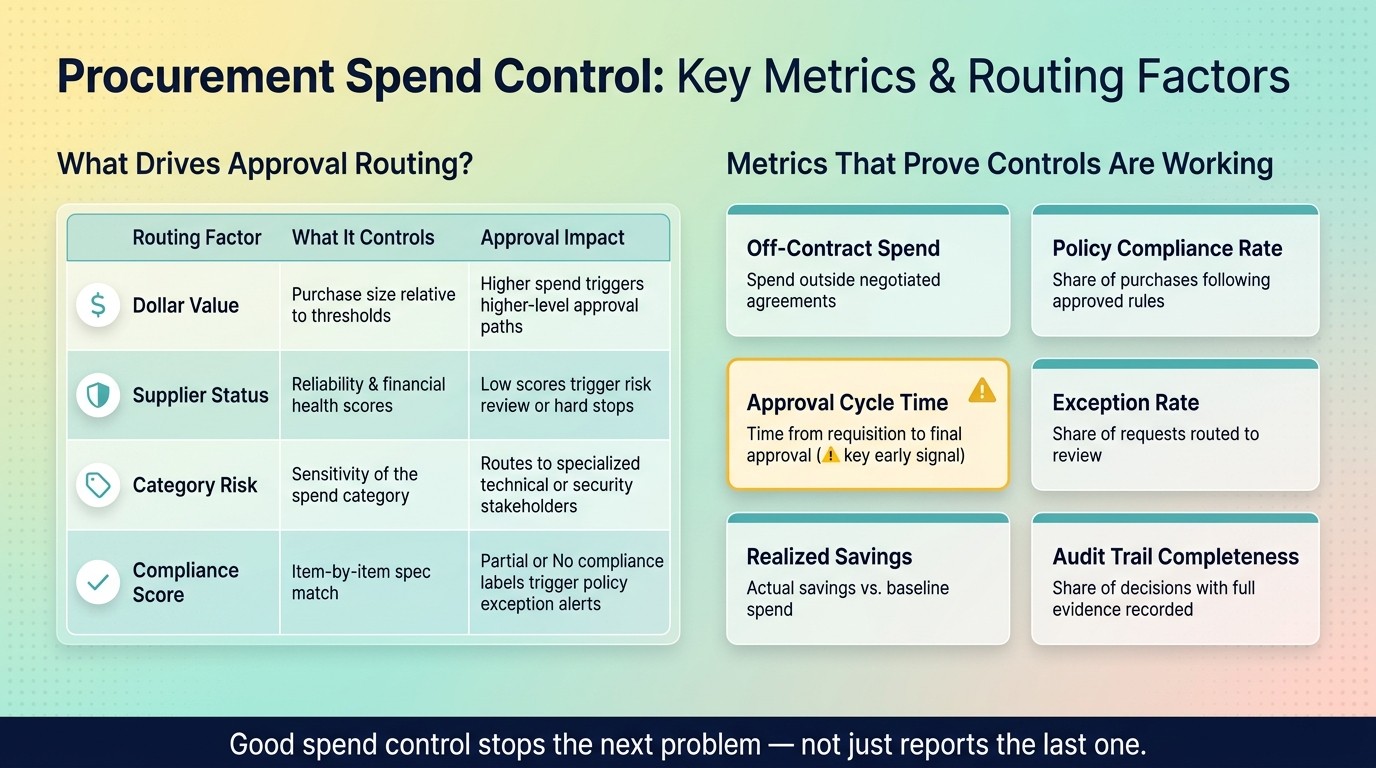
Routing Factor | What It Controls | Approval Impact |
|---|---|---|
Dollar Value | Purchase size relative to approval thresholds | Higher spend triggers higher-level approval paths |
Supplier Status | Reliability and financial health scores | Low scores trigger additional risk review or hard stops |
Category Risk | Sensitivity of the spend category | Routes requirements to specialized technical or security stakeholders |
Compliance Score | Item-by-item match against technical specifications | "Partial" or "No" compliance labels trigger policy exception alerts |
Configure Dollar-Based and Percentage-Based Alert Thresholds
Thresholds work best when you combine absolute dollar limits with percentage-based triggers. A dollar threshold can catch a large one-time purchase. A percentage-of-budget warning can spot slow overspend before it turns into a bigger problem.
Alerts also need context. Include the department, supplier, line items, reason code, and source data in every alert. Without that, an alert is just noise. With it, the reviewer has what they need to make a call.
When an alert fires, the exception path should spell out who can override the rule and what evidence they must record.
Handle Policy Exceptions Without Slowing Down Operations
Exceptions will happen, so send them through a controlled, documented approval path. Each one should have a clear route: who can approve it, what evidence is needed, and how the override is logged.
A controlled override process lets a buyer approve an exception with a required reason code, while the system automatically logs the decision, the approver, and the evidence reviewed. Log the approver, reason code, and evidence for auditability.
Then use exception patterns to tighten supplier and category controls.
Compare Suppliers and Control Spend by Category
Supplier data helps you tighten the controls that alerts and exceptions already put in motion. When you look at exception patterns, you can spot which suppliers and spend categories need stricter checks.
Evaluate Suppliers on Cost, Compliance, Contract Status, and Risk
Unit price is only one piece of the picture. Compliance, contract fit, and risk often matter more. A low quote can still be the wrong pick if the specs don’t match, the contract terms are off, or the risk level is too high.
AI scoring sets the match criteria before suppliers are compared. It checks source materials against each requirement and marks each line item as Yes, No, or Partial. Those scores should then guide approval depth, preferred-list status, and exception routing.
Concentration risk needs its own review. Track:
supplier concentration
support coverage
financial health
market momentum
Once suppliers are scored, apply tighter rules to the categories with the most variance.
Platforms like Procright can help teams automate specification creation, compare products, and verify compliance with transparent source-backed scoring.
Apply Category Controls to High-Variance and High-Risk Spend
Not every category needs the same level of control. Focus on categories with repeated overruns, inconsistent specs, or off-contract buying.
Start with the technical procurement specification. Vague requirements often drive overspend. When a spec says "enterprise-grade security" without defining it, vendors can fill in the blanks with assumptions that work in their favor.
Then assign importance weights to each specification item in the category. That way, the scoring reflects what matters most, whether that’s compliance, data retention, or load tolerances, instead of treating every line item the same. In many high-overspend categories, a small set of costly technical requirements isn’t being enforced the same way every time.
Use the compliance and risk data from supplier evaluations to enforce preferred supplier rules in high-variance categories. Route nonpreferred suppliers for review instead of letting them pass through automatic approval.
Governance, Metrics, and Continuous Optimization
AI Spend Control: Approval Routing Factors & Key Metrics for Procurement Teams
Once visibility, routing, and category controls are live, the next step is simple: check if they’re actually cutting leakage. Governance works best as a steady control loop, not a one-time setup.
Measure Whether Your Spend Controls Are Working
Focus on outcomes, not just activity. These metrics show whether your controls are reducing risk or just slowing people down:
Metric | What It Tells You |
|---|---|
Off-contract spend | Spend outside negotiated agreements - tied to supplier and category controls |
Policy compliance rate | Share of purchases that follow approved suppliers, contracts, and thresholds |
Approval cycle time | Time from requisition to final approval - tied to routing rules |
Exception rate | Share of requests routed to review or escalation - tied to threshold design |
Realized savings | Actual savings vs. baseline spend |
Audit trail completeness | Share of decisions with complete evidence - tied to exception handling |
Approval cycle time is one of the best early signals to watch. If it starts creeping up, that often means routing rules or exception handling need a closer look.
Tighten Rules, Review Exceptions, and Expand the Program
Use what the numbers show you to tighten thresholds, simplify approvals, and extend the controls that are doing their job. That’s the loop: monitor outcomes, review exceptions, and tighten rules where leakage keeps showing up.
This also changes how buyers spend their time. Instead of getting buried in admin work, they can focus on exceptions, supplier risk, and judgment calls. AI handles intake, approvals, and compliance checks. People handle stakeholder management, supplier relationships, and high-risk exceptions.
When you adjust thresholds, start with categories where your team has already dealt with budget overruns or supplier reliability issues. Check rule changes against known failure modes before rolling them out more broadly. Keep a complete evidence record for every decision. Then run the same controls in the next high-risk category.
FAQs
How does AI catch overspend before invoicing?
AI catches overspend before invoicing by dealing with the root causes of costly procurement mistakes early in the buying cycle. Instead of flagging problems after costs hit the ledger, Procright helps make sure technical specifications are complete, accurate, and aligned with standards before suppliers are contacted.
It also spots missing requirements, clears up category needs, and scores supplier offerings line by line using transparent data. That helps teams avoid bad picks and the rework that can push total costs past the initial invoice.
What should trigger a hard stop vs. soft stop?
A hard stop should happen when a purchase fails a non-negotiable standard. That includes cases like missing a critical technical requirement, failing a compliance benchmark, or going over a budget ceiling that simply can't be worked out.
A soft stop makes sense for non-critical issues. Think incomplete but fixable data, or a product that only meets part of a requirement. It tells the team to fill in the gaps or tighten the specs without slowing everything down more than needed.
Which procurement metrics should I track first?
Start with metrics that help teams make better calls and cut risk:
Technical compliance scores
Market acceptance rates
Supplier reliability data
Corporate maturity scores
Local support availability
It also helps to track documentation quality. That way, each decision is auditable and backed by evidence against the original specifications.