AI in Procurement: Structuring Data from PDFs
Turn procurement PDFs into auditable, structured data—extract, normalize, validate, and route low-confidence fields for review.
In this article
PDFs slow procurement down because they show pages, not clean fields. If I want invoices, POs, contracts, and spec sheets to work inside an ERP, I need AI to turn them into structured data, check that data, and send low-confidence items to review.
Here’s the short version:
Procurement teams spend 30%–40% of their week pulling data from documents
Manual document handling often takes 10–18 minutes per file
AI can improve procurement accuracy by processing files in 8–12 seconds and routing unclear fields for review
Field accuracy often lands around 95%–99% on digital PDFs and 88%–96% on clean scans
The best setup is usually AI first, human review second, manual entry last
If I were summarizing the article in one line, it would be this: the goal is not to read PDFs faster; it is to turn them into data that procurement systems can use for data-driven procurement decisions like matching, checks, approvals, and reporting.
What matters most is simple:
Use a schema first
Normalize dates, money, and units
Validate totals, vendors, and date logic
Store page-level source links for audit trails
Review low-confidence fields instead of guessing
A few document types matter more than the rest. Invoices and POs feed 2-way and 3-way matching. Contracts feed date, SLA, and risk checks. Compliance files support tax and insurance checks. Vendor datasheets support side-by-side product review after units and terms are standardized.
Quick comparison
Area | What AI pulls out | What to check before loading |
|---|---|---|
Invoices & POs | PO number, invoice number, dates, line items, totals, payment terms | Totals match, vendor exists, dates make sense |
Contracts | Parties, effective dates, renewal terms, penalties, SLAs | Clause mapping, date logic, missing fields = |
Compliance docs | EIN/Tax ID, policy numbers, tax class, coverage limits | Master data match, format checks, rule checks |
Datasheets | Part numbers, dimensions, materials, ratings, certifications | Unit conversion, range checks, source traceability |
I’d also keep one rule front and center: tell the model to return null when it can’t find a field. Bad guesses create more work than missing values.
The article also makes one practical point about rollout: start small. Pick one file type, focus on the fields tied to price, risk, and approval timing, and connect every extracted field back to its source page. That gives you data you can load, review, and defend.
From there, the article ties this process to Procright. In plain terms, it shows how structured fields from PDFs can feed product scoring, line-by-line compliance checks, and spec-based supplier comparison instead of leaving teams stuck in files and spreadsheets.
So if you’re trying to cut manual entry, lower errors, and make procurement files usable, this is the path: extract, standardize, validate, review, and sync.
How AI structures data from procurement PDFs
AI turns PDF content into fields that procurement systems can use. That process starts with OCR, layout detection, and field capture.
OCR, table extraction, and field capture
AI uses OCR to read scanned and digital PDFs. From there, layout analysis spots tables, headers, and footnotes in purchase orders, invoices, and vendor datasheets.
This matters more than it might seem. A PDF can look neat on the page but still be messy under the hood. Tables may have merged cells, split rows, or headers stretched across several columns. Parsers deal with those cases so values stay lined up with the right fields.
The pipeline also standardizes core data before it moves downstream:
Dates to ISO 8601 (
YYYY-MM-DD)Currency values to decimals with ISO currency codes
Units of measure to standard codes that help avoid downstream mismatches
Once the layout is mapped, NLP handles the clause-level details.
NLP for clauses, entities, and technical attributes
Field capture works well for structured data. NLP handles clauses, terms, and technical attributes buried in body text.
For contracts, NLP extracts supplier names, effective dates, payment terms, renewal notice periods, and penalty clauses. For vendor datasheets, it pulls product materials, dimensions, certifications, and operating temperatures.
It also standardizes different terms that point to the same idea across suppliers, so they map to one schema field. That way, one supplier’s wording doesn’t throw off the system just because another supplier says the same thing a different way.
Schema design: deciding which fields to keep
Procurement teams need to decide which fields matter before extraction starts. Without a schema, parsed text still needs manual cleanup.
A schema defines which fields apply to each document type and what format each field must follow. The table below shows the decision-critical fields for common procurement documents:
Document Type | Key Schema Fields |
|---|---|
Purchase Order | PO Number, Issue Date, Supplier Name, Item Code/SKU, Quantity Ordered, Unit Price, Line Total, Order Total, Requested Delivery Date |
Invoice | Invoice Number, Invoice Date, Vendor Name, PO Reference, Due Date, Line Items, Total Amount, Currency Code, Payment Terms |
Contract | Effective/Expiry Dates, Parties Involved, Renewal Notice Periods, Payment Terms, Penalty/Service Credit Clauses, Delivery SLAs |
Vendor Onboarding | Legal Business Name, EIN/Tax ID, Address, Tax Classification, Bank Routing/Account Numbers |
One practical rule helps a lot: tell the model to return null instead of guessing when it can’t find a field. Then add AI-driven data validation checks, like confirming that line items add up to the invoice total or that a delivery date comes after the issue date. That gives the pipeline a way to catch problems before they hit your ERP.
With the schema set, the next step is deciding which document types should produce which fields.
What AI extracts from common procurement PDF types
Once the schema is set, extraction can zero in on the fields each document type actually contains.
Purchase orders and invoices
POs and invoices are high-volume documents, and they often slow down AP and sourcing teams. The main header fields usually include PO and invoice numbers, dates, currency, vendor and buyer details, plus ship-to and bill-to addresses. At the line level, the system pulls SKUs, descriptions, quantities, units of measure, unit prices, and line totals. It also extracts commercial terms such as payment terms, Incoterms, tax amounts, and freight charges.
That data powers matching workflows. In 2-way matching, the invoice is checked against the PO. In 3-way matching, the goods receipt note is added to the check. Once those fields are structured, the system can solve common procurement issues by flagging mismatches and sending exceptions to a reviewer.
AI also gives each extracted field a confidence score. If a field clears the set threshold, it can move forward to auto-approval and ERP posting. If it falls below that mark, it gets routed to a reviewer instead.
The same field structure can support clause-heavy documents too, but the extraction approach changes. Instead of reading rows and columns, the system has to pull meaning from prose.
Contracts and compliance documents
Contracts are tougher to parse than invoices because the key data sits inside paragraphs, not tables. For contracts, the system extracts parties, dates, renewal terms, payment terms, liability caps, SLAs, and exit fees.
That clause data can then feed expiry alerts and supplier risk monitoring workflows. For compliance documents such as certificates of insurance (COIs) and W-9s, AI extracts insurer names, policy numbers, coverage limits, EINs, and tax classifications. It then checks those fields against business rules automatically.
Technical documents bring a different problem: unit normalization and side-by-side spec checks. This data is critical when teams automate product specification creation to ensure technical accuracy.
Specifications and vendor datasheets
Vendor datasheets are tricky for a few reasons: dense technical content, inconsistent formatting, and units that may switch between metric and imperial systems. The main fields here include part numbers, product descriptions, dimensions, materials, IP ratings, voltage, rated current, breaking capacity, performance ratings, and certifications such as ISO 9001, ISO 14001, and SOC 2.
AI converts units into a common standard so teams can benchmark and compare specs directly. Each extracted field also links back to its source location, including the file, page, and table cell. That keeps the data auditable and traceable, and it ties structured extraction back to procurement decisions teams can defend.
Best practices for getting reliable structured data from PDFs
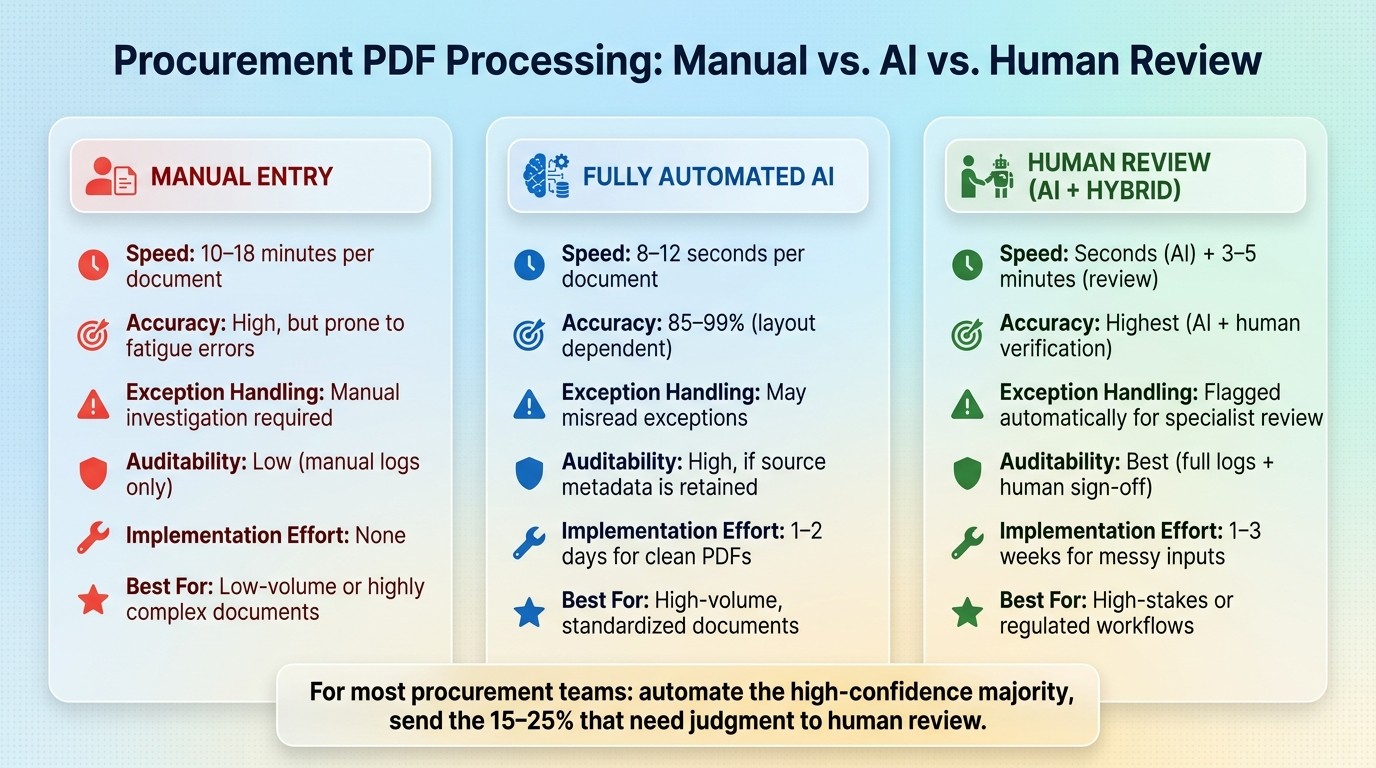
AI vs Manual vs Human Review: Procurement PDF Processing Compared
After extraction, reliability comes down to three things: normalization, validation, and exception routing.
Standardize fields, units, dates, and business rules
Once your schema is in place, normalize and validate data before it gets loaded. Store dates in ISO 8601 format (2026-06-29) and show U.S. date formatting only when needed. Store currency as a numeric value like 1250.00, then keep the currency code in a separate field. For units of measure, map values to a standard like UNECE Rec 20 so metric and imperial measurements can compare products for compliance efficiently directly.
Validation should happen in two layers.
First, check the data type: number, date, or string.
Then apply business rules: do line items add up to the invoice total? Is the date in the past? Does the vendor name match your ERP master data?
Rules like these catch the stuff that slips through OCR and layout parsing:
Attribute | Validation Rule | Error Caught |
|---|---|---|
Rated Current | Value < 1,000A and unit present | OCR reading "164" instead of "16A" |
Voltage | Value within ±10% of standard levels | "23V" flagged as likely "230V" |
Invoice Total | Sum(Line Items) + Tax = Total | Calculation errors or missed lines |
Date | ISO 8601; date <= today | Future-dated invoices or format errors |
Vendor | Match against ERP master data | Unrecognized or potentially fraudulent suppliers |
Use human review for exceptions and model improvement
AI extraction doesn’t get every document right. Field accuracy usually lands at 95–99% on digital PDFs and drops to 88–96% on high-quality scans. Handwritten notes, redlined contracts, and vague compliance wording tend to push those numbers down.
The practical move is to set a confidence threshold. Low-confidence fields should go to human review instead of flowing straight into your ERP. Review works best when people get a side-by-side screen with the source document and highlighted text. That setup keeps review time around 3–5 minutes per exception, which is much less than the 10–18 minutes often spent on manual document handling.
Each correction also gives you a training signal. If the same supplier layouts or document types keep causing exceptions, that’s a sign to tune the model and tighten your business rules over time.
Connect structured data to procurement systems and reporting
Clean data matters only if it reaches the systems people use. Push extracted JSON into ERP, PIM, or contract-management platforms through APIs so teams don’t have to re-enter anything by hand.
It also helps to attach source_file, source_page, and source coordinates to every field. That traceability links the final ERP record back to the original PDF, which matters for audits, dispute handling, and internal controls.
Automation vs. human review vs. manual entry: a comparison
These controls help you decide what to automate and what to send for review. The right setup depends on document volume, complexity, and risk.
Feature | Manual Entry | Fully Automated AI | Human Review |
|---|---|---|---|
Speed | 10–18 mins per doc | 8–12 seconds per doc | Seconds for AI + 3–5 mins for review |
Accuracy | High, but prone to fatigue | 85–99% (layout dependent) | Highest (AI + human verification) |
Exception Handling | Manual investigation | May misread exceptions | Flagged automatically for specialist review |
Auditability | Low (manual logs only) | High, if source metadata is retained | Best (full logs + human sign-off) |
Implementation Effort | None | 1–2 days for clean PDFs | 1–3 weeks for messy inputs |
Best Procurement Fit | Low-volume or highly complex | High-volume, standardized documents | High-stakes or regulated workflows |
For most procurement teams, a hybrid setup makes the most sense: let automation handle the high-confidence majority, then send the 15–25% of documents that need judgment to human review.
Using Procright to turn PDF data into procurement decisions
Once teams turn PDF data into structured fields, they can actually use it. That means writing better specs, solving product comparison challenges in a consistent way, and checking compliance without digging through stacks of files. In practice, that structured data becomes the backbone for sourcing and compliance calls. This shift is a key step for organizations looking to build an AI-native procurement team that prioritizes data-driven strategy.
From PDF extraction to structured specifications
Procright pulls PDF and DOCX specs together into a single specification. That matters because procurement work often starts with scattered documents, partial drafts, and missing requirements.
Its AI agent reviews draft specifications, spots gaps, and adds missing technical requirements like log retention or access controls to help teams complete the spec before sending out an RFP. And when teams use industry-specific templates, specification errors can drop by 90%.
At that point, the specification stops being just a document. It becomes the checklist used to review every product.
Product comparison and compliance verification with structured data
Procright then uses that specification to score suppliers line by line against the required criteria. Its discovery engine matches the spec against actual products and pulls evidence from PDFs, web pages, and videos.
Those same structured attributes drive compliance checks and rankings. Each product gets a line-by-line compliance score marked as "Yes", "Partially", "No", or "Not Found". And each score links back to the exact source page or spreadsheet cell.
That traceability is a big deal. If someone asks, “Why did this product get a partial score?” the team can go straight to the source instead of hunting around.
Teams can also assign importance levels to must-have attributes, so final rankings line up with actual business priorities instead of treating every requirement the same.
Specification review methods compared
The table below shows how Procright's AI-assisted workflow stacks up against manual review and spreadsheet-based comparison on the points that shape procurement decisions most.
Feature | Manual Review | Spreadsheet-Based | AI-Assisted (Procright) |
|---|---|---|---|
Traceability | None; requires manual searching of files | Manual; links often break | Full; automatic citations to source page/cell |
Compliance Scoring | Subjective and binary (Pass/Fail) | Manual line-by-line comparison | Automated line-by-line scoring (Yes/Partially/No/Not Found) |
Decision Support | Relies on guesswork | Data-heavy but hard to rank | Ranked scores tied to structured specification attributes |
Conclusion: Next steps for procurement teams
The value of PDF structure is operational, not cosmetic.
If PDF data stays unstructured, your team can’t query it in a useful way or put it to work at scale. That’s where AI procurement tools come in. It uses OCR and NLP to pull out fields, then maps those fields to a schema so downstream systems can use them. Validation rules stop errors before they hit your ERP, while human review steps in for edge cases like liability caps and unclear compliance language.
For most procurement teams, the best place to start is a narrow pilot. Pick one document type and focus on the fields that affect price, risk, and approval timing. Also, store source metadata with every field. That audit trail gives you something solid to point to when compliance or legal questions come up.
Structured PDFs turn procurement documents into searchable, auditable, decision-ready data. This foundation is essential for advanced initiatives like AI forecasting for supply chain resilience.
FAQs
How do I choose the right fields to extract first?
Focus on the fields that tie straight to your procurement goals and business-rule checks. A good starting point is a schema that keeps atomic values - like payment terms and total amounts - separate from more complex clause data.
Start with the fields that matter most day to day: vendor names, invoice or PO numbers, line-item descriptions, quantities, unit prices, and tax totals. For more complex documents, keep the document hierarchy intact so each line item stays connected to the clause that governs it.
What kinds of PDF documents are hardest for AI to process accurately?
The hardest PDFs for AI to process are the ones with complex layouts. Multi-column pages are a big headache because they can scramble the reading order.
Other trouble spots include tables - especially when they run across multiple pages or when columns shift - along with scanned documents, handwriting, and inconsistent layouts from different sources.
How should low-confidence fields be reviewed before ERP sync?
Before the ERP sync happens, assign each extracted field a confidence score from 0.00 to 1.00. Then send any field that falls below your set threshold - usually 0.88 to 0.95 - to a human reviewer.
The key is to review only the flagged fields, not the whole document. Make those fields easy to spot, then run validation checks for things like:
currency ranges
date formats
cross-field consistency
For example, confirm that subtotal + tax = total.
Related Blog Posts
Try it on a real buy
Bring one category. Watch where the flags land.
We use a little analytics to see which pages actually help. Nothing else, no ad trackers.